

Telecom
MTN Presents Prizes to Winners of App Developer Challenge


Following the successful completion of the MTN App Developer Challenge, MTN Nigeria, leading Information and Communications Technology (ICT) Company, has presented prizes to the winners in all the categories at its headquarters in Lagos.
Speaking at the closing ceremony of the initiative, Larry Annetts, chief marketing officer, MTN Nigeria, said: “The MTN App Developer Challenge is a demonstration of our commitment to delivering a bold new digital world to our esteemed customers. This initiative represents a tangible and credible platform to make our brand promise a reality as well as promote the growth and use of locally relevant content, which would help develop the Nigerian app ecosystem.”
The first phase of the challenge which kicked off on 24 July 2013 witnessed hundreds of mobile app entries, from which the top downloaded apps would be shortlisted.
In the second phase, which began on 24 October and ended on 24 November 2013, members of the public had to visit the the MTN Nextappstore to download their favourite apps from the entries. Based on the highest number of downloads, 4 apps were selected per category. The judges then selected one wild card app per category.
Categories for entries in the MTN App Developer Challenge include Entertainment and lifestyle, Productivity, Games, Education, Health and a special category for student entries.
The panel of Judges for the challenge included, Chika Nwobi, a serial entrepreneur, Akinwunmi Braithwaite, customer relations executive, MTN Nigeria, Stanley Muoneke, business development director at Intel, and Emmanuel Oluwatosin, business manager, Nokia Live and Country Lead, Mobile Monday Nigeria. The Judging criteria was based on the originality of concept, relevance of concept to the market, apps with the best user experience as well as its commercial viability.
The Best Overall App was won by Okada Books, developed by Okechukwu Ofili. The app provides a fast, simple and fun way to read books without ever leaving the couch. It provides access to past JAMB and WAEC questions and thus turns the phone into a powerful educational resource tool.
The Best Education App was Onpoint, a GPA calculator and timetable, developed by Henri Good Nnochiri.
The Best Entertainment & Lifestyle App, Afro Talez, developed by Elizabeth Kperrun, presents traditional African Folktales in a fun, entertaining and interactive way for kids.
The Best Gaming App, Danfo Reloaded II by Bayo Puddicombe is a representation of the thrills of driving on the average Nigerian road. The Best Health & Wellness App, Certified Drugs by Ilyas Muyiwa provides an up to date database of pharmaceuticals and allied products approved for use in Nigeria.
The Best Productivity App, Track My Cash by Sunday Akinsete is a personal cash manager that helps to track how your money is being expended.
The Special Category which is the Best Student App (Undergraduate) was won by Kayode Sowole, who developed the Wazobia Bible that allows people to read the bible in Pidgin and other translations.
The Best Overall winner received a Hyundai IX35 car and N1 million in addition to a Samsung Galaxy S4 mobile phone, as well as, six months’ promotion on the MTN NextApps store.
The six other winners that emerged from each category received N1 million and a Samsung Galaxy S4 mobile phone as well as six months’ promotion on the MTN NextApps store.



Nigerian Communications Commission (NCC) has said that it was strengthening collaboration with state governments and industry players to develop a transparent, cost-based pricing framework for sharing telecom ducts as part of efforts to speed up broadband expansion across Nigeria.

Ayuba Shuaibu, director of Policy, Competition and Economic Analysis, NCC, disclosed this at the Stakeholders’ Forum in Abuja.
Shuaibu said the initiative was designed to build consensus among all parties.
“The primary purpose of this forum is to ensure seamless synergy between the Commission and all stakeholders,” he said.
The director said the consultation was prompted by longstanding complaints over permits, levies and other charges imposed by different levels of government.
He said bringing together state commissioners, telecom operators, tower companies and representatives of the Nigeria Governors’ Forum had helped improve understanding of the issues.
“This engagement is a work in progress. We expect more input from stakeholders before presenting the outcome to the Nigeria Governors’ Forum,” he added.
Dr Helen Adeneye, commissioner for Innovation, Science and Technology, Kogi State. welcomed the consultation, saying Nigeria needs a harmonised policy that clearly defines the responsibilities of both the federal and state governments.
“We need a harmonised policy that allows states to collaborate better with telecom operators and creates a more business-friendly environment,” she said.
Dr Adeneye added that adopting the Dig-Once policy would establish a uniform pricing system and help resolve disputes over charges for telecom infrastructure deployment.
Chidi Ajuzie, chief executive officer, WTES Projects Limited, whose firm is conducting the consultancy study, said the proposed framework would introduce a common cost structure for duct sharing to support broadband investment and economic growth.
“The study is designed to create a uniform pricing model that will drive broadband growth, economic development and wider adoption across the country,” he said.
Ajuzie explained that the consultants had developed preliminary floor and ceiling prices to guide operators while allowing flexibility within the approved range.
He added that the recommendations remain open to industry input before the NCC finalises the framework.
The Dig-Once Policy is designed to reduce the cost and disruption of deploying broadband infrastructure by requiring fibre ducts to be installed whenever roads are constructed or rehabilitated.
The NCC is developing a cost-based pricing framework for sharing these ducts to promote fair pricing, reduce duplication of infrastructure and encourage investment.
The proposed model is expected to support the Federal Government’s broadband expansion targets while improving collaboration between telecom operators and state governments.
Telecom
MUSON Graduates Shine at 2026 Concert as MTN Foundation Celebrates 20 Years of Music Scholarships

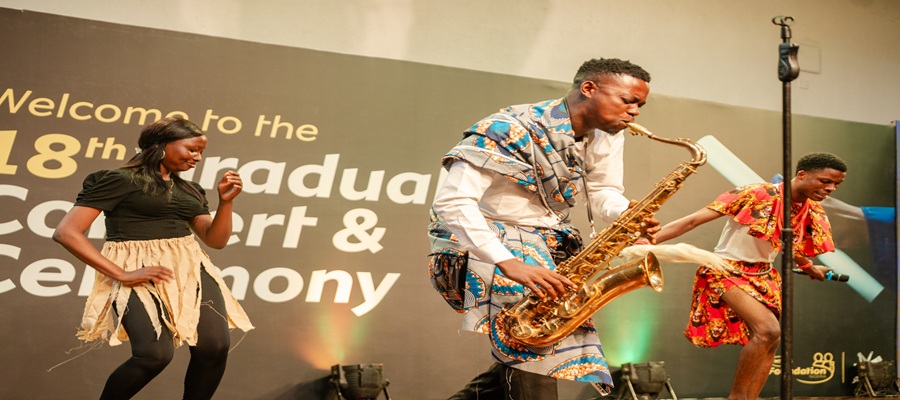
Emeka Nwodike, acting director of the MUSON School of Music, conducted the institution’s graduating class in a grand finale performance, bringing the 2026 graduation concert to a memorable close. The concert took place on July 7 at the Shell Hall of the MUSON Centre, Onikan, Lagos.

The event celebrated students who successfully completed the MUSON Diploma Programme through the MTN Foundation Scholarship Programme.
The graduating students delivered a rich choral repertoire that reflected the breadth of their musical training, performing Italian Salad by Richard Genee, My Song by Eriks Esenvalds, Obi Dimkpa by Laz Ekwueme, and an ABBA Medley arranged by Goran Bejstam. Under the Acting Director’s baton, the choir demonstrated technical precision, vocal maturity and artistic expression before an audience of family members, music enthusiasts and industry stakeholders.
The concert formed part of the long-running partnership between the MTN Foundation and the Musical Society of Nigeria (MUSON), which has, since 2006, provided scholarships for hundreds of talented young Nigerians to receive formal music education through the MUSON Diploma School. The programme continues to serve as one of the country’s foremost platforms for developing professional musicians and strengthening Nigeria’s creative economy.
Speaking at the close of the concert, Nwodike expressed appreciation to the MTN Foundation for its sustained support of the scholarship programme over the past two decades. He also thanked the Director of the MUSON Centre, faculty members, mentors and other stakeholders whose dedication has contributed to the school’s continued success.
“For nearly 20 years, the MTN Foundation has remained a steadfast partner in our mission to nurture young musical talent. We are deeply grateful for that commitment. I also want to thank the Director of the MUSON Centre, our faculty, mentors and everyone whose dedication has helped the MUSON School of Music continue to grow and thrive. Their support has made this programme what it is today, and our graduates are a testament to that collective effort,” he said.
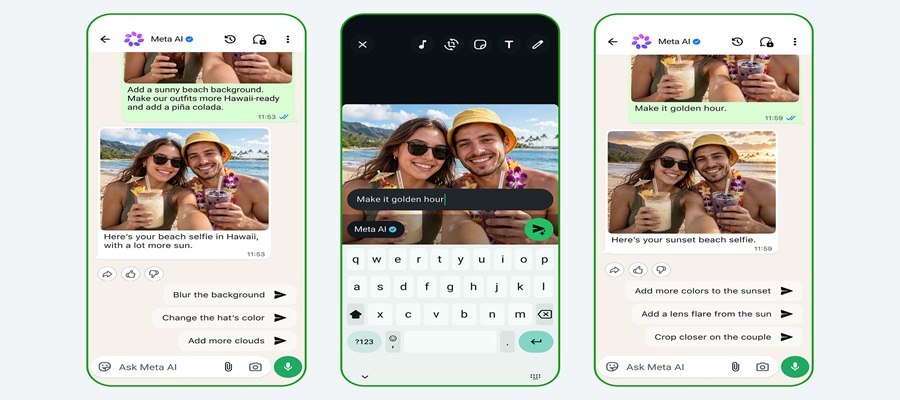
Meta is rolling out Muse Image, the companyʼs first image generation model from Meta Superintelligence Labs, now available in Meta AI . Muse Spark made Meta AI a smarter assistant; now, Muse Image acts as the creative partner that knows your world, making it easy to turn your ideas into high-quality visuals that you can download and share anywhere, including directly to your feed, story, or chat.

The model also powers new creative tools across Metaʼs apps. You can use more than 30 new AI-powered effects for Instagram Stories and generate images in your direct chats with Meta AI on WhatsApp — starting in limited countries with more locations on the way.
Simple Prompts, High-Quality Outputs
Whether you’re starting from scratch or working with an existing photo, you can describe what you want in simple, conversational language, and Meta AI handles the rest thanks to Muse Image. Ask it to mock up an image of you in front of a historical landmark, cleanly erase a photobomber from the background of a shot, or write a custom prompt to build a functional QR code. It will also render text cleanly inside your visuals, meaning you can ask for a how-to guide or a detailed infographic on a specific subject, and the text comes out legible and styled to match.
Suggested Presets to Help You Get Started
Sometimes the hardest part of creating is getting started. Meta AI now includes a presets panel with suggested prompts to help inspire you. One tap restores an old family photo, lets you see yourself with trending hairstyles, or reimagines you as a claymation character or a 16-bit video game hero. Whatever you create, itʼs easy to share with friends across Metaʼs apps so they can try the same preset on their own photos.
Shop Your Room Redesigns
You can also snap a photo of your room and ask Meta AI to redesign it with real products from the web or Facebook Marketplace. Suggest a style you love or ask Meta AI to pull from whatʼs trending to see what your space looks like with a full makeover.
An Intelligent Creative Partner
Muse Image doesn’t just build an image; it thinks through your prompt first. By pairing up with Muse Spark, the model takes multiple steps behind the scenes — planning its layout, looking up real-time web context, and intelligently blending multiple visual references at once. Whether you want to place your pet in a famous painting or combine a selfie with a vacation photo to create a custom postcard, Meta AI handles the complex reasoning for you so the final visual matches your vision perfectly.
Rooted in Your World
You can also @-mention Instagram accounts in the Meta AI app to bring specific Instagram profiles right into your images. Whether you want to design a custom event invitation, mock up a collaborative creative concept, or generate a personalized graphic, tagging a username lets Meta AI use public photos to build a visual thatʼs ready to post. You have control over how your content can be tagged for AI creation with an easy setting to turn this feature off at any time.
Edit Directly on the Photo
To make a change, just tap the markup icon on your creation to circle, sketch, or annotate edits right on top of the photo. Since Meta AI remembers the full context of your conversation, you can keep refining by swapping styles, adding elements, or tweaking details — all without starting from scratch.
Whatʼs Next
Soon, Meta will bring Muse Image to more countries and the places where people use Meta AI, including Facebook and Messenger, and additional surfaces on Instagram and WhatsApp. In the coming weeks, advertisers and agencies will be able to tap into Muse Image through Advantage+ creative.
Using Meta AI with Muse Image is free for everyday creation. For people who want to create even more, itʼs available as part of Metaʼs subscription plans.
Images are just the beginning. With Muse Video already in development, Meta is building entirely new ways for you to bring your ideas to life, getting one step closer to personal superintelligence.

CAC to Sanction Companies with Incomplete Business Letters From August 1

BVN Enrollments Hit 69.55m- NIBSS

CBN Warns against Rejection of N100 Banknotes

Data Protection Industry Hits N16.3Bn in 3 Years- NDPC

NCC Seeks Cost-Based Pricing Framework for Ducts

NASENI Moves to Digitize CCB’s 5m Assets Declaration and Operations

Mobile Internet Gender Gap Widest in Africa – GSMA

Nigeria Launches FreeTV Nationwide

CANAL+ Partners Samsung to Pre-Load DStv Stream on New Samsung TVs In Nigeria, Other African Countries

Lebara Nigeria Launches Lebara Play, Africa’s First Telecom-Owned Micro-Drama Platform




 News2 days ago
NRC, Ponzi Scheme Collapses Resulting Loss of Billions of Naira

 General News3 days ago
IHS Nigeria, FCT-HSES Concludes Clean Cooking Energy Campaign “Project Breathe Clean Air” in Abuja

 E-Business3 days ago
Kaspersky Transforms Threat Intelligence Reporting into an Interactive Content Hub

 News3 days ago
Microsoft to Lay Off 4,800 Workers

 Broadcasting3 days ago
NELFUND Investigates 34 Universities Over Students’ Missing Tuition Refunds

 Telecom3 days ago
Airtel Africa Cuts Diesel Dependence by 9.1m Litres

 Telecom3 days ago
A New Blueprint – How Strategic Collaboration is Rewriting the Narrative on Youth Drug Abuse

 News3 days ago
Access Bank, Fifth Chukker and UNICEF Renew Commitment to Expanding Educational Opportunities for Nigeria’s Most Vulnerable Children