

Telecom
Meta, Microsoft open AI Model for Commercial Use


Facebook parent Meta has partnered with Microsoft to unveil its ChatGPT rival: the Llama 2 open source artificial intelligence (AI) model.

According to a Microsoft blog post, the new free-to-use model enables developers and organisations to build generative AI-powered tools and experiences.
Llama 2 will be distributed by Microsoft through its Azure cloud service and will run on the Windows operating system.
“Today’s announcement builds on our partnership to accelerate innovation in the era of AI, and further extends Microsoft’s open model ecosystem and position as the world’s supercomputing platform for AI,” says John Montgomery, corporate vice-president of Azure AI.
Meta used the acronym LLaMA, for Large Language Model Meta AI, to describe the first version of its model. It’s now dropped the capital letters for its second version, Llama 2.
Microsoft says Azure users can now fine-tune and deploy the 7B, 13B and 70B-parameter Llama 2 models on Azure. In addition, Llama will be optimised to run locally on Windows.
Windows developers will be able to use Llama by targeting the DirectML execution provider through the ONNX Runtime, it adds.
Meta and Microsoft previously partnered up on AI with a collaboration to integrate ONNX Runtime with PYTorch, to create a developer experience for PyTorch on Azure. Azure is also Meta’s preferred strategic cloud provider.
“Meta and Microsoft share a commitment to democratising AI and its benefits, and we are excited that Meta is taking an open approach with Llama 2.
“We offer developers choice in the types of models they build on, supporting open and frontier models, and are thrilled to be Meta’s preferred partner as they release their new version of Llama 2 to commercial customers for the first time,” says Montgomery.
In a Facebook post, Meta founder Mark Zuckerberg says: “Open source drives innovation because it enables many more developers to build with new technology. It also improves safety and security because when software is open, more people can scrutinise it to identify and fix potential issues. I believe it would unlock more progress if the ecosystem were more open, which is why we’re open-sourcing Llama 2.”
According to Reuters, the announcement of Llama 2 comes after Google and Amazon gave business customers a range of AI models to choose from. Amazon is marketing access to Claude – AI from start-up Anthropic – in addition to its own family of Titan models. Google has said it plans to make Claude and other models available to its cloud customers, it adds.
Zuckerberg says the Llama model can be downloaded directly or through Microsoft. “With Microsoft, you can access these models through Azure, along with Microsoft’s safety and content tools. There is also an optimised version that you can run locally on Windows.”
The AI race is heating up rapidly, with X Corp CEO Elon Musk announcing his own AI firm, xAI. Musk is leading the firm, which comprises former employees from US technology firms, such as OpenAI, Microsoft Research and Google Research.



OpenAI, the developer of ChatGPT, is reportedly in discussions to offer the U.S. government a five per cent equity stake in the company as part of efforts to address growing political and regulatory scrutiny surrounding artificial intelligence (AI).

According to a report by the Financial Times, the proposal is still at an early stage and would see other leading American AI companies consider similar arrangements to allow the public to benefit from the industry’s rapid growth.
OpenAI Chief Executive Officer, Sam Altman, was quoted as saying that public ownership would enable citizens to share in the economic benefits generated by AI while helping to build public trust in the technology.
Based on OpenAI’s March funding round, which valued the company at about 852 billion dollars, a five per cent stake would be worth approximately 42.6 billion dollars.
The report said the proposal comes amid increasing concerns over AI’s impact on jobs, national security and the concentration of wealth within a handful of technology companies.
Last month, U.S. President Donald Trump said his administration was exploring ways to ensure Americans benefit directly from the country’s leadership in artificial intelligence, including the possibility of government equity stakes in AI companies.
Under the reported proposal, OpenAI executives suggested that major AI firms could allocate five per cent of their equity to a public investment vehicle modelled after the Alaska Permanent Fund, which invests state oil revenues and distributes returns for public benefit.
The discussions are also taking place as OpenAI and rival AI company Anthropic prepare for potential stock market listings that would allow public investment in their businesses.
According to the report, implementation of such an arrangement could require approval by the U.S. Congress, while it remains unclear whether other AI companies would support the proposal.
OpenAI had previously advocated the creation of a “public wealth fund” that would give every citizen a stake in AI-driven economic growth, regardless of whether they participate in financial markets.
The proposal comes as the Trump administration intensifies oversight of advanced AI technologies while promoting U.S. leadership in the rapidly expanding sector.
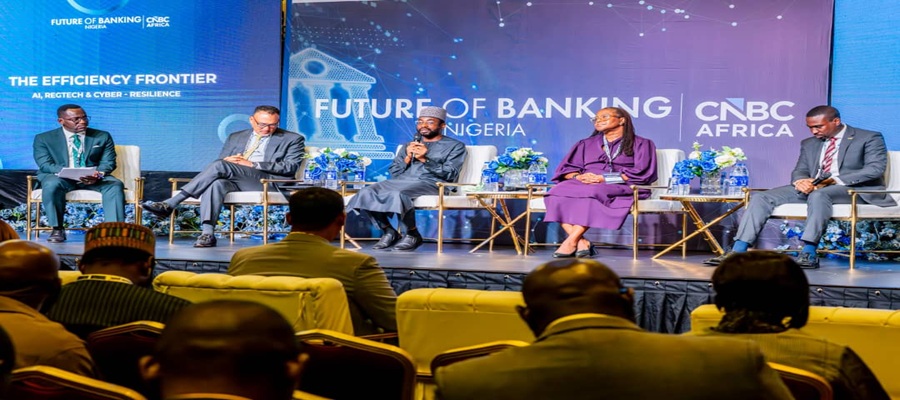
Kashifu Inuwa, director general of the National Information Technology Development Agency (NITDA), has said the next phase of growth for Nigeria’s banking sector will be driven less by capital accumulation and more by the ability of financial institutions to build digital trust through artificial intelligence (AI), regulatory technology (RegTech) and cyber resilience.

From left: Wole Famurewa, Ayotunde Coker, Managing Director, Rack Centre; the Director General of the National Information Technology Development Agency (NITDA), Kashifu Inuwa; Prof. Olayinka David West of Lagos Business School; and Femi Osinubi, Africa Advisory Leader, PwC, during the panel session, “The Efficiency Frontier – AI, RegTech and Cyber Resilience,” at the Future of Banking Nigeria Summit organised by CNBC Africa in Lagos.
Speaking during a panel session titled “The Efficiency Frontier – AI, RegTech and Cyber Resilience” at the Future of Banking Nigeria Summit organised by CNBC Africa in Lagos, Inuwa argued that while Nigeria’s banking industry has successfully weathered major reforms over the past two decades, the emerging threats confronting the sector require a different approach.
He noted that the industry has repeatedly demonstrated resilience through landmark milestones such as the 2005 banking consolidation, the 2009 banking reforms and the ongoing recapitalisation exercise. According to him, the priority has now shifted from simply raising capital to ensuring that such capital is protected and sustained in an increasingly digital economy.
“Today’s question is no longer whether we can raise capital, but whether we can protect, preserve and grow that capital in the digital era. Trust has become the foundation of modern banking, and that trust must be built on resilient digital infrastructure and effective regulation,” he said.
Inuwa observed that digital channels have become the primary point of interaction between banks and customers, making technology resilience, cybersecurity and uninterrupted service delivery essential to maintaining public confidence in the financial system.
He described artificial intelligence as a strategic tool capable of transforming banking operations by improving productivity, strengthening decision-making, boosting revenue and delivering personalised financial services that reflect the expectations of digitally connected customers.
The DG also highlighted the growing importance of regulatory technology, saying its adoption can simplify compliance, lower operational costs, improve transparency and strengthen governance across financial institutions.
According to him, effective regulation must evolve alongside innovation. He explained that NITDA combines formal regulatory instruments with collaborative, innovation-friendly approaches that allow emerging technologies to develop while regulators establish appropriate standards and safeguards.
“Technology evolves much faster than traditional regulation. Regulators must work closely with innovators to create enabling frameworks that encourage innovation while protecting consumers and maintaining market confidence,” he said.
Using Nigeria’s thriving fintech ecosystem as an example, Inuwa said technology has fundamentally changed the delivery of financial services by enabling customers to open accounts, access banking products and carry out transactions remotely without visiting physical branches.
He further called for closer collaboration among regulators to improve access to finance for Small and Medium-sized Enterprises (SMEs). He explained that AI-powered credit assessment and digital financial management tools can help financial institutions better understand business performance, reduce lending risks and expand credit to underserved enterprises.
On responsible AI adoption, Inuwa disclosed that NITDA’s National Artificial Intelligence Strategy provides a framework for deploying AI across critical sectors in partnership with sector regulators, including the Central Bank of Nigeria (CBN) for financial services.
He added that the Agency is also developing National Standards for Sovereign Cloud infrastructure and data classification to strengthen Nigeria’s digital sovereignty and ensure that sensitive national and financial data remain adequately protected.
Inuwa concluded that deeper collaboration among regulators, technology innovators and financial institutions will be critical to building a secure, resilient and globally competitive financial ecosystem that supports sustainable economic growth.

Indian government has asked Meta Platforms to suspend the rollout of WhatsApp’s proposed username feature in the country over fears that it could fuel online fraud, impersonation and phishing attacks.

The directive, issued by the Ministry of Electronics and Information Technology (MeitY), comes days after WhatsApp announced plans to introduce usernames globally, allowing users to connect without sharing their phone numbers in a move aimed at enhancing privacy.
India, WhatsApp’s largest market with more than 500 million users, expressed concern that the feature could make it easier for cybercriminals to impersonate individuals and organisations, particularly among users with limited digital literacy.
According to media reports, the ministry, in a letter to Meta, warned that the feature could increase incidents of online fraud, phishing, digital arrest scams and identity theft.
A senior government official was quoted as saying that malicious actors could claim usernames resembling those of legitimate individuals and use them to deceive unsuspecting users.
The ministry has reportedly asked Meta not to launch the feature in India until consultations with the government are concluded and the company provides satisfactory explanations on the safeguards built into the system. Authorities have also asked WhatsApp to respond to the concerns within three days.
Responding to the concerns, Meta said the username feature had not yet gone live in India and stressed that multiple security measures had been incorporated to prevent abuse.
The company said usernames for high-profile public figures and verified organisations had already been reserved to prevent impersonation.
Meta added that users would still require a phone number to register for WhatsApp and that the platform had introduced several layers of protection, including limits on messaging unknown users, restrictions on repeated attempts to guess usernames, and systems to detect and remove impersonation and scam-related activities.
The latest development comes as India intensifies efforts to combat cybercrime amid a sharp rise in digital fraud cases across the country.
Government data indicate that financial losses from cyber fraud have risen significantly in recent years, prompting closer scrutiny of digital platforms and their security features.

Court Declares Keystone Bank Staff Wanted over Alleged N35m Fraud

IMF Raises Concerns over N8.83 Trillion Unreported Spending in Nigeria’s Budgets

NOTAP to Commercialise University Research, Expands Patent Drive

FG Unveils Digital Postcode System for MDAs

BoI, NBCC Sign MoU to Deepen Bilateral Trade, Industrial Growth and Investment

Mobile Internet Gender Gap Widest in Africa – GSMA

London Strengthens Global Investment Ties with Africa @ First Ever London-Africa Business Summit

FG Targets Alleged N3tn Capital Flight, Opens Airtime Credit Market to Nigerian Fintechs

Japan, UNESCO Boost Digital Learning in 15 CoEs with Donation of ICT Equipment

Nigeria Launches FreeTV Nationwide




 News3 days ago
Verve Strengthens Global Acceptance Across Leading Digital Platforms

 News3 days ago
Army Says Terrorists Now Recruiting, Raising Funds Online

 Telecom3 days ago
Lebara Nigeria Becomes Member of GSMA Network

 E-Business3 days ago
Kaspersky Warns of The Gentlemen Ransomware Group Expanding Operations with New Malware

 Telecom3 days ago
Airtel Nigeria Deepens Focus on Data Usage Transparency @ Customer Forum

 Telecom3 days ago
Vitel Wireless Warns Public, Says it Not Running any Investment Scheme

 Telecom2 days ago
MTN Foundation, Microsoft Empower Nigerian Educators with AI Integration Skills

 E-Financial3 days ago
Bank of Industry Appoints Kuramo Capital as Manager of Dice Fund of Funds