

Telecom
20 Things You Didn’t Know You Could Do with Search


It’s no secret that Google Search is the place Nigerians go to answer questions they are too embarrassed to ask their friends. From answering questions to weather forecasts and sports results, Google has developed some pretty cool features over the years. Search turned 20 recently, and we’ve compiled 20 of the most useful tips and tricks to help you search, that many people don’t know about.
Find events: With your phone, simply search for [events near me] or for a specific event type like [food festivals] and you’ll see listings for local activities from around the web.
Movie showtimes and tickets: Type ‘movie showtimes’ into the Search bar to get showtimes, theater locations, and ratings all in one place. It makes it easy to decide which movie and location work best for you (and then to buy your tickets in advance).
Recipe Search: Got a craving for jollof rice? Type ‘jollof rice’ into the search bar and Google will show you a host of recipe suggestions, so you’re guaranteed to find one exactly to your taste.
Live sports scores: Search makes it easy to stay up on the latest scores, whether you’re a fervent fantasy sports aficionado or a casual fan. Type in the name of your favorite team or league (like the NPFL), and get real-time scores and recaps from recent games.
Weather Forecast – Planning a trip somewhere and need to know what to pack? Simply search ‘weather [location]’ and right there on your search results page you’ll get the forecast for the next week.
Find a job: Now available in more than 100 countries around the world, you can search for jobs right on Google. Try searching for [jobs near me] or [retail jobs] to explore jobs from across the web. You can also save jobs set up alerts, map your potential commute and click through to apply.
Set a timer – Need to monitor your dinner while you’re elsewhere in the house? Set a timer by typing ‘set a timer to 12 minutes and 45 seconds’, for example, and Google will sound an alarm when time is up.
Help with health questions: Not feeling so good? Type your ailment name into the search bar and, if it’s a common condition influenza or a sprained ankle, you’ll find relevant medical facts in a knowledge panel. Google will show you typical symptoms, treatments, how common the condition is, whether it’s critical or contagious, ages of people affected and more—all from reliable sources and vetted by doctors.
Tip calculator: You can use Google to calculate your tip when you’re in a restaurant. Simply search for [tip calculator], enter the cost of your meal, and the percentage you want to tip. You can even ask Google to help you split the bill evenly with your friends.
Convert cash: If you’re heading out on a trip, here’s a tool that makes a ton of cents – real-time currency conversions right on Google. Search for something like [$500 in naira ] and you’ll get a box with the current exchange rate and an interactive graph to let you explore the change over time.
Track packages: You can enter any UPS, USPS, or Fedex tracking number directly into the Google search bar, and it’ll show you the tracking information about your package.
Keep track of your life: If you don’t want to toggle through your tabs, Search can help you find information about your upcoming plans. If you’re logged into your Google account, search for “my trips” or “my appointments” and Google will show you (and only you!) your upcoming flights, hotel reservations and schedule from Gmail and Google Calendar.
Get the numbers about your noms: Watching your weight? You can search for nutritional information and find out the number of calories in your everyday foods. For example, ask Google “how much fat is there in chocolate cake?” or “how much sugar is there in tomato sauce?” and Google will break down the nutritional stats for you.
Definitions and synonyms: You can use Google as a dictionary and thesaurus. Try searching for [what does loquacious mean] and you might find yourself talking nonstop about this feature.
Ask complex multi-part questions: Google really does have the answer to just about everything – no matter how complex. For example, if you search [when were the members of Plantashun Boiz born], you will (feel old and) see the birthdates of 2face Idibia, Faze and Blackface.
Search with an image: On your computer, upload your own photo to Google Images to find the same or similar photos on the web. Click on the camera icon in Google Images and Google will also tell you the origin and other details about the photo. Now you can know where that meme really came from.
Check how to say massive numbers correctly: Type in any long number and add “=english” to the end of your search and you’ll find the correct way to spell out the number in words. Try it for 6006131520 (hint: it’s not “Google is 20”).
Search within a time period: You can narrow your search to a specific date range and see only content published during that time. This can be useful if you’re looking for insight into how a news topic may have been covered at a certain point in time or looking for resources for a history paper, perhaps.
Search within a site: If you’re looking for an article or page from a specific publisher, Search will let you focus your results on that single website. Just add “site:” ahead of the web URL to limit your results to that publisher – for example, site:cnn.com (you need to drop the www). You can then sort by recency or add additional keywords to narrow down your search.
Advanced Search: If all of these tricks still don’t get you what you need, you can use Advanced Search to apply a number of filters, like specifying terms you want to exclude or only find pages that are in certain languages, regions, sites or file formats.



Google has launched its Search Live feature globally to over 200 countries, including Nigeria, where AI Mode is available, enabling voice-and-camera conversations in users’ preferred languages.

Powered by the new multilingual Gemini 3.1 Flash Live model, it delivers natural, real-time interactions via the Google app on Android or iOS—tap the Live icon under the Search bar.
Ideal for hands-free help, users can speak queries for audio replies, follow-ups, or web links. Camera integration adds visual context, like troubleshooting a shelving unit, or pairs with Google Lens for real-world chats.
From the app or Lens, Nigerians can now explore, learn, or solve tasks instantly, boosting everyday productivity worldwide.

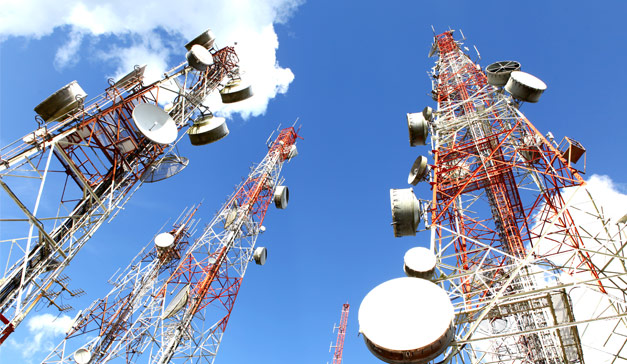
Clean and reliable power for telecom networks in Ethiopia, Liberia, and Sierra Leone will be expanded following a $45 million investment by the International Finance Corporation (IFC) in IPT PowerTech.

The investment targets countries where limited power supply continues to slow digital connectivity and broader economic participation, the institution stated earlier this week.
To enable this expansion, the IFC is providing a $45 million corporate financing package consisting of an A-loan of $27 million and $18 million in blended finance.
The blended portion is sourced from the Canada-IFC Blended Climate Finance Programme and the IDA20 Private Sector Window Blended Finance Facility.
The initiative marks the IFC’s first direct infrastructure engagement in Liberia in a decade and in Sierra Leone in six years.
It will help scale solar- and battery-based power systems that reduce reliance on diesel and support greener, more resilient telecom networks.
By improving the quality and stability of power to telecom towers, the initiative will strengthen mobile coverage and ensure that households, schools, health centres, and small businesses can depend on consistent digital services, said the IFC.
The funding supports the modernisation, operation, and maintenance of 2 235 telecom sites across the three nations. More than 90% of these are located in off-grid or weak-grid locations.
With new solar and battery systems powering these sites, mobile networks will experience fewer outages and improved service quality.
Optimising the energy mix is estimated to reduce power costs for operators by up to 30% in Liberia, 26% in Sierra Leone, and 52% in Ethiopia.
This transition is also expected to cut emissions by more than 10 624 tonnes of carbon dioxide annually. Furthermore, the partnership will promote gender inclusion by expanding opportunities for women in technical, operational, and leadership roles within the sector, says the IFC.
This agreement reflects a shared vision for a greener telecom industry and empowers the company to scale its innovative energy platforms, according to Nabil Haddad, CEO of IPT PowerTech Group.
Reliable and affordable power for telecom networks is a cornerstone of Africa’s digital transformation, said Nathalie Kouassi-Akon, IFC regional director for West Africa and the Gulf of Guinea.
Through this partnership, the institution is supporting a scalable, private sector-led solution that enables mobile operators to reach underserved and fragile communities more sustainably, added Kouassi-Akon.
The project advances the World Bank Group and African Development Bank’s Mission 300 initiative, which aims to provide electricity to 300 million Africans by 2030.

Expedier has unveiled “Expedier for Business,” an online pro-banking platform to simplify global payments, multi-currency transactions, and financial operations for expanding companies.

Kingsley Madu
The tool centralizes payments, invoicing, payroll, and treasury into one secure dashboard, tackling challenges like fragmented systems and poor visibility that hinder international scaling.
Kingsley Madu, Co-Founder and CEO of Expedier, said: “African businesses are increasingly global… Expedier for Business was built to simplify how companies manage money across borders while maintaining visibility, control, and compliance.”
Key features include customizable dashboards for payments, invoices, and workflows; support for USD, CAD, GBP, EUR, and more; virtual cards; automated payroll/invoicing; currency swaps; and real-time tracking.
Security measures cover two-factor authentication, KYC/KYB verification, and team access controls.
As cross-border trade and remote work boom in Africa, the platform aids firms dealing with international suppliers, teams, and customers. It is now available for organizations scaling globally.

NDIC Insures 99 Percent of Bank Customers

FG Shifting Focus to “Meaningful Connectivity” to Drive Inclusion – Minister

CBN Bars Chronic Loan Defaulters from Accessing Loans

Google Rolls Out Search Live AI to 200+ Countries, Including Nigeria

Breaking…..Kuda Lays Off Many Employees in Broad Restructuring

Kaspersky Discovers New Phishing Campaign Exploiting Google Tasks Notifications to Steal Corporate Credentials

Spotify’s Loud & Clear Report Reveals Over ₦60Bn Revenue for Nigerian Artists in 2025

China Threatens to Shut Nigeria’s Satellite Over $11.44m Unpaid Debt

MTN Nigeria Posts Record N1.70 Trillion Pre‑Tax Profit, Declares N20 Dividend for 2025

Madonna University Taps Tech Guru Adote for Strategic Board Role




 News2 days ago
EU Pumps €290m into Nigeria’s Digital, Health, Agri Sectors

 Telecom2 days ago
US Jury Finds Meta, Google Liable in Landmark Social Media Addiction Case

 E-Business2 days ago
5 Wealth-Building Strategies for Nigerian Women-led Businesses

 News2 days ago
Firm Shares Tips for Updating Your Digital Habits for an AI-driven World

 Telecom2 days ago
Mobile Money Transactions Accounted for $2 trillion in 2025

 E-Business2 days ago
Nigeria, Finland Sign Cybersecurity Pact

 E-Financial2 days ago
MoneyMaster Enhances App, Rewards Users with Data and Airtime Bonuses

 News1 day ago
Francis Okafor Stuns China, Emerges Second-Place Winner @ Tencent OpenClaw Hackathon