

Telecom
5 Common Backup Mistakes and How to Avoid Them


Are you confident that your valuable data is protected from unexpected disasters or cyber threats? Consider this: 1 in 10 computers fall victim to viruses, and a staggering 113 phones are stolen every minute every day[1].

With data loss being a sudden and potentially irretrievable nightmare, ensuring reliable backups is non-negotiable. March 31st, celebrated as World Backup Day, is a poignant reminder of this essential task. Let’s delve into the common backup mistakes people make and how to steer clear of those.
1. Skipping regular backups:
The most common mistake is forgetting to back up data regularly. Whether personal files or crucial business documents, not establishing a consistent backup routine leaves you vulnerable to data loss.
Unexpected system crashes or malware attacks can happen anytime, making your precious data inaccessible or permanently lost. But you can help avoid such a situation by setting up automatic backups.
A device can get damaged or stolen, putting your backups at risk, so depending entirely on one storage medium is playing a dangerous game with your data’s safety.
Instead, diversify your backup storage solutions with a combination of external HDDs, NAS, and cloud storage.

Portable HDDs like those from WD like Western Digital’s My Passport offer up to 5TB for simple, cost-effective backups. For smartphones, 2-in-1 flash drives such as SanDisk Ultra Dual Drive Go USB Type-C and SanDisk iXpand Flash Drive Luxe are convenient options.
These drives, compatible with USB Type-C devices, automatically back up photos, videos, and more. Just plug and play for seamless data transfer across devices.
If you need a device to store huge amounts of data, then the desktop drive called My Book from WD is just the product for you, with up to 22TB of storage capacity.
3. Forgetting version control:
Overlooking version control during backups is another blunder. Not keeping multiple versions of files increases the chance of saving corrupted or wrong data over previous versions.
Without a proper versioning system, fixing mistakes or retrieving older versions can become a challenge. To prevent forgetting version control, establish a system that tracks changes to your files over time.
This ensures that you can always revert to earlier versions if needed, helping protect against accidental data loss or corruption.
Regularly maintaining this system will help you stay organized and prepared for any unforeseen issues.
Additionally, it’s crucial to verify the version you’re backing up to ensure it’s the correct one.
This simple step can help prevent accidental overwriting of important data with potentially corrupted or incorrect versions.
Double-checking ensures that you’re safeguarding the most up-to-date and accurate information, minimizing the risk of errors during backups.
Many people overlook off-site backup solutions, assuming local backups are foolproof. However, relying solely on local backups makes you vulnerable to site-specific disasters like fires or theft.
Using off-site backups means keeping copies of your data in different places so that if something bad happens in one area, your data stays safe.
As an alternative, you could use cloud storage. Cloud backup devices are popular for remote data storage accessible via the internet. Various online cloud services offer features like file synchronization, sharing, and encryption for secure data storage.
5. Underestimating encryption:
Not prioritizing encryption in backups can be a costly mistake. Storing unencrypted backups makes your sensitive data vulnerable to unauthorized access or breaches.
Implementing strong encryption ensures even if your backups fall into the wrong hands, the data remains protected.
However, it is equally important to remember not to opt for out-of-the-box encryption solutions, as they might make it difficult for you to retrieve the backed-up information later.
My Passport HDD and My Book from WD come equipped with built-in 256-bit AES hardware encryption with password protection that helps keep content secure.
Additionally, maintaining proper key management practices is essential to ensure smooth decryption and access to your data when needed.
This World Backup Day, Western Digital urges you to back up your data safely, and at the same time, prepare for the unexpected by having a contingency plan in place for device mishaps like crashes, theft, or damage.
Worrying about losing data isn’t something you have to lose sleep over if you have an active data backup strategy.
A common rule of thumb for keeping important data from disappearing forever is the 3-2-1 Rule. It dictates that you should:
3. Have THREE copies of your data. One is a primary backup and two are copies.
2. Save copies of your backups on TWO different types of media or devices.
1. ONE backup copy should be kept offsite in case of disaster.
Determine where and how you’ll store backup files and identify support contacts for swift assistance.
These proactive measures ensure quick data recovery and safeguard your cherished memories for the long haul.


MTN Nigeria is accelerating investments in network expansion and modernization to address rising demand for mobile and data services across the country.

The operator is deploying additional base stations, upgrading existing infrastructure, and expanding fiber connectivity to improve network capacity, coverage, and service quality.
The investments are designed to support increasing smartphone adoption, higher data consumption, and the growing use of digital services by consumers and businesses.
MTN said the expansion aligns with its long-term strategy to enhance customer experience while strengthening Nigeria’s digital infrastructure.
The company expects the ongoing upgrades to improve connectivity, support economic growth, and enable broader access to reliable telecommunications services as demand for high-speed broadband continues to increase.

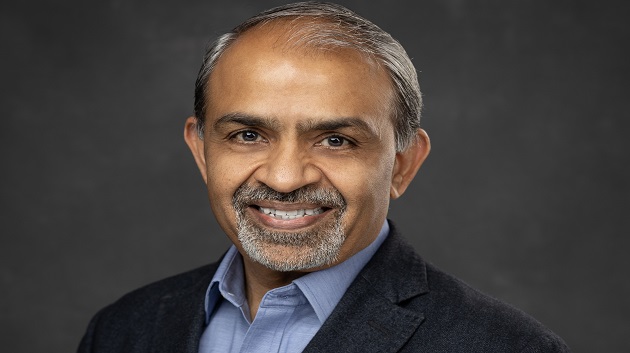
Airtel Africa’s CEO, Sunil Taldar, has announced the telco’s commitment to connecting 5,000 schools across its operating countries in Africa to the internet by 2027 through its philanthropic arm, Airtel Africa Foundation, in partnership with the United Nations Children’s Fund (UNICEF).

So far, the $57m partnership, which was launched in 2021, has cumulatively connected 3,296 schools and provided access to over 2 million learners and about 40,000 teachers. 64 digital learning platforms have been zero-rated thereby enabling more than 11m users to access educational content at no cost.
Speaking during a visit to St. Monica’s Girls School in Lusaka, which is one of the 300 schools already connected to the internet in Zambia, the Airtel Africa CEO stated that the initiative is having a profound impact on the quality of education by expanding access to digital learning resources for African children, in collaboration with governments.
Mr Taldar added: “Students are accessing best-in-class education from the curriculum developed by UNICEF in partnership with various Ministries of Education and provided through Airtel’s connectivity.
“We are also training teachers, so that they deliver digital education effectively. We aim to continue deepening meaningful connectivity in schools by providing free internet access, zero‑rated platforms and training teachers across the continent”.
Expressing her appreciation, the Headmistress of St. Monica’s Girls’ School, Sr Matilda Soloko said: “Being among the first schools connected in the initial stage, our learners have been able to study using the learning portal and their studies have been intensified. We remain grateful to Airtel and UNICEF.”
UNICEF’s Country Representative for Zambia, Dr Saja Farooq Abdullah said: “What this partnership has brought is really bridging the equality gap and the digital divide. It is making sure that every child learns wherever they are. It was exciting and interesting to see and hear from the girls how they can learn at their own pace, how they can review the materials, and how they do their homework with comfort.
The Director of Secondary Education in Zambia’s Ministry of Education, Yvonne Mwemba Chuulu lauded UNICEF and Airtel for the partnership saying: “At the Ministry of Education, we cannot do it alone, and we are grateful for the partnership that we have today.
“Our children are able to learn in a blended fashion, where we have a teacher who is also employing digital devices. We have also heard from the learners that they are able to access the portal when they are at home, which is a good thing because our learners continue to learn in the comfort of their homes”.
The School Connection programme is expanding digital learning to learners in 13 countries: Chad, Congo, Democratic Republic of Congo, Gabon, Kenya, Madagascar, Malawi, Niger, Nigeria, Rwanda, Tanzania, Uganda, and Zambia. By equipping these schools with internet connectivity and training teachers on using the digital tools, it is providing children, particularly in underserved and remote regions, with the digital tools and skills they need to thrive.
Airtel Africa Foundation is advancing inclusive development across four strategic pillars, Financial Inclusion, Education, Environmental Sustainability and Digital Inclusion.

MultiChoice has officially become a wholly owned subsidiary of French media company Canal+, marking the completion of one of the largest acquisitions in Africa’s media and entertainment industry.

The integration brings the South Africa-based pay television operator under the full ownership of Canal+, a global media group with operations in 70 countries.
Announcing the completion of the transaction on Thursday, Chief Executive Officer of Canal+ Africa and MultiChoice, David Mignot, described the development as the beginning of a new phase of growth for the broadcaster.
“MultiChoice is now a full subsidiary of a truly international media group operating in 70 countries.
“The group was founded in France, is listed in London and Johannesburg, and has a strong African presence with operations in more than 45 countries,” Mignot said.
The acquisition combines Canal+’s international operations with MultiChoice’s extensive footprint across sub-Saharan Africa, where it serves millions of households through its DStv and GOtv platforms, as well as the Showmax streaming service.
According to Canal+, the integration will strengthen MultiChoice’s competitive position by giving it access to broader financial resources, technology, content partnerships and operational expertise.
The company said the combined business would increase investment in local content production, sports broadcasting and streaming services as competition intensifies from global platforms such as Netflix, Amazon Prime Video and Disney+.
The transaction is also expected to provide MultiChoice with greater access to international markets at a time when traditional pay television operators are adapting to changing consumer viewing habits and the rapid growth of digital streaming platforms.
Canal+ has expanded steadily across Africa over the past decade and now assumes full control of a business operating in more than 45 African countries, further strengthening its position in the continent’s media and entertainment sector.
The acquisition followed Canal+’s gradual increase in its shareholding in MultiChoice, which began in 2024.
After exceeding the regulatory threshold, the company launched a mandatory offer in April 2024 to acquire the remaining shares of the Johannesburg-listed broadcaster.
Following regulatory approvals and shareholder acceptance, Canal+ secured control of MultiChoice in 2025 before completing the process that has now made the company a wholly owned subsidiary.
Industry observers describe the acquisition as one of the most significant media transactions involving an African company, reflecting a broader trend of consolidation as global entertainment firms seek greater scale to compete in the streaming era.

Police Busts Syndicate Who Allegedly Stole N3Bn from Financial Institution

MTN Accelerates Network Expansion to Meet Surging Telecom Demand

Court Remands Akujobi, Ex Access over alleged Theft of N294.5m

TeKnowledge, Equinix Partner to Advance Nigerian Digital Infrastructure

NSIB Faults Runway Identification, Reveals Cockpit Disagreement in Asaba Jet Incident

Nigeria Launches FreeTV Nationwide

NASENI Moves to Digitize CCB’s 5m Assets Declaration and Operations

NRC, Ponzi Scheme Collapses Resulting Loss of Billions of Naira

Lebara Nigeria Launches Lebara Play, Africa’s First Telecom-Owned Micro-Drama Platform

CANAL+ Partners Samsung to Pre-Load DStv Stream on New Samsung TVs In Nigeria, Other African Countries




 Telecom2 days ago
Fixed Wired Internet Market Lags as Mobile Gains Ground

 News2 days ago
Study Reveals How Moniepoint is Powering Nigeria’s $11Bn Food Service Sector

 Broadcasting2 days ago
BON Establishes Six Ad Hoc Committees to Modernize Broadcasting
 News1 day ago
Police Busts Syndicate Who Allegedly Stole N3Bn from Financial Institution

 E-Business2 days ago
New NIMC Act Strengthens Data Protection, Privacy – Director

 Telecom1 day ago
DStv, GOtv Owner MultiChoice Officially Joins Canal+ Group

 General News2 days ago
Court Adjourns Alleged Binance Tax Evasion Case over Settlement Talks

 General News2 days ago
Xenophobic Attacks: OYC Threatens to Picket MTN Nigeria Offices