

E-Business
Norton Encourages Online Safety in Nigeria, Gives Tips on Protecting Children

Norton, by Symantec, is encouraging individuals to manage their children’s growing online independence by educating them on the many serious dangers of the Internet, and ensuring they can surf the web knowing they are protected from the threats out in cyberspace today.
Ms. Marian Merritt, Norton’s Internet Safety Advocate of the Company made the call during conversations at the Safer Internet Day which held recently.
She said, “The increasing accessibility of the internet on mobile devices, such as tablets and smartphones, mostly amongst the younger generations across the world calls for safer and more responsible use of online technology,”
Meritt went on to mention that cyberbullying has been identified as one of the main issues of online safety which is increasingly becoming a serious concern and happens online or on mobile phones. She stressed the importance for adults to educate their children on online etiquette,
She stated that “this includes cautioning them to avoid talking to strangers or accepting friend requests from people they do not know, limiting their time allowed online or by restricting the apps they download on their mobile phones.”

In addition to this, she provided the following top 10 tips for parents and care givers for ensuring young people remain protected online:
“Don’t give out your personal information – Don’t put personal details such as your home address, telephone numbers or parent’s work address online as cybercriminals can use this information to create a fake profile with your details.
“What goes online, stays online – Use privacy settings to make sure only your friends and family can see photos you post. Avoid posting holiday plans as criminals have been known to track your movements
“Check your security and privacy settings – Make sure your social network privacy settings are secured so only your friends can see your personal information and use your privacy settings to restrict who can see your posts, videos and photos
“Password safety – Sharing your password with your parents is a sensible idea, but avoid sharing your password with your friends, even if they promise they won’t tell anyone! Also, when setting your password, make sure it isn’t something people may guess such as your pet’s name. Use a mixture of letters, numbers and upper and lower case characters
“Always protect your mobile device – Make sure your mobile phone is pin-protected so all your personal information stored on it is safe. Download a security app which allows you to remotely wipe any personal data, should your mobile be lost or stolen
“Don’t talk to strangers online or offline – Don’t meet up with strangers and let your parents know if a stranger has tried to get in contact with you online. Often people you speak to online may not be who they say they are so only share your personal details on social media sites with friends, family and people you already know in the ‘real’ world
“Listen to the adults who know – Adults will always be worried about you. Help set their mind at rest and avoid chatting online with strangers or using the internet so long you neglect your real world activities and real world friends
“Be wary of unsecured or unknown websites – When shopping online, use reputable and known retailers. Make sure any transactions you make only take place across secure web pages which you can identify from the padlock sign in your browser address bar and where the address says https
“Be careful what links you click on – Avoid clicking links in an email, Instant Message or on your social network unless you are sure the message is from someone you know. Cybercriminals have been known to hack into your friends’ email accounts and social networks to send emails or post messages claiming they are in trouble and asking you to transfer them money. Don’t believe it if it sounds suspicious or offers something unrealistic
“Make sure your security software is up to date – Security software is now available on all types of devices; mobile phones, tablets and PCs. Make sure you have the latest security software on your devices to stay protected at all times,” she advised.



Nigeria has emerged as one of Africa’s most regulated online gambling markets, even as illegal operators continue to dominate the continent, according to a new report by Gaming Compliance International (GCI).

The report, the first comprehensive assessment of online gambling across all 54 African countries, showed that Africa’s online gambling Gross Gaming Revenue (GGR) reached $23 billion in 2025.
However, only $5.2 billion (23 per cent) was generated by licensed operators, while $17.8 billion (77 per cent) remained in the unregulated market.
In West Africa, total online gambling revenue rose to $4.8 billion in 2025 from $4.3 billion in 2024. Of the 2025 figure, regulated operators accounted for $1.5 billion (31 per cent), while $3.3 billion (69 per cent) flowed to unlicensed platforms, highlighting the region’s persistent enforcement challenges.
Nigeria stood out as the region’s strongest performer, recording the lowest unregulated market share at 56 per cent, compared with the West African average of 69 per cent and the African average of 77 per cent.
The study also found that online gambling participation across Africa increased from 198 million people (13 per cent of the population) in 2024 to 215 million (14 per cent) in 2025.
Despite this growth, GCI estimated that illegal operators deprived African governments of about $3.55 billion in tax revenue in 2025. The number of unlicensed gambling platforms targeting African consumers also rose to 4,129, up from 3,644 in 2024.
Commenting on the findings, Matt Holt, chief executive officer, GCI, said the report provides regulators with the first continent-wide benchmark for strengthening oversight and consumer protection.
Ismail Vali, president, GCI, urged governments to develop competitive and well-regulated markets that encourage consumers to patronise licensed operators, boost public revenue and attract greater investment.
Online gambling in Nigeria is regulated by the Nation Lottery Regulatory Commission.


At the height of the Northern Hemisphere tourist season, demand for communications and mobile Internet services rises sharply. Kaspersky’s security experts have uncovered scams that target anyone purchasing mobile connections or SIM cards worldwide.

Fraudsters create counterfeit websites that look like the portals of major regional and international telecom providers to trick users into revealing their phone numbers, personal details or banking information.
Kaspersky is sharing several examples of these fake login pages that mimic legitimate telecom operator sites and giving recommendations on how not to be deceived.
In the first case, scammers exploit the brand name of an international telecommunications company operating services in Asia, Africa and Europe. Fake authentication pages encourage users to put in their phone number and credentials.
While the first example shows the different design, the second scam site closely mimics the original log in page, making it hard for users to tell the difference and spot a fake. Entering authentication or payment data on fraudulent web sites may result in money or data loss and become a reason for more frequent spam and fraudulent calls.
Another example is a scam page which poses as another international communications company, working in North Africa, the Middle East and Southeast Asia. In this scheme scammers encourage users to top up their mobile data/Internet plans by entering their personal information and bank cards details.
Kaspersky experts have also identified a scam when cyber criminals suggest users enter their personal data to check and pay a bill inquiry. Such scam schemes are usually aimed at gaining victims’ personal data for further fraud or account hacking and stealing money.
“Because of the active use of AI, scammers can now create fake pages with ever increasing accuracy and speed, targeting the most popular user interest areas. We constantly see scams revolving around sports events, music concerts, seasonal sales and holidays. Unfortunately, the telecoms industry is no exception.
To keep your data and money safe, be vigilant when purchasing mobile or Internet plans online. Using an eSIM – purchased through an official app – is one way to avoid fake telecom sites, as it eliminates the need to enter personal details on questionable web pages.
If you’re unsure about a site’s legitimacy, search for the brand name directly in a search engine and enable a security solution that blocks phishing links for you,” comments Tatyana Kulikova, cybersecurity expert at Kaspersky.

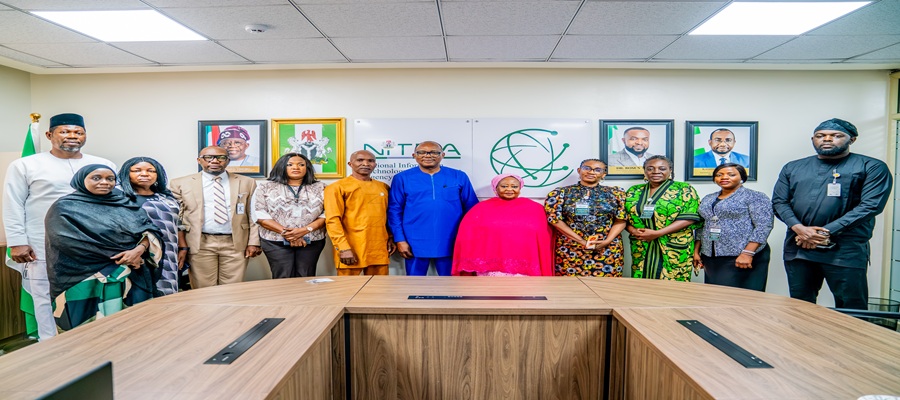
In a strategic push to bridge the gender digital divide, the National Information Technology Development Agency (NITDA) has partnered with the Nigeria Association of Women Journalists (NAWOJ) to advance women’s digital inclusion and drive the nation’s transformation agenda.

Dr Aristotle Onumo and some NITDA staff, pose for a group photograph with the President of the National Association of Women Journalists (NAWOJ), Comrade Aisha Ibrahim, and members of the delegation following a strategic engagement at the Agency’s Headquarters in Abuja.
The partnership was cemented during a courtesy visit to NITDA Director General, Kashifu Inuwa, CCIE, by a NAWOJ delegation led by National President Comrade Aishatu Ibrahim, who introduced the agency to the forthcoming Women in Security (WINSEC) Summit & Awards 2026.
Inuwa, represented by Dr. Aristotle Onumo, the Director of the Stakeholders Management and Partnerships Department, assured the association that NITDA would not only participate in the conference, but also support the success of the conference.
Inuwa hailed the NAWOJ for creating a platform for peacebuilding, dialogue on security and women’s inclusion, which he described as one of the critical areas NITDA is focused on to ensure that more women obtain digital literacy and skills under the National Gender Inclusive Strategy.
Beyond NITDA’s plan to participate in the conference, the DG noted that a robust partnership between the organisations would engender meaningful opportunities and initiatives through which many more women can access digital literacy.
“Inclusivity is the key to everything we do at NITDA. We clearly defined that 40 per cent of our programmes must recognise the issue of gender. We ensure that women are adequately represented and positioned to benefit greatly from the programmes that we organise in the agency.
“We graciously accept to participate actively in that conference. Apart from acquiring skills among journalists themselves, partnership with NAWOJ will also serve as a platform through which we can also reach out to various women’s groups across the federation,” Inuwa said.
Earlier, Comrade Ibrahim commended the DG for his visionary and transformational leadership which has continued to position NITDA as the catalyst for Nigeria’s digital economy through its various programmes.
She explained that the Women in Security (WINSEC) Summit and Awards 2026 is an initiative of NAWOJ designed to promote collaboration among government institutions, security agencies, technology experts, the media, and other stakeholders to address contemporary security challenges.
According to Comrade Ibrahim, the association also aims to recognise outstanding individuals and institutions that have demonstrated excellence in security, governance, and innovation while fostering meaningful dialogue on the role of technology in building a safer and more resilient Nigeria.
“We deeply appreciate your exemplary leadership, passion for innovation, and unwavering commitment to building a digitally empowered Nigeria. We respectfully invite the agency to partner with NAWOJ in making this landmark initiative a success.
“We look forward to establishing a long-term partnership with NITDA that will empower women journalists with cutting-edge digital skills, support digital inclusion and contribute to innovation, digital literacy, and human capital development,” the NAWOJ president added.
Both organisations expressed optimism that the meeting would lay a solid foundation for a rewarding partnership agreement with specific and clearly defined objectives that will support digital inclusion and contribute to innovation, digital literacy, and human capital development.

Nigeria Leads Africa in Online Gambling Regulation – GCI

CBN Has Not Published Annual Financial Statements Since 2022 despite Legal Requirement

ChatPay Unveils Public Waitlist for WhatsApp-Based Banking Platform

GSMA Says High Smartphone Costs Threatens Africa’s AI Future

Dangote Refinery Completes Landmark $2.5bn Private Equity Placement

NRC, Ponzi Scheme Collapses Resulting Loss of Billions of Naira

NASENI Moves to Digitize CCB’s 5m Assets Declaration and Operations

Tokenization, Blockchain Technology will Transform Financial Institutions – IMF

EFCC Busts NIS Visa Overstay Racket, Uncovers N700m in an Account

From Scarcity to Scale: What Africa Can Learn from India’s Agricultural Transformation




 General News3 days ago
FG Launches C.L.I.C.K.D., Consumer Credit Scheme for Tech Devices

 Telecom3 days ago
Airtel Nigeria Expands Retail Footprint to Strengthen Customer Access Nationwide

 Telecom3 days ago
MTN Nigeria Opens Applications for Next Afrobeats Star Season 2 with Bigger Prizes

 News3 days ago
NPC Opens Nationwide Digital Birth, Death Registration Platform

 Telecom3 days ago
Kaspersky Survey Highlights the Need for Smartphone Security

 E-Business3 days ago
Ovaloop Technologies Unveils Digital Tools to Formalize SMEs Operations Across Africa

 E-Financial3 days ago
CBN Retains Interest Rate at 26.5% as Cardoso Cites Global Uncertainty Despite Inflation Drop

 Telecom2 days ago
Court Dismisses Pan African Towers’ Bid to Halt Ex-CEO’s Suit, Awards ₦500,000 Costs