

Telecom
ATCON Visits Saraki, Warns of Dangers of ICT Tax Bill


Association of Telecommunications Companies of Nigeria (ATCON) has again warned that the proposed plan by the federal government to impose a special tax of nine per cent for the use of communication services would only succeed in worsening the prevailing high cost of doing business in the country.
The group during a visit to Senator Bukola Saraki, President of the Senate, asked the federal government to drop the plan to tax every phone call made, text message sent and data used by Nigerians.
According to ATCON, the bill potentially creates and raises the issue of double taxation since Value Added Tax (VAT) Act already imposes tax of five per cent on the supply of goods and services, calling for the suspension of the bill to allow for the rapid growth of the telecommunications sector in line with the Nigerian National Broadband Plan.
A member of the ATCON delegation told Nigeria CommunicationsWeek that the visit was part of the Association’s advocacy against the 9% Communication Services Tax Bill already considered for passage at the Upper Chamber.
“ATCON”, the source said, “has not shifted ground on its position against the Communication Services Tax Bill. As an industry, we are strictly against the moves by the Federal Government.

“During the meeting, the ATCON President presented our case to His Excellency, Dr. Bukola Saraki, saying, look the growth of Information and Communication Technology during the last few years has been phenomenal and tremendous with positive impact on every aspect of human life, however, the industry which is heavily taxed already would prefer this Bill is not passed.
“There is no doubt that the emergence and liberalization of this sector has also impacted positively on revenue accruable to government , employment generation (both Direct and Indirect), Foreign Direct Investment (in tens of billions of dollars) and a host of other positives which time would not permit me to mention. What the industry needs now are more palliative and not more tax. It’s true government is looking for measures to generate more revenue, but this tax is not a better option.”
Before now, ATCON’s position has been that they recognize that, generally, taxation is one of the many ways through which governments all over the world generate income to be able to discharge their duties to the citizens, “Government at all levels make collections of taxes mandatory through enactment of policies. The contributions of the Communications sector was meagre some fifteen years ago but through the concerted efforts of some patriotic and dedicated experts in the telecommunications sector under the aegis of the Association of Telecommunications Companies of Nigeria who advocated for the liberalization of the sector, the sector is now contributing revenue of well over 10% to the nation’s GDP.
“ATCON believes any calculated actions that have potentials to stifle further contribution of the telecoms industry to our GDP must be avoided by all tiers of government in Nigeria as the perceived benefits of imposing a Communication Service tax on telecoms subscribers has the potential to erode if not destroy the achievements that have been made since the telecoms sector was liberated. We therefore advise both the House of Representatives and the Senate (the Legislative arm of government) to discontinue with the bill.
Also recently, Telecommunications groups which include, GSMA the industry association representing mobile operators worldwide; ALTON, representing the mobile operators of Nigeria; ATCON, the Association of Telecommunications Companies of Nigeria and NATCOMS, the National Association of Telecommunications Subscribers, expressed their grave concerns regarding the proposal, which is under consideration by the National Assembly.
The bill seeks to establish a 9% Communication Service Tax to be levied on charges payable by a user of an electronic communication service (i.e., SMS, voice calls, MMS, data usage) supplied by service providers.
According to the group, ‘If introduced, such tax will result in an increase in prices for consumers, which will have adverse impacts on the adoption of mobile services and industry investment, as well as counter-productive to the longer term national digital strategy objectives set by the government of Nigeria.
They further stated that: “the socio-economic impact of mobile penetration is now widely recognised. According to research conducted by the World Bank, a 10% increase in mobile broadband penetration in low to middle income countries leads to a 1.38% increase in GDP growth. Today, 83 million people in Nigeria have access to mobile services. With over half of the population without a mobile connection, affordability remains a key challenge to connect the unconnected, who are typically lower income population groups.
Further taxation on electronic communication services will hit lower income consumers the most, who are already struggling due to the adverse economic situation and increased price pressure and for whom affordable access to information and communication technology is critical to their social and economic inclusion. Moreover, this will result in a double taxation for consumers who already pay Value Added Taxes on telecommunications services.”
They added that in 2014, the mobile ecosystem contributed USD8.3 billion to the Nigerian economy. This they said is set to increase as penetration of voice and broadband services grows.
But, in a recent public forum in Lagos the federal government through Barrister Adebayo Shittu expressed hopes to generate more than N20bn monthly from communication service tax.
The Minister said, “We all know that the introduction of new taxes without harmonising existing ones will put pressure on the Nigerian tax system, making it unattractive to investors. “This may also be counter productive in the long run for our target broadband penetration.
“My focus on any tax regime will be to align any process that will stimulate the economy and also ensure that tax system is sufficient by widening the tax net and creating an effective framework for tax compliance to protect the poor and vulnerable in the society.”
Efforts to reach the ATCON President proved abortive however the executive secretary confirmed the visit, but said that a comprehensive report shall be made available later.


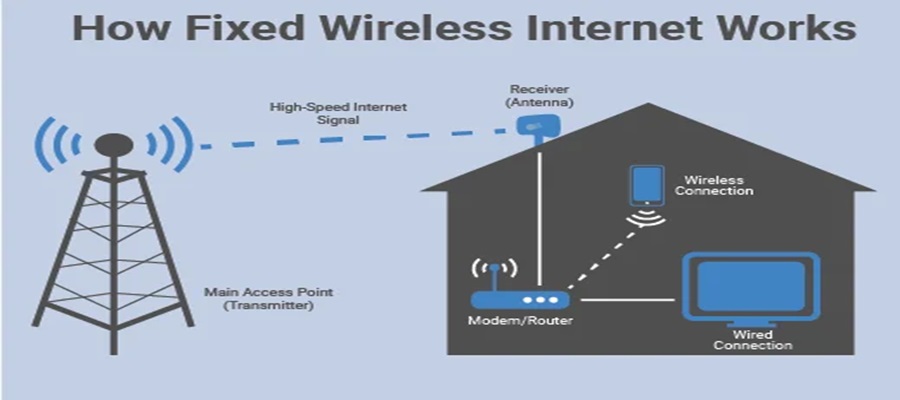
Nigeria has exactly 156,662 active fixed wired internet subscriptions as of mid-2026.

This is a tiny fraction compared to mobile GSM networks, which dominate the market with over 154 million subscribers.
The fixed wired market primarily consists of homes and offices using direct physical cables like fiber optics.
Fixed wired services use physical cables, like glass fiber or copper wire, to bring internet directly into a building.
It is like a dedicated, private water pipe for your home. It provides very fast speeds, unlimited data, and is reliable.
In contrast, mobile GSM uses radio waves transmitted from tall towers to phones, acting more like a sprinkler that sprays a signal across an entire neighborhood.
Because laying physical cables across cities is expensive and hard to do, these subscriptions are very rare.
However, the market has seen recent growth, driven largely by Fiber-to-the-Home (FTTH) services.
The top players are: MTN FibreX with 110,564 subscribers, which is roughly 88.7 per cent of the entire market.
SWIFTNG accounts for about 13,945 connections.
The others are ipNX and 21st Century Technologies which make up the number.

Nigerian Communications Commission (NCC) has said that it was strengthening collaboration with state governments and industry players to develop a transparent, cost-based pricing framework for sharing telecom ducts as part of efforts to speed up broadband expansion across Nigeria.

Ayuba Shuaibu, director of Policy, Competition and Economic Analysis, NCC, disclosed this at the Stakeholders’ Forum in Abuja.
Shuaibu said the initiative was designed to build consensus among all parties.
“The primary purpose of this forum is to ensure seamless synergy between the Commission and all stakeholders,” he said.
The director said the consultation was prompted by longstanding complaints over permits, levies and other charges imposed by different levels of government.
He said bringing together state commissioners, telecom operators, tower companies and representatives of the Nigeria Governors’ Forum had helped improve understanding of the issues.
“This engagement is a work in progress. We expect more input from stakeholders before presenting the outcome to the Nigeria Governors’ Forum,” he added.
Dr Helen Adeneye, commissioner for Innovation, Science and Technology, Kogi State. welcomed the consultation, saying Nigeria needs a harmonised policy that clearly defines the responsibilities of both the federal and state governments.
“We need a harmonised policy that allows states to collaborate better with telecom operators and creates a more business-friendly environment,” she said.
Dr Adeneye added that adopting the Dig-Once policy would establish a uniform pricing system and help resolve disputes over charges for telecom infrastructure deployment.
Chidi Ajuzie, chief executive officer, WTES Projects Limited, whose firm is conducting the consultancy study, said the proposed framework would introduce a common cost structure for duct sharing to support broadband investment and economic growth.
“The study is designed to create a uniform pricing model that will drive broadband growth, economic development and wider adoption across the country,” he said.
Ajuzie explained that the consultants had developed preliminary floor and ceiling prices to guide operators while allowing flexibility within the approved range.
He added that the recommendations remain open to industry input before the NCC finalises the framework.
The Dig-Once Policy is designed to reduce the cost and disruption of deploying broadband infrastructure by requiring fibre ducts to be installed whenever roads are constructed or rehabilitated.
The NCC is developing a cost-based pricing framework for sharing these ducts to promote fair pricing, reduce duplication of infrastructure and encourage investment.
The proposed model is expected to support the Federal Government’s broadband expansion targets while improving collaboration between telecom operators and state governments.
Telecom
MUSON Graduates Shine at 2026 Concert as MTN Foundation Celebrates 20 Years of Music Scholarships


Emeka Nwodike, acting director of the MUSON School of Music, conducted the institution’s graduating class in a grand finale performance, bringing the 2026 graduation concert to a memorable close. The concert took place on July 7 at the Shell Hall of the MUSON Centre, Onikan, Lagos.

The event celebrated students who successfully completed the MUSON Diploma Programme through the MTN Foundation Scholarship Programme.
The graduating students delivered a rich choral repertoire that reflected the breadth of their musical training, performing Italian Salad by Richard Genee, My Song by Eriks Esenvalds, Obi Dimkpa by Laz Ekwueme, and an ABBA Medley arranged by Goran Bejstam. Under the Acting Director’s baton, the choir demonstrated technical precision, vocal maturity and artistic expression before an audience of family members, music enthusiasts and industry stakeholders.
The concert formed part of the long-running partnership between the MTN Foundation and the Musical Society of Nigeria (MUSON), which has, since 2006, provided scholarships for hundreds of talented young Nigerians to receive formal music education through the MUSON Diploma School. The programme continues to serve as one of the country’s foremost platforms for developing professional musicians and strengthening Nigeria’s creative economy.
Speaking at the close of the concert, Nwodike expressed appreciation to the MTN Foundation for its sustained support of the scholarship programme over the past two decades. He also thanked the Director of the MUSON Centre, faculty members, mentors and other stakeholders whose dedication has contributed to the school’s continued success.
“For nearly 20 years, the MTN Foundation has remained a steadfast partner in our mission to nurture young musical talent. We are deeply grateful for that commitment. I also want to thank the Director of the MUSON Centre, our faculty, mentors and everyone whose dedication has helped the MUSON School of Music continue to grow and thrive. Their support has made this programme what it is today, and our graduates are a testament to that collective effort,” he said.

Court Adjourns Alleged Binance Tax Evasion Case over Settlement Talks

Fixed Wired Internet Market Lags as Mobile Gains Ground

Xenophobic Attacks: OYC Threatens to Picket MTN Nigeria Offices

New NIMC Act Strengthens Data Protection, Privacy – Director

BON Establishes Six Ad Hoc Committees to Modernize Broadcasting

NASENI Moves to Digitize CCB’s 5m Assets Declaration and Operations

Mobile Internet Gender Gap Widest in Africa – GSMA

Nigeria Launches FreeTV Nationwide

CANAL+ Partners Samsung to Pre-Load DStv Stream on New Samsung TVs In Nigeria, Other African Countries

Lebara Nigeria Launches Lebara Play, Africa’s First Telecom-Owned Micro-Drama Platform




 News2 days ago
NRC, Ponzi Scheme Collapses Resulting Loss of Billions of Naira

 News2 days ago
NSITF Partners South African Insurer on Digital Transformation

 E-Financial2 days ago
FCT-IRS Unveils New Digital Platform, Taxporta

 General News2 days ago
KPMG Urges Africa’s Most Innovative Tech Entrepreneurs to Enter the Global Tech Innovator 2026 Competition

 E-Business2 days ago
FG Suspends New Internet Regulations to Prevent Overlapping Rules
 E-Business2 days ago
NIN Enrollment Hits over 136m as New ID Law Takes Effect

 E-Business2 days ago
Plateau PCC Collects Nigerians’ Data without Privacy Policy – FIJ

 General News2 days ago
Court Declares ARCON’s N60Bn Fine against Facebook Nigeria Illegal