

Telecom
BlackBerry Introduces Cloud-Based Communication Platform for Developers


BlackBerry Limited has entered the Communications Platform as a Service (CPaaS) market with the introduction of its BBM Enterprise SDK (software development kit) that will enable developers to integrate secure messaging, voice and video capabilities into applications and services.
Available worldwide this month, the BBM Enterprise SDK allows BlackBerry to be competitive with other cloud communications platforms by presenting enterprises and developers APIs to enhance overall business processes.
“We are constantly innovating and looking for ways to leverage our legacy and expertise in secure mobility to solve real business problems,” said Marty Beard, Chief Operating Officer, BlackBerry. “We are opening up a new revenue stream for the company with a fully cloud-based communication service that is designed to help developers, ISVs, and enterprises meet the most demanding security and compliance requirements.”
High-Quality Features With Security At The Core
As instant messaging becomes a primary means of communication in the enterprise, current market offerings do not provide the same level of security and encryption for which BlackBerry is known, putting businesses at risk. With more than 80 security certifications and approvals to date – more than any other mobile vendor – BBM Enterprise SDK leverages this expertise to provide the highest-level of security for messages, voice, and video for iOS and Android.
Examples of capabilities being provided to developers include:
Secure Messaging: 1:1 chat and group chatting; message quoting, retraction, editing and deletion
Secure Voice and Video Communications: 1:1 voice and video calling; accept an incoming voice or video call while app is running in the background; display a thumbnail preview of the video call; view video call in full screen
Secure File Sharing and Collaboration: share files, text, contact cards, media, data, and location
Secure Real-time Notifications: push notifications; messaging and collaboration-related notifications
Benefits of using BBM Enterprise SDK include:
Enterprise-Grade Security with BlackBerry’s renowned NOC architecture: BlackBerry’s renowned NOC was built with security in mind and is designed to meet the most demanding enterprise needs. It is globally accessible and provides built-in redundancies to ensure optimal performance, flexibility, QoS and availability for products being built for mass scale.
Faster Time to Market: By leveraging BlackBerry’s comprehensive, secure communications framework for mobile applications and services, developers can focus more on what matters most versus worrying about the complexities of developing secure messaging capabilities and an IT infrastructure.
Greater Scalability: Developers can help guard against unforeseen spikes in usage that may affect service availability through a secure, hosted cloud, all without having to deploy a complex and costly infrastructure.
Reduced Costs: Enterprises can avoid upfront investments in hardware infrastructure by utilizing BBM Enterprise’s fully cloud-based model, as well as control operational costs with an affordable subscription-based per-user licensing model.
Partner Pipeline for Success
BlackBerry’s existing ecosystem of developers, which has created more than 4,000 third-party enterprise applications on the BlackBerry Development Platform, can now easily integrate real-time communications.
The company has a pipeline of partners ready to use the BBM Enterprise SDK when it becomes available. Below are quotes from a few of these partners, which support various industries such as healthcare, law enforcement, and financial services.
“Mobile Innovations is excited to leverage BBM Enterprise SDK. Our law enforcement customers have a strong need for highly secure and protected IM and multi-OS chat groups, as they come together to staff incidents, attend occurrences, and solve crimes,” said Gary Bauer, President, Mobile Innovations Corp.
“Forrest Green will integrate the BBM Enterprise SDK for collaborating with indigenous communities and businesses to securely provide data and analytical solutions. We already leverage BBM Enterprise in a strategic alliance with Mohawk Internet Technologies, to provide data management solutions that are Canadian Federal Government Protected B and PHIPA certified. BBM Enterprise SDK ensures secure communications with federal and provincial health and social service providers to proactively help vulnerable persons. Sharing secure and timely data with Chiefs and Community Managers is critical to improving safety, lowering costs and demonstrating measurable outcomes,” according Murray Rowe Jr., President, Forrest Green Group of Companies
“By building powerful tools for communication and collaboration between physicians and specialists, we can tackle one of the biggest problems in healthcare and dramatically improve wait times to deliver quality care when it is most important to patients – in real-time! We proudly chose BBM Enterprise as our cross-platform backbone communication technology for security and reliability that is second to none,” Charlie Farkas, Director, Engineering and Product Development, Oculys Health Informatics, said.
“The biggest challenge to global communication, collaboration and trade is the language barrier. Our real-time translation tools combined with BlackBerry’s secure communication platform will enable customers and partners on any device to conduct business globally with greater efficiency and productivity. We are thrilled to be leveraging the new BBM Enterprise SDK”, said Ed Karthaus, President & CEO of Yappn Corp
“We are excited to extend our long-standing relationship with BlackBerry. Combining the security and functionality of BBM Enterprise SDK into Tango Networks’ Kinetic Communications Platform will allow us to deliver solutions that meet and exceed current and future compliance standards. In conjunction with the BBM Enterprise platform, we will be able to decrease the complexity, infrastructure, and cost for our enterprise customers while ensuring the strictest security requirements and protection,” Derek Peper, Senior Vice President, Tango Networks, said.


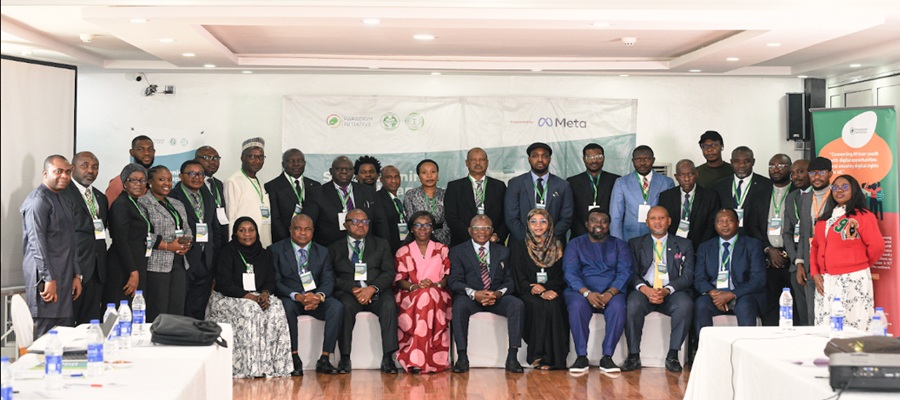
Paradigm Initiative (PIN), a pan-African digital rights and inclusion organisation, says it has engaged more than 1,300 stakeholders across 11 African countries through a series of forums, training sessions and policy dialogues aimed at strengthening digital rights, inclusion and online civic participation.

The organisation disclosed this in a statement, saying the engagements were carried out during the second quarter of the year through 26 programmes focused on election monitoring, judicial capacity building, digital literacy and policy development.
According to PIN, the initiative brought together policymakers, judges, lawyers, journalists, civil society organisations and community groups to promote a safer, more inclusive digital ecosystem across the continent.
The organisation said the programmes focused on safeguarding electoral integrity in Zambia, The Gambia and Ethiopia, while also strengthening the capacity of Nigeria’s judiciary on issues relating to Artificial Intelligence (AI), data privacy and digital evidence.
In partnership with Meta, PIN trained 35 judges in Lagos across two cohorts on privacy, data protection, AI and digital evidence.
It described the initiative as a significant step towards equipping Nigeria’s judicial officers to effectively handle legal disputes arising from an increasingly digital society.
The organisation also expanded its Digital Rights and Elections in Africa Meetings (DREAM) to Ethiopia, The Gambia and Zambia.
According to the statement, the programme equipped 110 civil society organisations, media professionals and election management bodies with skills to monitor digital rights violations and protect online civic spaces during election periods.
PIN further said its Digital Rights Academy (DRA) trained more than 100 lawyers, law students and digital rights advocates from Cameroon, the Republic of Congo, Ghana, Nigeria, Tanzania and Zimbabwe.
The academy focused on strengthening participants’ capacity in strategic litigation and promoting accountability for digital rights violations.
The organisation also hosted a Digital Policy Engagement Roundtable, bringing together 34 stakeholders, including organisations representing persons with disabilities, to discuss accessibility and inclusion in digital policy development.
It said Afrocities roundtables held in Nigeria and Tanzania attracted 80 participants who explored ways of improving informal workers’ access to digital social protection and financial services.
According to the statement, a ministerial roundtable in Zambia also aligned the country’s digital priorities with the World Summit on the Information Society (WSIS+20) review process.
PIN said it also implemented the Digital Rights and Inclusion Board Learning Experience (DRIBLE) Ambassadors Training in Cameroon, Nigeria and Senegal.
The programme reached 315 participants and strengthened their capacity to deliver digital rights education through experiential learning approaches.
The organisation said the training improved participants’ understanding of digital rights and increased interest in practical digital rights education across communities.
PIN also highlighted the successful hosting of the Digital Rights and Inclusion Forum 2026 (DRIF26) in Abidjan, Côte d’Ivoire.
The forum, themed “Building Inclusive and Resilient Digital Futures”, attracted 415 participants from more than 39 countries.
According to the organisation, the event brought together policymakers, civil society organisations, media professionals, academics, legal experts, technologists, human rights defenders and development partners to promote dialogue, partnerships and knowledge sharing on Africa’s digital future.
PIN said the engagements underscored the growing importance of collaborative efforts in advancing digital rights, promoting inclusion and strengthening digital governance across the continent

Federal Government has suspended the implementation and enforcement of newly introduced regulations affecting internet platforms, online intermediaries and other cross-cutting issues in the digital economy pending the development of a harmonised national policy framework.

Bosun Tijani
The Minister of Communications, Innovation and Digital Economy, Bosun Tijani, issued the directive following a strategic meeting with the leadership of the Nigerian Communications Commission, National Information Technology Development Agency and the Nigeria Data Protection Commission.
According to a statement issued on Tuesday, the three agencies have been directed to maintain the existing regulatory framework while efforts to harmonise policies are underway.
The statement said the implementation or enforcement of recently introduced regulations, guidelines, codes, directives and administrative requirements relating to internet platforms and other digital economy issues would be deferred where they are part of the ongoing review.
It, however, clarified that the directive does not affect the statutory responsibilities of the agencies.
According to the ministry, existing regulations that fall within the legal mandates of the respective agencies will remain in force, provided they are consistent with the ministry’s policy direction.
Tijani said the rapid convergence of telecommunications, digital platforms, artificial intelligence, online safety and data governance had created overlapping regulatory responsibilities, making closer collaboration among regulators imperative.
He said a harmonised regulatory framework would provide greater legal certainty for businesses, encourage investment, promote innovation, strengthen consumer confidence and enhance Nigeria’s competitiveness as Africa’s leading digital economy.
“As part of the harmonisation process, a joint technical coordination committee comprising representatives of the NCC, NITDA and NDPC has been established.
“The committee will coordinate stakeholder consultations and develop recommendations for a unified national policy and governance framework,” the statement said.
It added that the proposed framework would seek to clearly define the responsibilities of each regulator, reduce compliance uncertainty for businesses and improve regulatory coordination across the digital ecosystem.
The ministry stressed that the harmonisation exercise was aimed at improving collaboration among the agencies and was not intended to diminish their statutory powers.
The development comes less than 24 hours after President Bola Tinubu directed the Federal Competition and Consumer Protection Commission to investigate major technology companies and generative artificial intelligence platforms over allegations of anti-competitive practices and the exploitation of Nigerian media content.

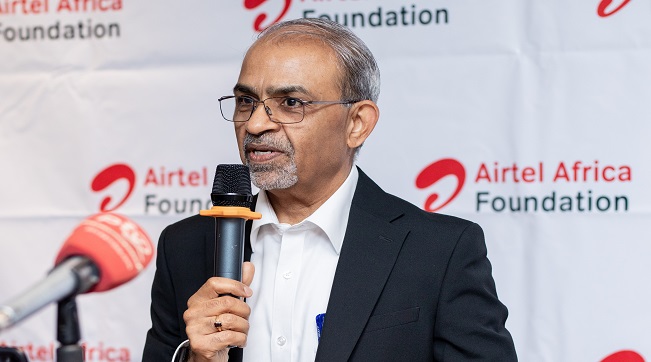
Airtel Africa, a telecommunications and mobile money services provider across 14 African countries, saved 9.1 million litres of diesel during its just ended 2025/2026 financial year, as part of efforts to drive responsible growth by minimising the environmental impact of its operations.

This was achieved by reducing reliance on diesel and increasing use of lower-carbon energy sources, including the conversion of 390 infrastructure sites to on-grid power during the year, thus improving efficiency and reducing emissions.
Airtel Africa CEO, Sunil Taldar highlighted this achievement during a media roundtable held in Lusaka, Zambia, where he presented the Group’s Sustainability Scorecard and progress towards building a more sustainable, inclusive and connected Africa.
Other initiatives to reduce Airtel Africa’s environmental impact during the year included promoting the circular economy, recycling 94% of total waste generated. These form part of Airtel Africa’s broader sustainability strategy, which seeks to create long-term value by balancing business growth with environmental stewardship, digital inclusion and socio-economic development.
Mr. Taldar emphasized that responsible growth remains central to Airtel Africa’s business strategy and is reflected in the company’s ability to extend services and opportunities to millions of people across the continent while advancing sustainability goals. Airtel Africa’s network now reaches 81.9% of the population across its markets, enabling greater access to connectivity, information, education and economic opportunities for individuals and communities.
The company recorded progress in its efforts to advance financial inclusion. Airtel Money now serves 54.1 million customers through a network of 2.4 million agents, making it one of Africa’s largest digital financial services ecosystems. Notably, 44.1% of Airtel Money customers are female, demonstrating the platform’s growing role in empowering women through access to secure, affordable and convenient financial services.
Beyond connectivity and financial inclusion, Airtel Africa, through its philanthropic arm, Airtel Africa Foundation continued to drive meaningful change across communities in the continent, investing US$6.2 million in priority programmes in four strategic areas namely Financial Inclusion, Education, Environmental Sustainability and Digital Inclusion.
Through its partnership with UNICEF, 3,296 schools have been connected to the free internet access, helping to bridge the digital divide and expand access to quality education reaching over 2 million learners and 38,868 teachers, while 64 zero-rated digital learning platforms enabled more than 11 million learners to access free digital educational content.
Also, during the year, more than 30,000 young people received digital skills training, while over 250 full undergraduate STEM scholarships were awarded through the Airtel Africa Tech Fellowship programme, helping to prepare the next generation of African innovators and technology leaders.

Court Declares ARCON’s N60Bn Fine against Facebook Nigeria Illegal

NIN Enrollment Hits over 136m as New ID Law Takes Effect

NRC, Ponzi Scheme Collapses Resulting Loss of Billions of Naira

Plateau PCC Collects Nigerians’ Data without Privacy Policy – FIJ

FG Suspends New Internet Regulations to Prevent Overlapping Rules

NASENI Moves to Digitize CCB’s 5m Assets Declaration and Operations

Mobile Internet Gender Gap Widest in Africa – GSMA

Nigeria Launches FreeTV Nationwide

CANAL+ Partners Samsung to Pre-Load DStv Stream on New Samsung TVs In Nigeria, Other African Countries

CredibleVoteNG Opens Free Access to all Polling Units in Nigeria after INEC Demanded N1.Bn for Register




 E-Financial3 days ago
Tokenization, Blockchain Technology will Transform Financial Institutions – IMF

 General News3 days ago
NIS Deploys Advanced Surveillance Masts, other Critical Infrastructure to Boost Border Security

 General News2 days ago
IHS Nigeria, FCT-HSES Concludes Clean Cooking Energy Campaign “Project Breathe Clean Air” in Abuja

 Broadcasting3 days ago
Obi, NDC Presidential Candidate Faces N50Bn Defamation Claim over Alleged Podcast Remark

 E-Business3 days ago
Weebly Websites to Shut Down for Nigeria, 66 Other Countries from September

 E-Financial3 days ago
FG Denies N8 Trillion ‘Shadow Budget’, Says IMF Quoted out of Context

 Telecom3 days ago
No Plans for Fresh Tariff Hike – MTN

 News3 days ago
World Bank Sounds Alarm: Low Revenue, Not Debt, Is Nigeria’s Biggest Fiscal Threat