

Telecom
Security Alert: NCC Recommends Two-Factor Authentication to Secure WhatsApp

Nigerian Communications Commission’s Computer Security Incident Response Team (NCC-CSIRT) has recommended that users of the popular messaging app, WhatsApp, set up Two-Factor Authentication (2FA) to avoid falling victim to account takeover by hackers.

In an advisory issued on Tuesday, NCC-CSIRT noted that WhatsApp, which is a Meta-owned service, is increasingly becoming a prime target for hackers and scammers who are always looking for ways to gain unauthorized access to users’ accounts.
The CSIRT described two-factor authentication (2FA) as an identity and access management security method that requires two forms of identification to access resources and data.
According to the advisory, “In the world of messaging apps, one of the most popular and recognizable is WhatsApp. WhatsApp is 100 per cent free to use, has a great mobile app, and supports audio and video calls. Whether you rely on WhatsApp for all your messaging needs or just use it from time to time, it is recommended to set it up with two-factor authentication (2FA). With this enabled, you will need to enter a custom PIN every time you log in to WhatsApp from a new device, adding an extra layer of security to your account.”
The Team said, “2FA gives businesses or people the ability to monitor and help safeguard their most vulnerable information and networks. The 2FA is important because it prevents cybercriminals from stealing, destroying, or accessing your internal data records for their own use”. The advisory stated.

The recommendation further states that, “WhatsApp provides two-factor authentication so you can further secure your account using a PIN. It is an optional feature that adds more security to your WhatsApp account, so it is recommended that everyone installs 2FA”.
The CSIRT stated ten steps for enabling 2FA on WhatsApp, which include the following steps:
Open WhatsApp, Tap Settings, Tap Account, Tap Two-Step Verification, Tap Enable, Enter the Six-Digit PIN you wish to use, Tap Next, then enter it a second time to confirm it, Tap Next, Add an email address for extra security (this step is optional but it is an extra way to retrieve your account if you forget your Pin) and then Tap Next.
For those concerned that their PIN might have been compromised or is easy to guess, they can change their WhatsApp PIN or email address by tapping settings.
Two-Step Verification, tapping Change PIN or Change Email Address, Entering a new PIN or email address, and then tapping ‘next’ to effect the necessary changes.
The CSIRT is the telecom sector’s cyber security incidence center set up by the NCC to focus on incidents in the telecom sector and as they may affect telecom consumers and citizens at large.
The CSIRT also works collaboratively with ngCERT, established by the Federal Government to reduce the volume of future computer risk incidents by preparing, protecting, and securing Nigerian cyberspace to forestall attacks, and problems or related events


Nigeria has exactly 156,662 active fixed wired internet subscriptions as of mid-2026.

This is a tiny fraction compared to mobile GSM networks, which dominate the market with over 154 million subscribers.
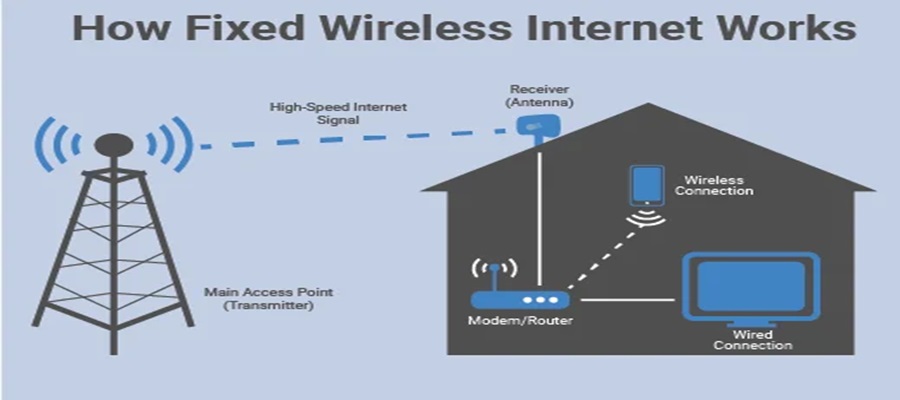
The fixed wired market primarily consists of homes and offices using direct physical cables like fiber optics.
Fixed wired services use physical cables, like glass fiber or copper wire, to bring internet directly into a building.
It is like a dedicated, private water pipe for your home. It provides very fast speeds, unlimited data, and is reliable.
In contrast, mobile GSM uses radio waves transmitted from tall towers to phones, acting more like a sprinkler that sprays a signal across an entire neighborhood.
Because laying physical cables across cities is expensive and hard to do, these subscriptions are very rare.
However, the market has seen recent growth, driven largely by Fiber-to-the-Home (FTTH) services.
The top players are: MTN FibreX with 110,564 subscribers, which is roughly 88.7 per cent of the entire market.
SWIFTNG accounts for about 13,945 connections.
The others are ipNX and 21st Century Technologies which make up the number.

Nigerian Communications Commission (NCC) says it is intensifying efforts to implement Nigeria’s planned 112 national emergency number following its approval by the National Economic Council (NEC).

NCC
The commission disclosed this during a meeting between Vice President Kashim Shettima and an NCC delegation led by the Chairman of its Governing Board, Chief Idris Ibikunle Olorunnimbe, at the Presidential Villa, Abuja.
Briefing the Vice President, Olorunnimbe said the NCC had already established about 35 Emergency Communications Centres (ECCs) across the country to support a unified national emergency response system.
He said the next phase of implementation would focus on closer collaboration with state governments and emergency response agencies to ensure the effective rollout of the initiative.
The development follows the recent approval by the NEC, chaired by the Vice President, for the adoption of 112 as Nigeria’s single national emergency number across all tiers of government and emergency response agencies.
The council also approved the establishment of a multi-agency implementation committee to be jointly coordinated by the Office of the Vice President and the NCC.
Olorunnimbe stressed that the success of the initiative would depend on the commitment of state governments to support and maintain emergency communications infrastructure, as well as the readiness of response agencies to promptly attend to distress calls.
“We need commitment at every level of all response agencies—from top to bottom—including the Nigeria Police Force, ambulance services across the states and, at the national level, the National Emergency Management Agency (NEMA),” he said.
Responding, Shettima directed the NCC to develop a comprehensive roadmap for the nationwide implementation of the single emergency number in line with international best practices.
He also urged the commission to work closely with the National Emergency Management Agency (NEMA), citing the agency’s experience in disaster management, relief and rehabilitation.
The Vice President assured the commission of the Federal Government’s commitment to sustaining the initiative, saying funding would be mobilised through the National Economic Council and partnerships with the private sector.
He also called for greater dedication from all emergency response agencies to ensure the success of the programme.
The adoption of 112 is expected to harmonise emergency communications across Nigeria by providing a single number through which citizens can quickly access police, fire, ambulance and other emergency services.
The initiative is also expected to replace multiple emergency contact numbers currently in use and improve coordination and response during emergencies.

Nigerian Communications Commission (NCC) has said that it was strengthening collaboration with state governments and industry players to develop a transparent, cost-based pricing framework for sharing telecom ducts as part of efforts to speed up broadband expansion across Nigeria.

Ayuba Shuaibu, director of Policy, Competition and Economic Analysis, NCC, disclosed this at the Stakeholders’ Forum in Abuja.
Shuaibu said the initiative was designed to build consensus among all parties.
“The primary purpose of this forum is to ensure seamless synergy between the Commission and all stakeholders,” he said.
The director said the consultation was prompted by longstanding complaints over permits, levies and other charges imposed by different levels of government.
He said bringing together state commissioners, telecom operators, tower companies and representatives of the Nigeria Governors’ Forum had helped improve understanding of the issues.
“This engagement is a work in progress. We expect more input from stakeholders before presenting the outcome to the Nigeria Governors’ Forum,” he added.
Dr Helen Adeneye, commissioner for Innovation, Science and Technology, Kogi State. welcomed the consultation, saying Nigeria needs a harmonised policy that clearly defines the responsibilities of both the federal and state governments.
“We need a harmonised policy that allows states to collaborate better with telecom operators and creates a more business-friendly environment,” she said.
Dr Adeneye added that adopting the Dig-Once policy would establish a uniform pricing system and help resolve disputes over charges for telecom infrastructure deployment.
Chidi Ajuzie, chief executive officer, WTES Projects Limited, whose firm is conducting the consultancy study, said the proposed framework would introduce a common cost structure for duct sharing to support broadband investment and economic growth.
“The study is designed to create a uniform pricing model that will drive broadband growth, economic development and wider adoption across the country,” he said.
Ajuzie explained that the consultants had developed preliminary floor and ceiling prices to guide operators while allowing flexibility within the approved range.
He added that the recommendations remain open to industry input before the NCC finalises the framework.
The Dig-Once Policy is designed to reduce the cost and disruption of deploying broadband infrastructure by requiring fibre ducts to be installed whenever roads are constructed or rehabilitated.
The NCC is developing a cost-based pricing framework for sharing these ducts to promote fair pricing, reduce duplication of infrastructure and encourage investment.
The proposed model is expected to support the Federal Government’s broadband expansion targets while improving collaboration between telecom operators and state governments.

Court Adjourns Alleged Binance Tax Evasion Case over Settlement Talks

Fixed Wired Internet Market Lags as Mobile Gains Ground

Xenophobic Attacks: OYC Threatens to Picket MTN Nigeria Offices

New NIMC Act Strengthens Data Protection, Privacy – Director

BON Establishes Six Ad Hoc Committees to Modernize Broadcasting

NASENI Moves to Digitize CCB’s 5m Assets Declaration and Operations

Mobile Internet Gender Gap Widest in Africa – GSMA

Nigeria Launches FreeTV Nationwide

CANAL+ Partners Samsung to Pre-Load DStv Stream on New Samsung TVs In Nigeria, Other African Countries

Lebara Nigeria Launches Lebara Play, Africa’s First Telecom-Owned Micro-Drama Platform




 News3 days ago
NRC, Ponzi Scheme Collapses Resulting Loss of Billions of Naira

 News3 days ago
NSITF Partners South African Insurer on Digital Transformation

 E-Financial3 days ago
FCT-IRS Unveils New Digital Platform, Taxporta

 General News3 days ago
KPMG Urges Africa’s Most Innovative Tech Entrepreneurs to Enter the Global Tech Innovator 2026 Competition

 E-Business3 days ago
FG Suspends New Internet Regulations to Prevent Overlapping Rules
 E-Business3 days ago
NIN Enrollment Hits over 136m as New ID Law Takes Effect

 E-Business3 days ago
Plateau PCC Collects Nigerians’ Data without Privacy Policy – FIJ

 Telecom2 days ago
NCC Seeks Cost-Based Pricing Framework for Ducts