

Telecom
FG Endorses 5G Trial, Directs Pantami to Address Challenges in Telecoms Sector


President Muhammadu Buhari endorsed the trial of 5G technology at the MTN first live demo of 5G network (5th generation network technology) in Abuja.
He was represented at the occasion by Dr Isa Pantami, minister of Communications and Digital Technology,
Buhari expressed delight to be part of the historical moment, stressing that migration from 4G to 5G would be a revolution in the industry.

The President also directed Pantami to address the challenges facing the telecoms sector systematically, adding that an executive order was in the pipeline to consider Telecommunications Infrastructure as critical national assets.
“We are working day in day out to make sure that the environment is conducive for people to do their businesses.
“This administration is passionate about developing Nigeria’s Information Communication Technology Sector which contributes more than Oil and Gas to GDP,” Buhari said.
Prof. Umar Danbatta, executive vice chairman, Nigerian Communication Commission (NCC), had told the global community that African continent held the ace, adding that 5G was the next frontier of investment.
Danbatta expressed optimism that 5G would provide a very veritable and convincing investment for investors.
Speaking at the event, Ernest Ndukwe, chairman, MTN Nigeria, expressed delight that Nigeria was one of the countries championing 5G trial on the African continent.
Ndukwe said that the new technology was at least, 100 times faster than 4G, adding that 5G also provided faster data transfer speed and lower latency, compared to 4G.
“Additionally, 5G boasts of improved reliability as well as better support for more devices.
“5G is a transformational change from 4G with the potential to provide 20 times faster data speeds.
“It carries a massive amount of data for a large number of simultaneous users.
“5G will support business innovative ambitions, create new markets, transform supply chain management and create smarter and more efficient manufacturing sector.
“5G is extremely fast and supports data transfer rates of up to 20Gbits/S. 5G will allow stream, download and upload of huge quantities of data at a much faster rate.
“During a comparison test on both 4G and 5G networks, it took just 15.78 seconds to download a 2.3 GB video on the 5G network and the same file on 4G took exactly 5 minutes, 3.84 seconds.
“This according to the telco operator will enable the company to provide better data services at a more affordable cost to its subscribers.”


MTN Group has moved a step closer to taking full ownership of telecommunications tower operator IHS Towers, after shareholders of the infrastructure company approved the proposed acquisition at an extraordinary general meeting (EGM).

The telecommunications group announced that IHS shareholders voted in favour of the transaction by the required two-thirds majority at the EGM held on 4 August, satisfying one of the key conditions precedent to the deal.
MTN first announced in February that it had entered into an agreement to acquire the remaining shares in IHS, a move that would give the mobile operator full ownership of one of Africa’s largest independent tower companies.
The acquisition forms part of MTN’s Ambition 2030 strategy, which aims to strengthen the group’s digital infrastructure capabilities and diversify revenue streams as demand for connectivity, cloud services and artificial intelligence (AI) continues to grow across the continent.
“The approval by IHS shareholders is an important step toward completion of the transaction,” says Ralph Mupita, MTN Group president and CEO.
“Within our Ambition 2030, the three-platform strategy, towers are a critical value-creation driver that will strengthen MTN’s strategic and financial position for the future, in a world where digital infrastructure and AI are becoming increasingly essential to Africa’s growth and development.”
Tower infrastructure has become increasingly strategic for mobile network operators as demand for high-speed mobile broadband, cloud computing and AI-powered services drives the need for expanded and more efficient network capacity.
The proposed acquisition is expected to strengthen MTN’s position as it continues expanding its digital ecosystem across Africa, where it serves more than 300 million subscribers.
IHS is one of the world’s largest tower companies, with nearly 29 000 towers in Africa serving various mobile network operators in five key MTN markets.
According to the mobile operator, the proposed transaction, which follows discussions noted in February, marks an important step to unlock compelling value for MTN, and strengthen and reintegrate its ownership of critical digital infrastructure across Africa.
For IHS shareholders, MTN notes, it provides an attractive opportunity to crystalise value.
The funding for the proposed transaction of the remaining shares MTN does not already own, for a consideration of $2.2 billion (R35 billion), will be through cash of approximately $1.1 billion on IHS’s balance sheet, along with available liquidity and debt from MTN.
MTN has approximately 24.7% shareholding in IHS, and as part of the transaction, it intends to take the company private through the acquisition of all outstanding shares it does not own, pursuant to a cash merger.
By reintegrating the tower assets, MTN says it will be able to internalise the margin currently paid to IHS, benefit from current and future incremental third-party revenues, improve cost predictability and unlock significant long-term value embedded in its existing investment.
The transaction remains subject to the receipt of the necessary regulatory approvals, which MTN says are still in progress. No timeline has been provided for the completion of the acquisition.

Telecommunications services provider Airtel Nigeria has further extended its national retail footprint with the rollout of 350 out of a planned 500 premium experience centres, which are designed to bring faster, more convenient service closer to millions of Nigerians.

The new retail shops, officially unveiled at a symbolic launch at City Mall, Onikan, Lagos, mark the latest phase in Airtel Nigeria’s grand retail strategy. They significantly expand the company’s extensive network of over 9,000 exclusive shops across every local government area, more than 350 premium experience centres, and over 73,000 retailers in all top towns and cities nationwide.
Built as compact, high-efficiency touchpoints, the newly launched shops are designed to enable subscribers complete all transactions such as Home Broadband, Fiber and Outdoor Units Subscription, Postpaid Plan Subscription, Enterprise Applications Enquiry and Subscription, as well as Prepaid Product services such as SIM registration and Data Plan purchase, other enquiries and comprehensive account support.
Simultaneously, several shops commenced operations at Purple Mall, Lekki; Marina, Lagos Island; Magodo, Lagos; Oke-Ilewo, Abeokuta; Trend Setter Mall, Benin; Abakaliki, Ebonyi State; Kano City Mall, Kano; Carpenters Mall, Gwarinpa, Abuja; and other parts of the country.
The rollout emphasises the company’s continued investment in customer experience and responds directly to feedback from customers seeking quicker access to everyday services without the longer waiting times that may be associated with larger retail centres.
Speaking on the company retail objectives, Joypratip Sengupta, Director, Sales and Distribution, Airtel Nigeria, explained that quality retail experience ultimately drives customer satisfaction. “Our goal is to demonstrate our dedication to exceptional quality of service, and these new shops, by their design, location, and equipment fit right within our goal to deliver superior service to every one of our customers,” he said.
He added that the expansion reflects Airtel Nigeria’s belief that excellent customer experience goes beyond technology to ensuring customers can receive support whenever and wherever they need it.
“Our business at Airtel is to ensure that we bring our services closer to our customers, and everything we do is centred on putting the customer first. These experience centres are open to help customers carry out their transactions faster and with greater ease. Whether you want to replace a SIM, purchase one of our routers, recharge airtime or data, or resolve any service issue, you can now do so more conveniently and closer to where you are,” he said.
He explained that the initiative represents a significant update to Airtel’s retail strategy, placing greater emphasis on accessibility, speed, and convenience.
“These express shops are designed to reduce traffic at our larger shops while giving customers faster access to the services they need. More importantly, they reinforce our vision of building the most accessible customer service network in Nigeria. As the telecom operator with the country’s largest retail footprint, we will continue expanding into more neighbourhoods, making it easier for customers to connect with Airtel wherever they are,” Sengupta noted.
In her remarks at the launch, Lynda Amechi, Head, Shops and Retail Postpaid Business, revealed that the new retail model was born from listening to customers and reimagining how Airtel delivers its services.
She said, “At Airtel, some of our best ideas come directly from our customers. One of the recurring concerns we received was the time customers sometimes spent waiting at our larger experience centres, even when they only needed simple transactions completed. We listened carefully and realised that many of these requests could be resolved within minutes if we brought our services closer to the communities where customers live and work.”
These new shops are also integrated into Airtel Nigeria’s broader customer experience agenda, which have seen the company continue to invest in digital self-service platforms, AI-powered customer support, nationwide customer forums, and significant network expansion across the country.
With this phase of shop launches, Airtel Nigeria has expanded customer access across the country while integrating digital innovation into physical touchpoints.

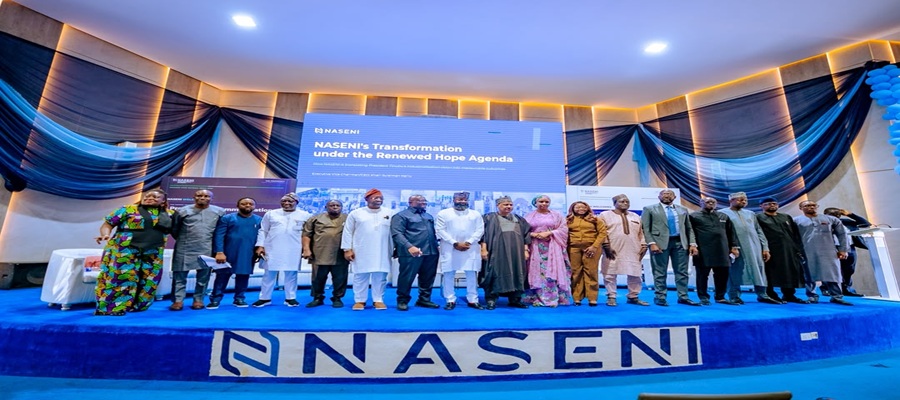
The Presidential Renewed Hope Media Tour has commended the National Agency for Science and Engineering Infrastructure (NASENI) for its progress in advancing indigenous technology development, describing the agency as a key driver of President Bola Tinubu’s Renewed Hope Agenda and Nigeria’s industrial transformation.

The commendation came during a visit by the presidential media delegation to NASENI’s headquarters in Abuja, where members inspected the agency’s technology and manufacturing facilities.
Speaking on behalf of the delegation, Mr. Bayo Onanuga, Special Adviser to the President on Communication, Information and Strategy, described the agency’s achievements as “impressive, impressive, impressive.”
He said NASENI’s progress demonstrated the capacity of Nigerian youths to excel when provided with the right leadership and support.
Onanuga also praised the leadership of the Executive Vice Chairman and Chief Executive Officer of NASENI, Khalil Suleiman Halilu, for repositioning the agency to support the Federal Government’s industrialisation objectives.
In his remarks, Halilu said sustainable industrial growth does not necessarily depend on producing goods entirely from local inputs but requires strategic investment in technology development, innovation and partnerships.
He explained that the agency is focusing on commercially viable innovations capable of creating jobs, reducing production time and supporting the Federal Government’s Nigeria First Policy.
According to him, NASENI is also strengthening technology transfer, commercialisation of research outputs, mentorship programmes for innovators and the Innovate Naija Challenge, which offers a ₦500 million prize fund to support promising Nigerian innovations.
The Minister of Information and National Orientation, Mohammed Idris, commended NASENI’s achievements and urged the media to give greater visibility to the Federal Government’s programmes and accomplishments across various sectors.
Also speaking, Hadiza Bala Usman stressed the need for stronger strategic communication and increased patronage of locally developed technologies and innovations.
Similarly, Sunday Dare advocated policies that would encourage Ministries, Departments and Agencies to prioritise NASENI products and other locally manufactured goods.
Other members of the delegation, including Tunde Rahman and Otega Ogra, also commended the agency’s strategic partnerships and locally developed technologies.
During the tour, the delegation inspected facilities dedicated to drone technology, helicopter assembly, reverse engineering, precision manufacturing, renewable energy, agricultural technology and recycling systems.
The visitors also witnessed the implementation of NASENI’s 3Cs framework—Creation, Collaboration and Commercialization—which the agency said is driving indigenous manufacturing, innovation and technology transfer.
At the end of the visit, stakeholders called for sustained nationwide campaigns to promote Nigerian-made products, strengthen local manufacturing, reduce dependence on imports and accelerate the country’s industrialisation agenda under President Tinubu.

ITUC-Africa Faults FG’s Plans to Remove Electricity Subsidy

SEC Begins Full e-Registration for Capital Market Services

NAICOM Revokes Nigeria Reinsurance’s Licence over Failure to Meet MCR

Many Nigerian Airlines May Collapse within 30 Days – Onyema

Ogbaga, Abuja Lawyer to Sue Telcos, DStv over Alleged Unfair Practices

NRC, Ponzi Scheme Collapses Resulting Loss of Billions of Naira

From Scarcity to Scale: What Africa Can Learn from India’s Agricultural Transformation

EFCC Busts NIS Visa Overstay Racket, Uncovers N700m in an Account

BON Establishes Six Ad Hoc Committees to Modernize Broadcasting

How EFCC Turned Recovered Loot Into School Supplies for Thousands of Nigerian Students




 E-Business2 days ago
Kaspersky Identifies Cyberespionage as a Growing Threat Across Africa, Others

 Broadcasting2 days ago
NBC Files Fresh Appeal against Judgment Barring it from Imposing Fines on Broadcast Stations

 News2 days ago
INTERPOL Report Shows AI Powers 55% of Cybercrimes in Africa Amid $484m Losses

 Telecom2 days ago
Why Strong Institutions Remain Africa’s True Growth Engine

 E-Financial2 days ago
Nigerians Lost N25.85Bn to Digital Payment Fraud in 2025 –CBN

 General News2 days ago
ASUS and Konga Unveil West Africa’s First Flagship Experience Store in Lagos

 News2 days ago
Nigeria Expands Deep-tech Skills Pipeline

 E-Financial2 days ago
NRS Announces 30 Percent Tax on Corporate Crypto Income