

Telecom
New Twists in Worldwide Smartphone Growth, Prices & Markets Maturity- IDC

According to a new mobile phone forecast from the International Data Corporation (IDC) Worldwide Quarterly Mobile Phone Tracker, worldwide smartphone shipments will reach a total of nearly 1.3 billion units in 2014, representing an increase of 26.3% over 2013.
Looking ahead, IDC expects 1.4 billion smartphones to be shipped worldwide in 2015 for a 12.2% year-over-year growth rate.
Slower annual growth continues throughout the forecast with unit shipments approaching 1.9 billion units in 2018, resulting in a 9.8% compound annual growth rate (CAGR) for the 2014–2018 forecast period.
Smartphone revenues reflect a starker picture, as they will be hard hit by the increasingly cutthroat nature of pricing, resulting in a 4.2% CAGR over the same forecast period.
“The impact of upstart Chinese players in the global market will be reflected in a race to the bottom when it comes to price. While premium phones aren’t going anywhere, we are seeing increasingly better specs in more affordable smartphones.
“Consumers no longer have to go with a top-of-the-line handset to guarantee decent hardware quality or experience,” saidMelissa Chau, Senior Research Manager with IDC’s Worldwide Quarterly Mobile Phone Tracker. “The biggest question now is how much lower can prices go?”
On a worldwide basis, smartphones are expected to have an average selling price (ASP) of US$297 worldwide in 2014, dropping to US$241 by 2018.
Emerging markets like India will see much lower smartphone prices, as ASPs hit US$135 in 2014 and fall to US$102 by 2018.
In contrast, ASPs in mature markets are not expected to change significantly and modestly higher shipment volumes will not drive up overall revenues as each generation of flagship phones shows less and less differentiation from its predecessors.
From an operating system perspective, Android devices will continue to drive shipment volumes while iOS devices drive revenues.
By 2018, Android will control 80% of global smartphones shipped and 61% of revenues, while iOS will control only 13% of volumes and 34% of revenues.
With Android volumes so dominant, it is no longer a possibility for new operating systems like Tizen and Firefox to compete on price alone – any underdog OS must bring a radically different appeal to gain any significant traction.
“As shipment volume slows, we expect greater attention to shift toward value trends,” saidRamon Llamas, Research Manager with IDC’sMobile Phones team.
“Apple’s approach with premium pricing ensures a growing portion of overall revenues despite its declining market share. Meanwhile, Android’s multi-faceted approach – with forked versions and low-cost Android One strategy – will produce mixed results, yet it allows deeper penetration into emerging markets. That can lead to additional pressure on its vendor partners, who will need to seek greater differentiation in terms of devices and experiences in the hyper-competitive smartphone market.”


Airtel Africa, a telecommunications and mobile money services provider across 14 African countries, saved 9.1 million litres of diesel during its just ended 2025/2026 financial year, as part of efforts to drive responsible growth by minimising the environmental impact of its operations.

This was achieved by reducing reliance on diesel and increasing use of lower-carbon energy sources, including the conversion of 390 infrastructure sites to on-grid power during the year, thus improving efficiency and reducing emissions.
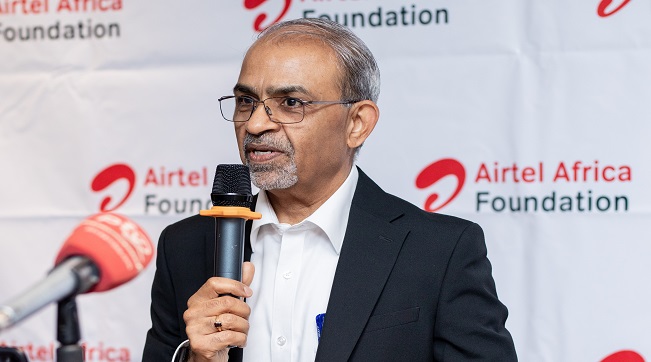
Airtel Africa CEO, Sunil Taldar highlighted this achievement during a media roundtable held in Lusaka, Zambia, where he presented the Group’s Sustainability Scorecard and progress towards building a more sustainable, inclusive and connected Africa.
Other initiatives to reduce Airtel Africa’s environmental impact during the year included promoting the circular economy, recycling 94% of total waste generated. These form part of Airtel Africa’s broader sustainability strategy, which seeks to create long-term value by balancing business growth with environmental stewardship, digital inclusion and socio-economic development.
Mr. Taldar emphasized that responsible growth remains central to Airtel Africa’s business strategy and is reflected in the company’s ability to extend services and opportunities to millions of people across the continent while advancing sustainability goals. Airtel Africa’s network now reaches 81.9% of the population across its markets, enabling greater access to connectivity, information, education and economic opportunities for individuals and communities.
The company recorded progress in its efforts to advance financial inclusion. Airtel Money now serves 54.1 million customers through a network of 2.4 million agents, making it one of Africa’s largest digital financial services ecosystems. Notably, 44.1% of Airtel Money customers are female, demonstrating the platform’s growing role in empowering women through access to secure, affordable and convenient financial services.
Beyond connectivity and financial inclusion, Airtel Africa, through its philanthropic arm, Airtel Africa Foundation continued to drive meaningful change across communities in the continent, investing US$6.2 million in priority programmes in four strategic areas namely Financial Inclusion, Education, Environmental Sustainability and Digital Inclusion.
Through its partnership with UNICEF, 3,296 schools have been connected to the free internet access, helping to bridge the digital divide and expand access to quality education reaching over 2 million learners and 38,868 teachers, while 64 zero-rated digital learning platforms enabled more than 11 million learners to access free digital educational content.
Also, during the year, more than 30,000 young people received digital skills training, while over 250 full undergraduate STEM scholarships were awarded through the Airtel Africa Tech Fellowship programme, helping to prepare the next generation of African innovators and technology leaders.


Microsoft has announced plans to cut about 4,800 jobs globally, representing approximately 2.1 per cent of its workforce, as part of a broader restructuring aimed at improving efficiency and competitiveness.

The layoffs include about 1,600 employees in the company’s Xbox gaming division.
The company said additional job cuts are expected later this year as it continues efforts to reposition its gaming business.
According to an internal memo from Xbox Chief Executive Officer, Asha Sharma, the restructuring is intended to “reset” the business amid increasing competition in the gaming industry.
“Our business today is not healthy,” Sharma said in the memo.
“We are operating at margins that are three to 10 times lower than comparable platform and publishing businesses.”
She attributed the challenges facing the division to rising production costs and intense competition in the gaming hardware market.
According to Sharma, the gaming industry is currently experiencing a severe hardware crisis as the cost of components used in gaming consoles continues to rise.
Xbox competes with gaming platforms such as Sony’s PlayStation and Nintendo’s Switch.
The latest layoffs form part of Microsoft’s broader strategy to streamline operations and strengthen the long-term sustainability of its gaming business.

By Odunayo Sanya, Executive Director, MTN Foundation
Leadership, in its truest essence, is not about the titles we hold or the executive seats we occupy; it is about the responsibility we assume for the future of our communities. According to John Maxwell, a leader is one who knows the way, shows the way and goes the way. As we commemorate World Drug Day (26 June), we are collectively confronted with a sobering reality that demands that we intentionally create the conditions for Nigerian youths to thrive.

Odunayo Sanya
This year’s global theme reminds us that the fight against substance abuse demands a collective response because its consequences extend far beyond the individual, affecting public health, economic productivity, community wellbeing, and national development.
To understand the weight of what is at stake, we must anchor our empathy in empirical truth. The United Nations Office on Drugs and Crime (UNODC) Drug Use in Nigeria Survey (2018), still one of Nigeria’s most comprehensive national assessments of substance abuse, revealed a deeply distressing reality. Nearly 14.3 million Nigerians aged 15 to 64 had used psychoactive substances. While the survey remains an important benchmark, the passage of time since its publication underscores the urgent need for more current data to guide prevention and intervention efforts. Nonetheless, the survey revealed that one in every four drug users in Nigeria was a woman, while the highest concentration of users was found among young people. This is not just a health crisis; it is an economic crisis and a systemic threat to our nation’s future leadership.
When we look at these numbers, we must refuse to see them merely as data points on a spreadsheet. Every statistic represents a vibrant mind diminished, a family fractured and a potential corporate leader or innovator sidelined. In my journey across the corporate and development sectors, I have learned that systemic challenges cannot be solved by sporadic, emotional reactions. They require structured, intelligent, sustainable, and data-informed ecosystems of change. True change requires us to transition from passive observers to active architects of sustainable interventions.
It was this profound sense of responsibility and strategic foresight that birthed the MTN Anti-Substance Abuse Programme (ASAP) in 2019. We recognised early on that the traditional approach of criminalising substance abuse without addressing the root causes – curiosity, peer pressure, lack of information and socio-economic despair – was a flawed model. ASAP was conceptualised as a multi-sectoral behaviour-change initiative designed to contribute to the reduction of first-time substance abusers in Nigeria.
This year’s World Drug Day theme “The World Drug Problem: Persisting Issues, New Challenges, Innovative Responses” is both a reminder of the complexity of the menace confronting our nation and an urgent call to action. It is clear that only innovative responses can curb the ever-evolving tactics of illicit drug networks. Beyond traditional substances, the world is witnessing a rapid increase in the production, availability and use of synthetic drugs. The commoditisation of prescription medicines has contributed to substance abuse. The inordinate use of technology as an enabler of cybernarcotics has changed the dynamics of the game.
Let me bring this closer home with some numbers. From January 2025 to May 2026, the NDLEA seized 5,305,484.88 kilograms of illicit drugs worth N1.5 trillion through 29,262 arrests. Recently, on May 16, the NDLEA busted a meth manufacturing ring in Ogun State. The scourge is no longer a distant tale: it resides with us. So, we must rise together as stakeholders in this war against substance abuse.
Over the years, the impact recorded through the ASAP initiative is a testament to the power of public-private sector partnerships. Through strategic partnerships with the NDLEA, the UNODC, the Ministry of Education, the Ministry of Health, and various non-governmental organisations, the MTN Foundation has institutionalised the anti-substance abuse advocacy. We have taken the message directly to the frontlines – our schools, motor parks, markets, and digital spaces. By building a coalition of voices, we are demystifying the stigma surrounding addiction, turning what was once whispered in shame into open and constructive community dialogues.
Our journey this year has been marked by a powerful surge of collective action. From stakeholder conferences in Enugu, Kaduna, Kwara and Abuja, to the resonant advocacy walks in tertiary institutions across Gombe, Delta, Abuja and Lagos, the response has been nothing short of extraordinary. The scale of this support – uniting associations, students, and parents alike – is a testament to the urgency and shared commitment driving this movement.
Our interventions have yielded measurable outcomes. To date, the ASAP initiative has directly impacted over 50,433 students and 1,556 teachers across public secondary schools in 32 states and the FCT, through structured anti-substance abuse capacity building initiatives, digital advocacy, peer-to-peer training, and community town halls. By empowering young people to become ambassadors themselves, we have leveraged the power of peer influence positively. We have seen firsthand that when you give a young person the right tools, accurate information, and a sense of purpose, they will choose a path of productivity over self-destruction.
True leadership, however, refuses to rest on yesterday’s laurels; it constantly asks where the next frontier of impact lies and what it requires. It is this restless pursuit of evidence-based and sustainable solutions that culminated in a historic milestone just two months ago, when the MTN Foundation, the United Nations Office on Drugs and Crime (UNODC), and the Office of the Vice President formalised a partnership to undertake Nigeria’s first nationally representative substance abuse survey among secondary school students. At a time when the most widely referenced national substance abuse data is almost a decade old and does not adequately capture the realities of in-school adolescents, this initiative seeks to provide the evidence needed to shape more targeted interventions and policy responses. The collaboration, which drew high praise from Vice President Kashim Shettima (GCON), is a powerful validation of our commitment to Nigeria’s youth and our belief that lasting solutions are built through multi-sectoral partnerships.
As a certified change practitioner, I know that for any behavioural shift to be sustainable, the intervention must be systemic, continuous, and dynamic. This year, our World Drug Day activities have been intentionally scaled up to meet the evolving landscape of substance abuse, particularly the rise of cheaper, highly lethal synthetic mixtures. Our focus this year focuses heavily on the digital ecosystem – leveraging technology to deploy accessible mental health resources, psychosocial helplines, and interactive awareness modules – because that is where our youth live, connect, and learn.
In tandem with our digital drive, this year’s ASAP calendar features high-level policy roundtables, quiz competitions, and grassroot activations across educational institutions. We are deliberately engaging policymakers to ensure that advocacy is backed by robust institutional frameworks. It is not enough to tell our children to say no to drugs; we must build a society that offers them a resounding “yes” to viable economic opportunities, mental health support, and inclusive community spaces.
The universe, as I often like to say, rewards extraordinary effort. The crisis before us is vast, but our collective capacity to innovate and heal is even greater. We cannot afford to look away or assume that this is someone else’s problem. The teenager struggling with addiction in a remote community is tied to the collective economic stability of our communities. Their failure is a leak in our national boat; their recovery is our shared victory.
As we mark World Drug Day, my call to action is to the government, corporate Nigeria, civil society organisations, and every well-meaning citizen: let us move from intent to action by investing heavily in preventive advocacy and psychosocial support structures. Let us choose to know the way, show the way, and walk the way together toward a drug-free, prosperous Nigeria.
Remember, it is everyone’s fight!

DSS Spyware Acquisition Enables Illegal Wiretaps, Detentions – The ICIR

Microsoft to Lay Off 4,800 Workers

Access Bank, Fifth Chukker and UNICEF Renew Commitment to Expanding Educational Opportunities for Nigeria’s Most Vulnerable Children

IHS Nigeria, FCT-HSES Concludes Clean Cooking Energy Campaign “Project Breathe Clean Air” in Abuja

Kaspersky Transforms Threat Intelligence Reporting into an Interactive Content Hub

Mobile Internet Gender Gap Widest in Africa – GSMA

NASENI Moves to Digitize CCB’s 5m Assets Declaration and Operations

Nigeria Launches FreeTV Nationwide

CANAL+ Partners Samsung to Pre-Load DStv Stream on New Samsung TVs In Nigeria, Other African Countries

UK, Nigeria Launch £15m Growth Programme to Accelerate Economic Transformation




 E-Financial2 days ago
Tokenization, Blockchain Technology will Transform Financial Institutions – IMF

 General News2 days ago
NIS Deploys Advanced Surveillance Masts, other Critical Infrastructure to Boost Border Security

 Broadcasting2 days ago
Obi, NDC Presidential Candidate Faces N50Bn Defamation Claim over Alleged Podcast Remark

 E-Business2 days ago
Weebly Websites to Shut Down for Nigeria, 66 Other Countries from September

 Telecom2 days ago
No Plans for Fresh Tariff Hike – MTN

 E-Financial2 days ago
FG Denies N8 Trillion ‘Shadow Budget’, Says IMF Quoted out of Context

 General News2 days ago
PufferPay CEO to Keynote Business Journal Fintech & Financial Inclusion Roundtable 2026

 Telecom2 days ago
Airtel Africa Foundation Equips 200 Young Women with Digital Skills to Drive Nigeria’s Tech Economy