

Telecom
Over 65m GSM Lines Risk Disconnection over SIM-NIN Linkage

About 65 million phone lines are at risk of disconnection after telecom operators refused to grant subscribers an extension to the National Identification Number (NIN) -Subscriber Identity Module (SIIM) linkage deadline.

The final deadline expired on September 14, 2024, and the Nigeria Communications Commission (NCC), the telecom regulator, expected that no SIM card would remain active without a verified NIN from September 15.
The Punch suggested that approximately 65 million lines remain at risk, as an estimated one million lines could not have been linked between the NCC’s deadline announcement and the actual cut-off date.
The telecom regulator’s data from March 2024 shows there were 219 million active lines across major networks such as MTN, Glo, Airtel, and 9mobile, with 153 million linked to NINs.
This means that about 66 million lines were unlinked to NIN after the NCC’s deadline announcement.
Meanwhile, , Gbenga Adebayo, chairman of the Association of Licensed Telecom Operators of Nigeria (ALTON), discarded the idea of a deadline extension and confirmed to The PUNCH on Monday that the disconnection process is already ongoing.
“It’s difficult to provide exact numbers for the lines disconnected so far, but it’s certainly less than 66 million because, even on the day of the deadline, people were still linking their SIMs,” Adebayo said.
He affirmed that mobile operators were adhering to the NCC’s directives, describing the deadline as “acceptable and reasonable.”
Adebayo urged subscribers to comply, stating, “We can’t keep extending deadlines and going back and forth on this issue. This is a national concern, and these data are critical for national development.”
However, the National Association of Telecoms Subscribers urged the NCC to extend the deadline.
Speaking with The PUNCH, the President of the association appealed to the NCC to push the deadline to September 22, allowing customer experience centres to operate over the weekend.
He said this would enable subscribers to resolve any registration issues on the NIN portal and avoid potential disruptions to telecom services.
“Given the NIN portal’s technical glitches that persisted for almost a week earlier, and the improvements made last week, it’s only fair that the NCC allows subscribers to make up for the lost time. This extension will provide a much-needed buffer for subscribers to resolve any registration issues,” he said.
Barely two weeks ago, Adeolu Ogungbanjo, president of the National Association of Telecommunications Subscribers (NATCOMS), expressed worry that there were challenges in linking NIN to SIM cards, with many subscribers expressing frustration over slow speeds and congestion on the NIMC portal.
Ogunbanjo emphasised that the current portal issues hinder the successful completion of the NIN-SIM linkage before the deadline, stating, “The current situation will not meet the deadline if not addressed urgently.”
Between July 28 and 29, millions of lines were temporarily barred due to unverified NINs, causing widespread disruptions in the country. The NCC had reversed its decision, giving subscribers more time to comply. However, with the deadline now expired, disconnections will commence.
Before the deadline elapsed, an NCC official, who requested anonymity as he was not authorised to comment on the matter, dismissed any possibility of an extension.
“We will disconnect anyone who refuses to comply; the grace period is over. The reason why we extended the last time was the misconception of Nigerians who claimed that the NCC wanted to frustrate the August 1 protest.”
In March, the NIMC and the NCC formed a strategic collaboration in a move at enhancing processes related to the NIN-SIM linkage.
According to their first-half 2024 financial results, MTN Nigeria and Airtel Africa collectively barred 13.5 million lines due to non-compliance with the NIN-SIM linkage directive.
MTN Nigeria reported blocking 8.6 million lines, while Airtel Africa stated that 4.8 million lines remained unverified, contrary to earlier reports of 8.7 million completed verifications.
The compulsory NIN-SIM linkage, initiated in December 2020, aimed to curb unregistered SIMs and those without NIN links. Following multiple deadline extensions by the NCC since December 2023, April 15, 2024, was set as the final deadline for fully barring subscribers with four or fewer SIMs having unverified NIN details.



WhatsApp has announced the commencement of global reservations for usernames, a new privacy-focused feature designed to allow users connect without sharing their phone numbers.

The Meta-owned messaging platform said the rollout of username reservations began on Monday, June 29, enabling users to reserve their preferred usernames ahead of the feature’s full in-app launch later this year.
According to the company, users will receive notifications within the app once the reservation option becomes available to them.
WhatsApp said the new feature is intended to strengthen user privacy by giving people an alternative way to communicate without revealing their phone numbers, particularly when interacting with new contacts or participating in group conversations.
It explained that unlike social media platforms, WhatsApp usernames are not designed for public discovery, noting that there will be no searchable directory or username suggestions.
The company said users would need to know a person’s exact username before they can initiate contact for the first time.
“Sometimes you just want to chat without handing over your digits,” WhatsApp said, adding that the feature would be useful in situations such as joining community or school groups where users may not wish to immediately disclose their phone numbers.
To enhance security, the platform is also introducing an optional username key, which will require anyone contacting a user for the first time through their username to enter an additional unique key.
WhatsApp said the extra verification layer is designed to provide greater control over who can initiate conversations.
The company noted that with more than three billion users worldwide, it decided to open username reservations ahead of the full rollout to give users an opportunity to secure their preferred usernames before the feature becomes widely available.
To assist users who may have difficulty selecting unique usernames, WhatsApp said it has developed a username generator capable of suggesting available options.
The company also disclosed that creators, small businesses and organisations would have the option of claiming the same usernames they already use on Instagram or Facebook, helping them maintain a consistent online identity across Meta platforms.
According to WhatsApp, once the feature becomes fully available, users who choose to enable usernames will no longer have their phone numbers displayed when they initiate conversations with people or businesses for the first time.
The company said reserving a username will take only a few seconds through the latest version of the application by navigating to Settings, then Account, and Username.
WhatsApp said the feature would be rolled out gradually across countries over the coming months, with users receiving notifications when it becomes available in their respective regions.
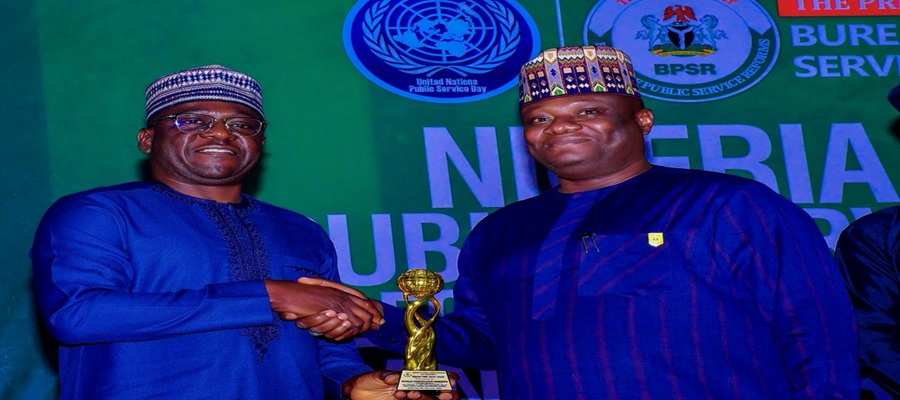
Nigerian Communications Commission (NCC) has been ranked among the top three best-performing Ministries, Departments, and Agencies (MDAs) of the Federal Government in the 2026 Public Service Reforms Performance Assessment conducted by the Bureau of Public Service Reforms (BPSR).

L-R: Engr. Abraham Oshadami, Executive Commissioner, Technical Services, Nigerian Communications Commission (NCC); Dr. Abubakar Ibrahim Kana, Permanent Secretary, General Services Office, Office of the Secretary General to the Government of the Federation during the Nigerian Public Service Award and Gala Night where NCC recieved the award for 3rd Best Performing MDA at Nicon Luxury Hotel, Abuja on the 23rd June, 2026.
In the latest Public Service Reforms Performance Assessment, the Commission was ranked third overall, following a comprehensive evaluation across key reform indicators, including the Self-Assessment Tool (SAT), Freedom of Information (FOI) Compliance Score, Fiscal Transparency and Integrity Index, and official website performance metrics.
In the ranking, the Nigerian Investment Promotion Commission (NIPC) and Nigerian Export Promotion Council (NEPC) came first and second, respectively.
The institutional ranking, conducted across all MDAs of the Federal Government, recognises MDAs that have distinguished themselves in advancing public service reforms and delivering excellence in service.
Aside from the institutional awards, 20 individuals across federal, state and local levels received various distinguished public service excellence and leadership awards, for their sterling performance in public service, including the Head of Civil Service of the Federation, Mrs. Didi Walson-Jack; Senior Special Assistant to the President on Sustainable Development Goals, Mrs. Adejoke Adefulire, among others.
Representing the Executive Vice Chairman/Chief Executive Officer of the NCC, Dr. Aminu Maida, at the award ceremony on Tuesday in Abuja, the Executive Commissioner, Technical Services, Engr. Abraham Oshadami, spoke on behalf of the NCC and other awardees present, expressing appreciation to the Bureau for sustaining the annual assessment framework.
“First; on behalf of all awardees, and second, on behalf of the Board, Management, and staff of the Nigerian Communications Commission, we thank the Bureau for these recognitions. For us at NCC, this recognition acknowledges our ongoing reform efforts and underscores the need to sustain them,” he stated.
He stated that the BPSR recognition served as a motivation for MDAs to strengthen their commitment to service delivery, noting that, for the NCC, the award also served as an affirmation that its reforms aimed at improving transparency and accountability in the sector were yielding greater public acceptance and positive recognition.
“For our telecommunications consumers, this recognition reflects ongoing efforts to strengthen service quality, transparency, and responsiveness across the sector.
“The assessment outcome also reinforces the importance of maintaining standards that support improved customer experience and greater confidence in telecom services nationwide,” he said.
Oshadami restated the Commission’s commitment to applying regulatory tools and innovative approaches towards supporting measurable improvements in service quality and consumer protection across Nigeria’s telecommunications sector.
The Commission has, over the past two years, introduced far-reaching reforms to promote transparency and accountability in the telecommunications sector.
These include the introduction of the National Coverage Map, which provides near real-time information on the performance and availability of operators’ networks across the country, as well as the publication of Quarterly Network Performance Reports, which provide detailed assessments of network performance nationwide.
Mobile Network Operators (MNOs) have also been directed to simplify the communication of their tariffs in a manner that is clear and easy for consumers to understand.
In addition, operators are required to comply with the updated Corporate Governance Guidelines, which emphasise stronger corporate accountability and improved operational performance.
The Commission has also placed significant emphasis on the proactive publication of clear, comprehensive, and timely data on industry activities to keep the public well informed and enhance accountability across the telecommunications sector.
In his remarks, the Director-General of BPSR, Mr. Dasuki Arabi, commended all participating MDAs – particularly the top performers for 2026 broader assessment- for their efforts toward transparency, accountability, and open governance. He noted that these values reflect consistency with established public service standards.
“This annual event, which begins with a public lecture and concludes with an award ceremony, marks the commemoration of the United Nations Public Service Day.
“It also highlights the role of the Nigeria Public Service Lecture Series and Awards as a platform for recognising MDAs that have demonstrated strong performance in reform implementation and service delivery,” he said.
The NCC was ranked the second-best-performing Federal Government agency in the 2025 website performance assessment by the BPSR.
This year’s evaluation was an expanded one, touching not only on official website performance metrics, but also on other parameters such as SAT, FOI Compliance Score, Fiscal Transparency and Integrity Index.
Telecom
Womenovate, MTN Foundation Lead Charge for Inclusive Tech at Women in Technology and Engineering Summit

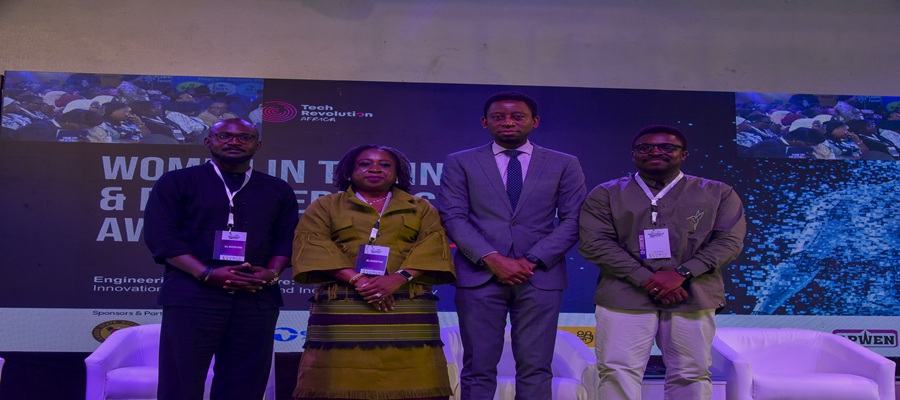
MTN Foundation, in a strategic partnership with Womenovate, officially kicked off the fifth edition of the Women in Technology and Engineering Summit (WITESA) at the MUSON Centre, Lagos, on June 23, 2026.

The summit, themed, “Engineering Africa’s future: Innovation, Infrastructure, and inclusive technology”, was designed to dismantle barriers for women in Science, Technology, Engineering, Agriculture, and Mathematics (STEAM) fields.
The summit serves as a call to action for corporate stakeholders, policymakers, and industry leaders to cultivate a more equitable digital ecosystem for female-led innovations. As a key sponsor, the MTN Foundation reinforced its commitment to nurturing future talent by integrating female students into the summit where they engaged directly with industry experts and gained exposure to emerging technologies.
The Lagos State Government, recognising the importance of initiatives like WITESA, highlighted the need for inclusive policy frameworks. Representing the Executive Governor of Lagos State, His Excellency Babajide Olusola Sanwo-Olu, the Honourable Commissioner for Innovation, Science, and Technology, Olatunbosun Alake, noted that the summit aligns perfectly with the state’s vision for growth. “Innovation and infrastructure alone are not enough; they must be inclusive,” Hon. Alake remarked.
“Initiatives such as WITESA are important. They provide the visibility, mentorship, and recognition that inspire young women to pursue careers in engineering, technology, artificial intelligence, data science, renewable energy, advanced manufacturing and other emerging sectors.”
Speaking on the company’s commitment to gender equity, the General Manager of Enterprise Marketing at MTN Nigeria, Njideka Jack, highlighted the telecom giant’s data-driven approach to social impact. “MTN is intentional in closing the digital gender gap. With a 41.4% female workforce and 46.4% female representation in executive positions, alongside our matching fund and the empowerment of 5,754 Y’ellopreneurs, we are proud of our journey in empowering women,” she stated.
Jack emphasised that MTN’s focus remains firm, adding, “We are represented at the intersection of innovation, infrastructure, and inclusive technology, and our presence here today reflects our dedication to creating sustainable pathways for women in tech.”
The event concluded on June 24 with an award ceremony celebrating trailblazers who have made significant contributions to scientific and technological advancement in Nigeria.
The ceremony honoured distinguished leaders, including Bukola Ajayi, Chief Information Officer of MTN Nigeria; Aigboje Aig-Imoukhuede, Chairman of Access Holdings Plc and Coronation Group; Nkemdilim Uwaje Begho, CEO of Future Software Resources Limited; and Ude Enebeli, Acting Chief Information Officer of MTN Cameroon, among other industry luminaries.
Motunrayo Opayinka, CEO of Womenovate and the convener of the summit, expressed that these awards are critical to normalising women’s contributions in high-impact technical fields. “This award is a celebration of those whose vision and dedication are rewriting the narrative of African technology,” Opayinka said.
“By recognising these leaders, we are inspiring a new generation to see themselves as the architects of Africa’s future.”
The summit marked a significant step forward in the conversation around digital inclusion, translating high-level dialogue into a concrete roadmap for policy and practice. By leveraging the combined strengths of its sponsors and adopting a community-driven approach, Womenovate established a new benchmark for corporate responsibility within Nigeria’s tech ecosystem.
The event concluded with an award ceremony celebrating industry leaders and trailblazers, reinforcing a shared vision where innovation, infrastructure, and inclusivity serve as key drivers of Africa’s technological future.

NDIC Says 281m Depositors Protected against Bank Failure

Wema Bank Suspends Telegram Operations over Scams

Akara Business Can Pay More than Bank Jobs – Governor Aide

OPay Unveils Emergency Lock, Safety PIN to Boost Customer Protection

FG Captures 32m Students DNEMIS ahead July 1 Rollout

London Strengthens Global Investment Ties with Africa @ First Ever London-Africa Business Summit

Mobile Internet Gender Gap Widest in Africa – GSMA

FG Targets Alleged N3tn Capital Flight, Opens Airtime Credit Market to Nigerian Fintechs

Japan, UNESCO Boost Digital Learning in 15 CoEs with Donation of ICT Equipment

Good News for DStv Users: Watch over 160 Channels Without Paying Extra




 E-Business1 day ago
LG Showcases AI-Powered Smart Living Innovations @ Africa Technology Expo 2026

 E-Financial1 day ago
UBA mobilises employees across Africa for environmental clean-up, wellness campaign

 General News1 day ago
LASTMA Launches 3367 Toll-Free Hotline for Emergency Response, Traffic Management

 Telecom1 day ago
OADC Reaffirms Abundant Capacity in Data Centres in Nigeria to Host Financial Data

 E-Financial1 day ago
PalmPay Calls for Trust, Infrastructure and Responsible AI to Drive Payment Ecosystem Innovation

 Telecom1 day ago
ALTON Backs NCC’s Local Smartphone Manufacturing Drive to Widen Digital Access

 E-Financial1 day ago
ngCERT Raises Alarm over Surge in Banks’ ATM Cyberattacks

 E-Financial1 day ago
FCCPC Dismisses Report Claiming Approval of 48 New Loan Apps