

Telecom
Skool Media Unveils State of the Arch Tech Experience Centres @ FSTC, Queens College & FGC Ijanikin

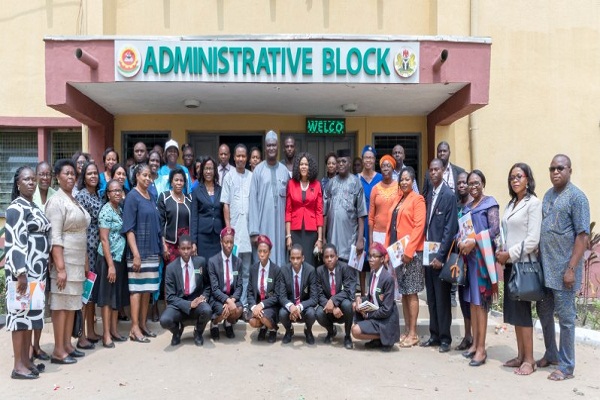
Skool Media Limited, an innovative educational technology company has unveiled its state of the arch technology experience centre, for both teachers and students of Federal Science and Technical College (FSTC), Queens College Yaba and Federal Government College, Ijanikin respectively.
The launch is in line with the company’s goal of changing the educational landscape with the use of technology to improve and reposition average Nigerian child for competitiveness in the global space.
Mr. Moses Imayi, CEO/Project Director Skool Media Nig Ltd, Speaking at the Launch said that Skool media is committed to the provision of quality education through the adoption of technology.
He noted that ICT is pivotal in the development of education in the country, hence the need in setting up these technology experience centers.

Alhaji Abubakar Isah inspecting Skool media’s state of arch technology experience centre for both teachers and students of Federal Science and Technical College (FSTC) Yaba.
He emphasized that the conceptualization and development of these centers across school locations marks a defining moment in the history of our educational sector, as it is expected to be a collaborative work space for computer based learning and an opportunity for students to engage with technology and become globally competitive.
Imayi added that the center is expected to be an inspirational enriching environment that would support both teachers and students to be resourceful with the aim of making learning fun and seamless whilst engaging with technology and innovation.
“Over the last five year, Skool media has invested approximately Five hundred million naira towards ensuring the growth and digitalization of the Nigerian educational sector across the six geo-political zones.
“Our expectation is to invest in the future of the Nigerian child and equip them to be at par with students across the world, he stated.

L-r: Project Director, Skool Media; Director/Principal, FSTC, Yaba and Director of ICT at FMoE, arriving the venue for the project commissioning.
Mr. Imayi listed some of the core 21st Century learning skills to be harnessed at the tech experience centers as includes; coding; Google Digital Skills; information retrieval—information literacy using key search engines; soft skills-EQ, team building, creative thinking and complex problem solving, personal branding; creative writing and public speaking workshops; Gamification, AR and VR mode or learning; hackathons, summer bootcamps, competitions amongst students; hub unique programmes: Ideation Day, Digital Innovation workshops, meetups, etc. and teachers capacity building: teach and techie day, teachathon, etc.
“It is indeed an honour to serve the society at this level of Public Private Partnership in ensuring the future of Nigeria’s students are equipped with the right digital skill sets”.
The special guest at the occasion; Permanent Secretary, Federal Ministry of Education, FMoE, Architect Sonny Echono, said that ICT delivery in the Unity Schools is done with the aim of redefining the teaching and learning processes so as to give the students the leverage to compete with their counterparts all over the world.
“The Honourable Minister of Education, Mallam Adamu Adamu is committed to the realisation of nothing short of excellent ICT Education in our Schools. Skool Media came in with the aim of extending the frontier of not only ICT education delivery but also to use the ICT skills in solving problems prevalent in our world today.
“The Commissioning of the Skool Media Staff and Students Experience Centres is a step in the right direction. I implore all the stakeholders, to join in collaborating in this laudable venture”.
The Permanent Secretary, who was represented by the Director of ICT at the Ministry, Alhaji Abubakar Isah, expressed confidence that the use of the centers will enhance the Students’ technology experience, promote design thinking, and help in elaborating project-based learning in schools.
“I wish the Skool Media as the Coordinators, all the best just as I expect that targets will be continuously met without much ado. I implore you not to rest on your oars but strive to raise your stakes in ICT service delivery.
“To the Colleges Managements, I advise you to ensure that staff and students use the facilities to the utmost capacity and let the impact be seen in the way problems are solved in the society”, the Arch. Echono said.

Director/Principal of Queen’s College, Yaba (left) welcoming the Director and other guests.
Dr. (Mrs) Ogochukwu Ufoegbune, Director/Principal, Federal Science and Technology College, FSTC, Yaba, Lagos, at the official commissioning of the Skool Media Students and Teachers Experience Center located in the college said that increased collaboration among the management, PTA and the Project Coordinators has led to re-equipping of the school’s ICT tools such as the provision of laptops, internet services and for teaching and learning.
While thanking the Government for the PPP arrangement, said that the School expects more project executions like more classes been equipped with Projectors, purchase of more laptops;
“Other needs are recruitment of more teachers, especially technical; hotels blocks, solar powered street lights, staff quarters”.

Guard of honour mounted for Alhaji Abubakar Isah by students of Queen college Lagos.
The Director/Principal, however, pledged that the school will make best uses of the experience centre provided for the School by Skool Media.
On her part, the Director/Principal, Queen’s College, Yaba, Dr. Mrs.T.F.O. Yakubu-Oyinloye, showered encomiums on the Skool Media for the projects.
She reiterated that access to quality ICT-enabled education has become imperative for the future of the students.
“Queens College is the flagship of girl’s education in Nigeria. We believe this project will foster modern learning skills in our students are creative, intelligent and forward looking to assignments that will inspire them more”, she said.
She said that the school has put necessary arrangements in place to ensure efficient use of the center located within the School library to boost teachers and students ICT experience.

Skool Media team with Principal and staff of Federal Government College , Ijanikin, Lagos.
Dr Mrs. OAU Essien, Principal, Federal Government College, Ijanikin, Speaking during the ceremony commended Skool Media team for the continuous support for the advancement of education and the passion they have demonstrated while working with the school management.
She also noted that more need to be done and the need for an improved collaborative effort to ensure sustainability of the on-going project.
She also used the opportunity to commission some ongoing projects within the school including the newly renovated Physics Laboratory and Guest Lounge within the premise.

Hands-on experience by the students
The Director while commissioning Skool media’s Teachers and Students Technology Experience centres at Federal Government College, Ijanikin also commissioned some projects including guest lodge, physics laboratory.
He also pledged to personally donate two badminton courts to the School in a bid to enhance sports facilities within the School.

Commissioning of the Experience center
In the same vein, Skool Media additionally pledged to provide the school with four units of standing air conditioners to support the school hall.



WhatsApp’s introduction of usernames ostensibly to increase privacy for users so they don’t have to swap phone numbers – could backfire if hackers turn usernames into a new avenue for privacy attacks.

This is according to two experts, who both note that usernames will be fair game for hackers, while also being accessible to governmental agencies and advertisers, upending WhatsApp’s key to success: conversations and calls are end-to-end encrypted by default.
WhatsApp has always stated that its encryption “ensures that only you and the person you are communicating with can read or listen to them, preventing anyone in between – including WhatsApp, Meta, or cyber criminals – from accessing your data”.
Over the weekend, the messaging app said it was introducing usernames so that users provide these as contact details instead of phone numbers, which it calls “a major privacy feature”. It is encouraging users to “reserve your username now, before the feature launches later this year”.
“Sometimes you just want to chat without handing over your digits,” WhatsApp says, noting that a phone number is personal and tied to many parts of a user’s life.
The Facebook and Instagram owner says: “This is also true for group conversations. You want to join the parent chat for the soccer team but you’re not ready to give your phone number to people you’ve never met.”
Trading View, a financial markets analysis platform, says: “The approach could help Meta position the update as a controlled privacy tool rather than a discovery feature, while bringing WhatsApp closer to rival messaging apps such as Signal, which already allows username-based conversations.”
It adds there will be no directory or username suggestions, so users will need to know a person’s exact username to contact them for the first time. An optional username key can be enabled to further restrict who is able to message them.
Meta is also introducing safeguards as the feature rolls out to reduce the risk of impersonation and scams, Trading View explains. Existing Facebook and Instagram usernames will be reserved for their current owners during the reservation period, and certain usernames associated with public figures, celebrities and government entities will remain permanently protected.
ICT veteran commentator Adrian Schofield, however, questions whether the feature will deliver the privacy benefits users expect. “Short usernames will not be difficult to find and are likely to become a new ‘game’ for those who enjoy breaking privacy protection,” he says.
The big issue is privacy, says T4i director Mark Walker, formerly with research company IDC. WhatsApp built its reputation on shielding users’ identities regardless of which groups they joined, or who they associated with. That promise, he argues, is now being quietly redefined.
“‘Privacy’ now means protection from impersonation by other users, not privacy from the platform’s own surveillance, data linkage, or other entities. It’s a security feature rebranded for a privacy-sensitive audience, directly trading away individual privacy for a form of collective safety,” he says.
Walker adds: “Users value WhatsApp for its privacy; none of the groups you join or people you associate with are shared externally with advertisers. That is what is being eroded.”
This move, Walker says, is “a sophisticated monetisation play,” using privacy, security and regulation to motivate users to verify their identities – for a fee – while positioning Meta as what he calls “the all-seeing trusted eye” attractive to both advertisers and government agencies.
In its announcement, Meta says users can reserve a username to use later this year when the feature launches. “A lot of names overlap, which is why we’re opening reservations early so everyone has the opportunity to select the username that matters to them.”
Content creators, small businesses and organisations that want to maintain a consistent online presence will be able to claim their existing Instagram or Facebook username on WhatsApp through reserved username options, says Meta.
“For most people, choosing a WhatsApp username should be something unique that only people you want to contact you will know. If you need help picking one, we have a username generator to make one work just for you,” Meta says.
WhatsApp had reached three billion users globally as of Meta’s 2025 first quarter results, or 36% of the world’s population. “WhatsApp now has more than three billion monthly actives, with more than 100 million people in the US and growing quickly there,” CEO Mark Zuckerberg said at the time.
During Meta’s latest results, Zuckerberg said: “WhatsApp continues to see strong momentum too, including in the US.”
Schofield questioned whether desirable short usernames could become targets for impersonation. “Look at the older Gmail accounts! Time to take a good look at alternative platforms? This feature will be rolled out in tranches,” Meta says.
Telecom
Airtel Nigeria CEO Urges Adoption of Intelligent Technology Platforms to Accelerate National Growth


Dinesh Balsingh, Airtel Nigeria’s Chief Executive Officer, has called on business leaders to accelerate Nigeria’s digital future by embracing intelligent technology platforms that drive innovation, productivity, and sustainable economic growth.

Speaking at the Lagos Business School (LBS) Breakfast Club on the theme, “From Telco to Techno,” Balsingh said the telecommunications industry is evolving beyond connectivity to become the foundation for enterprise transformation and the country’s digital economy.
Balsingh explained that while previous generations of mobile technology connected people through voice, internet access, and mobile broadband, the future lies in intelligent ecosystems powered by artificial intelligence (AI), the Internet of Things (IoT), satellite connectivity, and integrated enterprise solutions.
“The role of telecommunications has fundamentally changed. Businesses are no longer asking only for connectivity; they want solutions that improve productivity, strengthen security, and accelerate digital transformation. That is the journey Airtel is leading. We are evolving from a telecommunications company into a technology partner that helps organisations unlock growth and create long-term value,” he said.
Noting that value is no longer measured by the volume of data consumed but by the business outcomes technology delivers, he highlighted a key shift in telecommunications to AI-powered customer protections, industry-specific digital solutions, IoT platforms, and hybrid satellite-terrestrial networks that extend reliable connectivity to underserved communities and remote business locations.
“Technology should do more than connect people. It should protect them, simplify operations, and help businesses make better decisions. Investments are now focused on building smarter, more resilient digital infrastructure that supports organisations across every sector of the economy.”
He added that sectors including retail, education, healthcare, government, manufacturing, and oil and gas increasingly require integrated digital solutions that combine connectivity with cloud services, intelligent networking, surveillance, automation, and data analytics.
Balsingh also urged business leaders to rethink their digital priorities, noting that future competitiveness will depend on how connected, intelligent, secure, automated, and resilient their organisations become.
“The organisations that will lead the next decade are those that invest today in intelligent digital infrastructure. Our customers are no longer buying connectivity alone. They are investing in productivity, intelligence, and digital transformation.”
The session, which also featured the IMF Resident Representative for Nigeria, Christian Ebeke, formed part of the Lagos Business School Breakfast Club, a platform that brings together business executives and industry leaders to examine emerging trends shaping the future of enterprise and economic development.
Airtel Nigeria’s participation reinforced its commitment to supporting Nigeria’s digital transformation by enabling businesses with innovative technologies that improve efficiency, strengthen resilience, and unlock new opportunities for growth across the country’s rapidly evolving digital economy.
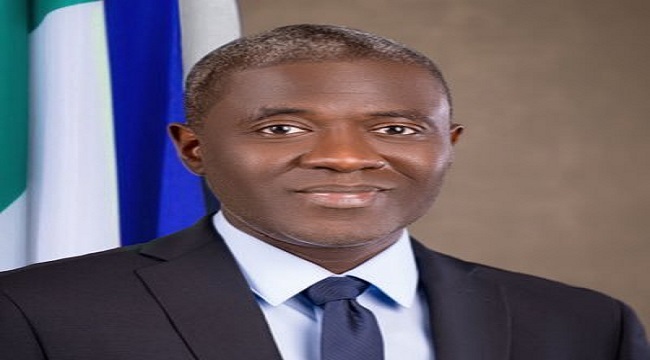
Nigerian Communications Commission (NCC) has called for accelerated deployment of Fibre-to-the-Home (FTTH) infrastructure, saying robust broadband connectivity is critical to achieving Nigeria’s ambition of building a one trillion-dollar economy.

Dr Aminu Maida, Executive Vice Chairman of the NCC, made the call while delivering a keynote address at the Association of Telecommunications Companies of Nigeria (ATCON) High-Level Industry Forum on FTTH in Lagos.
Maida said that although demand for high-speed internet continues to rise due to the growth of artificial intelligence, cloud computing, streaming services and digital businesses, fixed fibre broadband remains significantly underdeveloped in Nigeria.
According to him, the country currently has about 265,000 active FTTH subscriptions, a penetration level below the African average of 2.5 per cent and far behind the 47 per cent average recorded in more mature broadband markets.
“This low base should not discourage us. It should focus us.
“It shows the scale of the opportunity before Nigeria and reinforces the need to create the right conditions for fibre infrastructure to expand more rapidly, more sustainably and more widely across the country,” he said.
Maida said fibre infrastructure provides the speed, resilience and scalability required to support increasingly data-intensive applications and future technology upgrades.
He added that improved broadband infrastructure would enhance business competitiveness, expand digital services, improve productivity and attract greater investment into the country’s digital economy.
The NCC boss disclosed that the commission is conducting a Wholesale Fixed Broadband Market Assessment to evaluate competition in the wholesale broadband segment and identify measures to encourage infrastructure investment.
He said the assessment would also promote infrastructure sharing, strengthen open access models and improve affordability for consumers.
Maida renewed the commission’s call on state governments to remove barriers to fibre deployment, identifying Right of Way (RoW) approvals as one of the major obstacles to broadband expansion.
He said excessive RoW charges, prolonged approval timelines and multiple permitting requirements continue to increase deployment costs and delay network rollout.
According to him, 13 states have completely waived Right of Way charges, while 16 others have adopted the National Economic Council’s recommended rate of N145 per linear metre.
He said the commission would continue engaging the remaining states to eliminate impediments to broadband investment.
The NCC also disclosed that it had launched an Ease of Doing Business Portal to provide investors and network operators with state-by-state information on Right of Way charges, approval procedures and regulatory requirements.
Maida urged governments, property developers and urban planners to incorporate telecommunications infrastructure into the design of new residential and commercial developments.
He also stressed the need to enforce technical and safety standards in fibre deployment projects, warning that poor installation practices and substandard materials could lead to service disruptions and increased maintenance costs.
“Our priority is not simply that fibre is deployed quickly, but that it is built to last and capable of supporting Nigeria’s digital ambitions for decades to come,” he said.

Court Asks CBN, NIBSS to Seek Settlement in N98.5Bn Patent Suit

World Bank Approves Fresh $1.25Bn Loan for Nigeria

WhatsApp Usernames Spark Privacy Fears

Report Reveals More than Half of Users Encountered Fraud or Scams Online

Airtel Nigeria CEO Urges Adoption of Intelligent Technology Platforms to Accelerate National Growth

Mobile Internet Gender Gap Widest in Africa – GSMA

London Strengthens Global Investment Ties with Africa @ First Ever London-Africa Business Summit

FG Targets Alleged N3tn Capital Flight, Opens Airtime Credit Market to Nigerian Fintechs

Japan, UNESCO Boost Digital Learning in 15 CoEs with Donation of ICT Equipment

African Electric Vehicle Platform Raises $215m to Scale Electric Mobility in Nigeria, Others




 E-Financial3 days ago
Wema Bank Suspends Telegram Operations over Scams

 E-Financial3 days ago
NDIC Says 281m Depositors Protected against Bank Failure

 E-Financial3 days ago
NAICOM Moves to Deepen Penetration Through Licensing of a New Insurtech

 Telecom3 days ago
NCC Ranked Among Nigeria’s Top 3 Best-Performing Federal Agencies

 E-Business3 days ago
Kaspersky Reveals Malware Attacks on SMBs Disguised as AI Services Surged by Five Times in 2026

 General News3 days ago
EVC NCC, Aminu Maida, to Lead Speakers @ Business Journal Fintech & Financial Inclusion Roundtable 2026

 News3 days ago
FG Captures 32m Students DNEMIS ahead July 1 Rollout

 Telecom3 days ago
Womenovate, MTN Foundation Lead Charge for Inclusive Tech at Women in Technology and Engineering Summit