

Telecom
Way Out of Poor QoS in Nigeria


Telecommunications subscribers in Nigeria are daily faced with poor network service delivery that makes it impossible for them to make or receive calls.
Their problems are exacerbated by drop calls and lack of sustainability of calls, unsolicited text messages at odd hours, unsolicited telemarketing calls, deceptive broadband speed adverts by some service providers and failure of service delivery.
Others challenges include insufficient customer care lines, unrelenting sales promotion, despite poor network service delivery, non-compensation to consumers for loss of airtime and poor service delivery, and network insecurities characterised by uncontrollable interruptions on networks by unidentifiable third parties.
Operators on the hand have claimed that poor quality of service provisioning is not deliberate citing the myriad of challenges confronting and limiting their ability to deliver effective quality service.
They said these include: multiple regulation and taxation; Illegal access denials and site shut-outs; inadequate power supply; lack of incentives to drive service penetration to the remote and rural areas; rent seeking charges for permits; and approvals necessary for deployment; security; and so on.

Elsewhere, the Nigerian Communications Commission (NCC) has tried all forms of strategies to ensure that qualitative network is rendered to customers in the country.
In 2012, the Commission began to impose sanctions on operators for failing to meet with the required level of service provision.
It also came up with Mobile Number Portability (MNP), another way out of service inadequacies as customers can now have the option of either sticking to their failing network providers or testing new waters with other service providers without having to buy new SIM cards.
Despite these interventions, there seems not to have been any improvement in services rather it got worse as the number of subscriber base increased.
It goes to show that solving the problems of poor quality of service provisioning requires a collaborative effort of all the stakeholders in the telecom industry.
We are happy that the Ministry of Communications Technology partnership with the Ministry of Works, have developed new Right of Way (RoW) guidelines for Federal Government roads to enable operators have unencumbered means of laying OFC which is critical for infrastructure development and quality of service.
What is very important now is for the federal government to muster enough political will to remove arbitrary charges and eradicate multiple taxations that impede telecoms development across the nation.
Nigerians must also protect telecom infrastructure because they are critical national resource and the heart of communication.



Nigerian Communications Commission (NCC) has thrown its weight behind the upcoming Telecom Sector Sustainability Forum (TSSF 7.0), confirming its role as the headline keynote speaker for the Lagos event.

Over the years, the Telecoms Sector Sustainability Forum (TSSF) has evolved into a landmark industry convergence platform and an actionable catalyst for policy alignment, driving critical dialogue around the regulatory, economic, and infrastructural frameworks required to sustain Nigeria’s digital economy.
Taking place on 16th September, 2026, at the Radisson Blu Hotel, Ikeja, Lagos State, the seventh edition of the Telecoms Sector Sustainability Forum (TSSF 7.0), organised under the aegis of Business Remarks, will bring together key stakeholders driving the next phase of Nigeria’s telecommunications and digital growth.
Themed “Rethinking Nigeria’s Digital Infrastructure Strategy to Attract Investment and Drive Innovation”, TSSF 7.0 will address some of the sector’s most pressing priorities, such as policies, digital infrastructure expansion, digital inclusion, good connectivity, partnerships and investments needed to accelerate Nigeria’s next wave of innovations, digital transformation and economic growth.
Organised by Business Remarks, the forum has consistently brought together policymakers, mobile network operators (MNOs), infrastructure providers, data centre operators, policy advocates and financial technology stakeholders to dissect the pressing challenges facing the telecommunications ecosystem and chart a sustainable path forward.
Past editions have successfully addressed pivotal industry shifts, ranging from broadband penetration strategies, human capital flight, mobile virtual network operators (MVNOs) sustainability and infrastructure deficit funding to the operational integration of emerging technologies. By providing a neutral, high-level platform where regulators like the Nigerian Communications Commission (NCC) can interface directly with private sector players, the forum plays a vital role in ensuring that regulatory frameworks evolve in tandem with market realities.
Speaking about the event, the Convener, Bukola Olanrewaju, said the Nigerian telecoms sector investment has grown to $75.6 billion as of 2025, with a planned investment of over $1.38 billion in network capacity upgrades in 2026 targeted to enhance infrastructure resilience, boost coverage and improve quality of service for subscribers nationwide.
“As the industry faces a new frontier defined by deepening 5G and 4G penetration, expanding fibre optic networks, and complex macroeconomic pressures, the need to meet the growing demands for digital services while remaining profitable has become the defining challenge of the modern telecommunications landscape.”
At a time when investment in connectivity, subsea cables, fibre networks, data centres, cloud infrastructure and cybersecurity is reshaping the country’s digital landscape, TSSF remains a vanguard of thought leadership and industry engagement, fostering the public-private collaborations necessary to safeguard the backbone of Nigeria’s digital transformation.
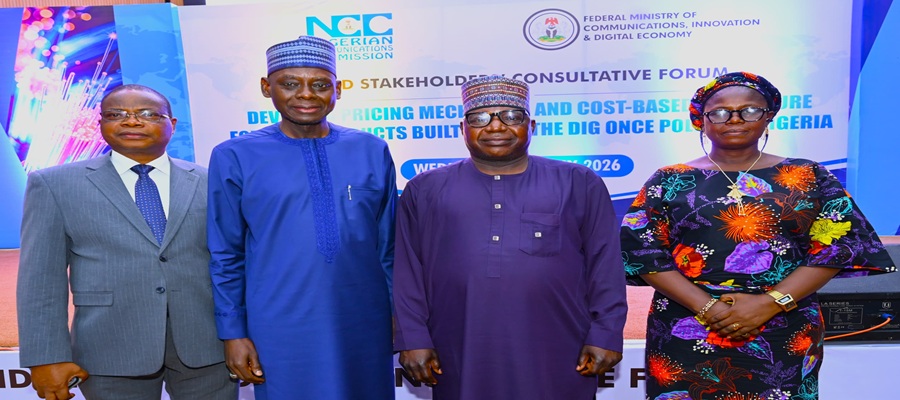
Nigerian Communications Commission (NCC) has reaffirmed its commitment to promoting efficient broadband infrastructure deployment in Nigeria through collaborative implementation of the Dig Once Policy.

L-R: Prof. Olalekan Yinusa, Executive Director, Policy, Strategy and Research, Nigeria Governors’ Forum; Mr. Ayuba Shuaibu, Director, Policy Competition and Economic Analysis, Nigerian Communications Commission, NCC; Engr. Nadungu Gagare, Permanent Secretary, Federal Ministry of Communications, Innovation and Digital Economy; Dr. Helen Aderibigbe Adeniyi, Hon. Commissioner, Ministry of Innovation Science and Technology, Kogi State, during the 2nd Stakeholders ‘ Consultative Forum on the Study to Develop a Mechanism and Cost-Based Structure for Sharing Duct Built Under The Dig-Once Policy in Nigeria, on the 8th July 2026, at the NCC Annex Office Mbora Abuja.
The Commission gave the assurance at the Second Stakeholders’ Consultative Forum to Develop a Pricing Mechanism and Cost-Based Structure for Sharing Ducts Built Under the Dig Once Policy in Nigeria, held at the NCC Annex Office, Mbora, Abuja, on Wednesday.
The forum brought together representatives of federal and state government institutions, telecommunications operators, infrastructure companies, industry associations, development partners and other key stakeholders to deliberate on the interim findings of the study and provide input towards the development of a transparent, equitable and cost-based framework for sharing underground duct infrastructure.
Speaking at the event, NCC’s Director, Policy, Competition and Economic Analysis, Mr Ayuba Shuaibu, said the consultative engagement underscored the Commission’s commitment to an open, transparent and inclusive regulatory process that accommodates the interests of infrastructure providers, network operators, public institutions and consumers.
Shuaibu noted that the proposed framework is intended to encourage infrastructure sharing, improve asset utilisation, reduce the cost of broadband deployment and facilitate the expansion of telecommunications infrastructure across the country.
According to him, the study is designed to establish a fair and transparent pricing mechanism for sharing underground ducts deployed under Nigeria’s Dig Once Policy, which encourages the installation of telecommunications ducts during road construction and rehabilitation projects. He explained that this would enable future fibre deployments without repeated road excavations.
“The Commission remains committed to a transparent, inclusive and consultative process. Our objective is to arrive at a pricing structure that balances the interests of infrastructure providers, access seekers and, ultimately, consumers, while also encouraging continued investment in broadband infrastructure.
“We encourage frank, constructive and solution-oriented contributions that will strengthen the final outcomes of this study,” Shuaibu said.
He added that observations, recommendations and contributions received from stakeholders during the consultation would be reviewed and incorporated into the final study report to ensure that the resulting framework is practical, commercially sustainable and responsive to industry realities.
Delivering the keynote presentation, the consultant, Mr Olugbenga Olabiyi, Managing Director of Dimension Data Limited, observed that passive infrastructure, including ducts, conduits, manholes and related facilities, constitutes one of the most capital-intensive components of broadband network deployment globally.
He said infrastructure sharing had emerged as an effective strategy for reducing deployment costs, improving efficiency and accelerating broadband expansion.
Olabiyi stated that Nigeria’s adoption of the Dig Once Policy presents an important opportunity to strengthen coordinated infrastructure deployment, minimise avoidable road excavations, improve utilisation of existing infrastructure and support broader broadband access across the country.
He also emphasised the importance of developing a predictable, transparent and equitable access framework, noting that inconsistent pricing models and unclear access conditions could undermine investment incentives and limit the benefits of infrastructure sharing.
“For Nigeria, where broadband expansion remains a national priority under the National Broadband Plan, successful implementation of the Dig Once Policy could become one of the most impactful infrastructure reforms in our telecommunications history.
“However, infrastructure sharing succeeds only when access is governed by fairness, transparency, predictability and effective market oversight.
“Without an equitable access framework, owners of shared infrastructure may inadvertently or deliberately create barriers to entry through excessive pricing, restrictive commercial conditions or discriminatory access practices. Such outcomes would undermine the objectives of the Dig Once initiative and discourage investment rather than promote it.
“This is why the NCC’s initiative to develop a cost-based pricing framework deserves commendation. A transparent and objective pricing methodology will provide confidence to investors, infrastructure companies, mobile network operators, Internet Service Providers, fibre operators and all participants within the communications ecosystem,” he said.
Participants at the forum reviewed the interim findings and provided recommendations on the proposed pricing methodology, implementation considerations and cost elements. Discussions focused on ensuring that the policy supports efficient infrastructure deployment while balancing the interests of infrastructure providers, access seekers and consumers.
The stakeholder consultation builds on earlier engagements conducted by the Commission on the study. It also aligns with the NCC’s commitment to implementing regulatory initiatives that promote broadband expansion, encourage infrastructure sharing and advance Nigeria’s digital transformation agenda.


MTN Nigeria is accelerating investments in network expansion and modernization to address rising demand for mobile and data services across the country.

The operator is deploying additional base stations, upgrading existing infrastructure, and expanding fiber connectivity to improve network capacity, coverage, and service quality.
The investments are designed to support increasing smartphone adoption, higher data consumption, and the growing use of digital services by consumers and businesses.
MTN said the expansion aligns with its long-term strategy to enhance customer experience while strengthening Nigeria’s digital infrastructure.
The company expects the ongoing upgrades to improve connectivity, support economic growth, and enable broader access to reliable telecommunications services as demand for high-speed broadband continues to increase.

Xora Finance, Fintech Firm Refuses to Hire Nigerians over Alleged Dishonesty

FG Secures Fresh $208.3m World Bank Loan for Cash Transfer

How Ponzi Scheme Victims can Seek Legal Remedies — Lawyers

SERAP Sues INEC over Alleged N800Bn 2027 Tinubu Campaign Fund

Kaigama,Catholic Archbishop of Abuja Warns against Misuse of AI

Nigeria Launches FreeTV Nationwide
NRC, Ponzi Scheme Collapses Resulting Loss of Billions of Naira

NASENI Moves to Digitize CCB’s 5m Assets Declaration and Operations

Lebara Nigeria Launches Lebara Play, Africa’s First Telecom-Owned Micro-Drama Platform

CANAL+ Partners Samsung to Pre-Load DStv Stream on New Samsung TVs In Nigeria, Other African Countries




 Telecom2 days ago
DStv, GOtv Owner MultiChoice Officially Joins Canal+ Group

 News2 days ago
Police Busts Syndicate Who Allegedly Stole N3Bn from Financial Institution

 Telecom2 days ago
MTN Accelerates Network Expansion to Meet Surging Telecom Demand

 E-Financial2 days ago
SEC Unveils Plans to Enforce Mandatory ESG Reporting for Large Firms Next Year

 Telecom2 days ago
Airtel Africa to Connect 5,000 Schools to Free Internet by 2027

 Broadcasting2 days ago
From Scarcity to Scale: What Africa Can Learn from India’s Agricultural Transformation

 E-Business2 days ago
TeKnowledge, Equinix Partner to Advance Nigerian Digital Infrastructure

 General News2 days ago
NSIB Faults Runway Identification, Reveals Cockpit Disagreement in Asaba Jet Incident