

Telecom
Airtel Subscribers to Enjoy Free Insurance Plan

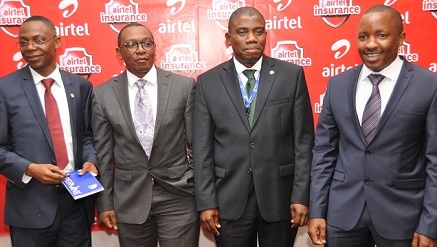
Airtel, leading telecommunications services provider in Nigeria has collaborated with two prominent insurance providers, to launch a free insurance product which offers Airtel customers life and hospitalisation insurance with increasing benefits based on monthly airtime recharge.
The Airtel partners on the product are MicroEnsure and Cornerstone Insurance plc.
The product launch is in line with Airtel’s vision to be the most loved brand in the daily lives of Nigerians,
The product, which is tagged Airtel Insurance is packaged to deliver affordable insurance services and encourage insurance culture among Nigerians. It is first of its kind in Nigeria and has been endorsed by the National Insurance Commission (NAICOM).

It is open to all Nigerian residents between the ages of 18 and 65 years. All they need to do is dial *259# to register for the service.
All hospitalisations are covered, both for natural and accidental causes, with no medical exclusions, making it the most widely accessible and generous free insurance cover in the country.
Airtel Insurance rewards loyal Airtel customers with a renewable monthly life and hospitalisation cover based on the amount of monthly airtime recharged.
Customers can qualify for this insurance by recharging as little as N1,000 with Airtel each month, and as they increase their monthly recharge, they earn more insurance cover – with up to N 500,000 and N50,000 of life insurance and hospitalisation cover per month.
The product becomes active on the first day of month following registration, and is based on the amount of airtime recharged the previous month, with a minimum monthly recharge of N 1,000.
Customers also have a variety of packages to choose from.
With a monthly recharge of N1,000 Airtel insurance gives the customer N10,000 hospitalisation and N100,000 life insurance while N5,000 recharge will earn customers as much as N25,000 hospitalisation and N250,000 life insurance.
A N10,000 recharge will attract N50,000 hospitalisation and N500,000 life insurance.
Mr. Maurice Newa, chief commercial officer, Airtel Nigeria, explained that majority of Nigerians especially the middle and low income earners in Nigeria cannot afford most available insurance policies due to income levels and complicated insurance processes.
He said the Airtel Insurance plan on the other hand was designed to make affordable insurance available to everyone in a simple manner.
“In line with our vision to enrich the lives of Nigerians and offer them quality services, Airtel Nigeria collaborated with twovery reputable insurance organisations to package this innovative product which guarantees our customers quality, affordable and accessible insurance services. This further corroborates Airtel’s commitment towards creating a robust platform that helps customers accomplish their professional and personal success and goals in life,” Newa said.
“MicroEnsure is proud to be leading the world as a mobile insurance provider, and this launch in Nigeria marks a milestone in free mobile insurance offerings,” said Peter Gross, regional director for MicroEnsure Africa.
He added that the combination of insurance products, all offered for free, is unprecedented in the industry here, and we take pride in introducing a cutting edge micro-insurance product here in Nigeria.
Also speaking, Mr. Ganiyu Musa, group managing director of Cornerstone Insurance PLC, said, “Cornerstone is delighted to be at the forefront of providing truly innovative products and channels combinations that address the Nigerian situation. That we are grossly under-insured as a nation is very well documented; we are glad to be able to provide a platform for millions of financially excluded Nigerians to enjoy the benefits and peace of mind of insurance – for free. As we say at Cornerstone, “The Future” is, indeed, “Assured.”
Bharti Airtel Limited is a leading global telecommunications company with operations in 20 countries across Asia and Africa.
Also, Cornerstone Insurance PLC is licenced in Nigeria as a composite Insurer offering both General and Life insurance products and services.
Cornerstone is committed to playing a lead role in the transformation of the insurance industry in Nigeria through the provision of truly innovative products and services using trusted partnerships and channels to deliver value beyond expectation.
And founded in 2002, MicroEnsure is the world’s first and largest organization whose sole focus is to address the mass market’s need to mitigate risk. MicroEnsure provides a range of micro-insurance products to over 8.2 million people throughout the world, with 4.5 million in Africa, 80% of whom have not previously been insured.
As an intermediary, MicroEnsure bridges the gap between mass-market distributors and insurance companies. MicroEnsure works to create markets in partnership with product distributors, enabling them to utilise insurance as a key marketing and sales tool.
MicroEnsure performs a range of services throughout this process, including product design and development, client education, underwriting and claims administration.


ntel, has officially moved away from its traditional voice and data business, unveiling a major transformation that will see it focus on digital infrastructure, artificial intelligence and technology-driven services.

As part of the consolidation process, ntel unveiled The Next Frontier, a transformation agenda planned to see the firm transform into an integrated digital infrastructure, connectivity and real estate enterprise.
Its new focus is a now BET Agenda – anchored on three growth pillars, Beam, Eden, and Titan and the drivers said that the strategy reflected ntel’s commitment to creating new opportunities through technology innovation, infrastructure development, and strategic asset optimisation.
The launch comes as ntel continues its journey towards regaining spectrum assets, while actively leveraging strategic partnerships to redefine innovation in the telecommunications industry and unlock new pathways for growth.
Built on the company’s BET Agenda – anchored on three growth pillars, Beam, Eden, and Titan – the strategy reflected ntel’s commitment to creating new opportunities through technology innovation, infrastructure development, and strategic asset optimisation.
The launch comes as ntel continues its journey towards regaining spectrum assets, while actively leveraging strategic partnerships to redefine innovation in the telecommunications industry and unlock new pathways for growth.
The company also showcased a portfolio of initiatives designed to strengthen its position as a future-focused infrastructure platform.
Under Beam, ntel announced the launch of WakaGo, a global e-SIM solution that delivers seamless connectivity for international travellers, alongside AirFibre, a high-speed fixed wireless broadband service designed to provide reliable internet access for businesses.
Under Titan, the company highlighted its growing infrastructure business focused on tower development, fibre connectivity, duct infrastructure, colocation services, and infrastructure sharing solutions that enable operators, enterprises, and technology providers to expand efficiently and sustainably.
A major highlight of the launch was Eden, ntel’s real estate development platform, which is transforming NatCom’s extensive property portfolio into high-value commercial and residential developments.
To further push its transformation, the company unveiled three flagship projects. They are Eden Place, a premium multi-storey commercial development in Lagos’ prime business district.
There is also Nova Place, a modern commercial development strategically located within Port Harcourt’s growing technology and business hub.
Terenna Court, a premium multi-storey residential apartment development in Abuja.
Together, these projects demonstrate ntel’s ambition to unlock the full potential of its real estate assets through strategic partnerships, innovative design, and long-term value creation.
Speaking at the unveiling of The Next Frontier, Soji Maurice-Diya, managing director/chief executive officer, NatCom Development and Investment Limited (trading as ntel), described the initiative as far more than a business transformation strategy.
According to him, it represents the company’s commitment to building an integrated ecosystem that connects people, empowers businesses, drives digital inclusion, and creates sustainable economic value for Nigeria.

Airtel Africa Foundation, through Airtel Nigeria, has reaffirmed its commitment to developing Nigeria’s future workforce with a high-impact virtual masterclass designed to equip young people with the practical skills required to thrive in an increasingly technology-driven economy.

The Initiative, held to commemorate World Youth Skills Day 2026, themed “Skills for a Shared Future – The NextGen Advantage,” presented a platform on which experienced Airtel professionals provided mentorship and coaching to undergraduates, interns, and recent graduates for the current realities of formal work environments.
Organised on the auspices of the Airtel Employee Volunteer Programme (EVP), by which staff donate their time and expertise towards social programmes, the 90-minute virtual masterclass, which was attended by over 400 undergraduates and young professionals, extended the reach of the Foundation’s education and youth development programmes.
Speaking on the initiative, Chief Executive Officer of Airtel Nigeria, Dinesh Balsingh, said investing in young people remains one of the most impactful ways to build Nigeria’s future economy.
He said, “The future of work is changing faster than ever before, and success will increasingly belong to those who are equipped with the right skills, the right mindset, and the confidence to adapt. As an organisation, we believe that empowering young people with practical digital and professional capabilities is an investment in Nigeria’s future competitiveness.
Through our Employee Volunteer Programme, our people are sharing not just knowledge, but real industry experience to help shape careers, unlock opportunities, and prepare the next generation to lead in a digital world.”
Unlike traditional career seminars, the masterclass adopted an interactive learning model that offered participants the option to select specialised breakout sessions aligned with personal interests and career aspirations.
In his keynote remarks titled The Next Gen Advantage, Director, Corporate Communications and CSR, Airtel Nigeria, Femi Adeniran, noted that the future will be shaped by the skills to transform great ideas into impactful solutions.
He summed up the pathway to a future-ready career into five actions, namely learning continuously, solving problems, building a digital reputation, embracing Artificial Intelligence, and developing human skills.
“Technical knowledge remains important, but employers today are equally looking for adaptability, collaboration, communication, digital confidence, and the ability to learn continuously,” he said.
In the first general session titled Your Network is Your Net Worth, Adebimpe Ayo-Elias, Director, Human Resources and Administration, Airtel Nigeria, charged attendees to build character. The second general session themed Your Money, Your Future, delivered tips on budgeting and financial discipline was facilitated by Olakunbi Osigbesan, Head, Treasure, Smartcash PSB.
Following the general sessions were five breakout rooms, in which attendees were offered curated guides designed to develop contemporary workplace competencies.
The first session, Digital Transformation and Growth, led by Oyebowale Akideinde, General Manager, Digital and Innovation, Airtel Nigeria, presented a mechanism to leverage digital platforms for visibility and opportunity creation.
The CV Clinic and Interview Masterclass, which was led by Chidera Okoye, HR Outsourcing Lead, Airtel Nigeria, discussed practical recruitment strategies, including applicant tracking system (ATS)-friendly CVs, and the STAR interview framework.
A third session on Communication and Personal Branding, delivered by Sam Adeoye, Head, Public Relations, Airtel Nigeria, focused on value presentation, executive communication, and earned visibility, built on “V.I.R.A.L.”, a mnemonic device created for the attendees by the facilitator.
The programme also featured a dedicated session titled AI as Your Superpower, presented by Ezenwa Agbanusi, IT Governance Executive at Airtel Nigeria, in which participants discussed prompt engineering and AI-powered tools for enhanced learning, creativity, and workplace performance.
Corporate Social Responsibility Lead at Airtel Nigeria, Victoria Ndu, led the fifth breakout room on Emotional Intelligence, with a guide on building a high emotional intelligence quotient (EQ) for improved workplace and business performance.
By connecting future professionals directly with industry experts, the company continues to support the development of a workforce equipped to participate meaningfully in Nigeria’s rapidly evolving digital economy and contribute to shared prosperity.

U.S. ride-hailing giant Uber has agreed to acquire German food delivery company Delivery Hero in a deal valued at €12.7 billion ($14.6 billion), marking one of the largest transactions in the global food delivery industry.

Uber
The companies announced the agreement on Thursday, with Uber offering €41.50 per share for Delivery Hero, a Berlin-based company that has grown into one of the world’s largest online food delivery platforms.
Despite the announcement, Delivery Hero’s shares declined by 0.5 per cent in Frankfurt trading to €37.90.
Founded in 2011, Delivery Hero operates in more than 60 markets across Asia, Europe, Latin America and the Middle East.
The company has expanded beyond traditional restaurant delivery services into quick commerce, providing rapid delivery of groceries and other consumer goods.
Under the agreement, Uber will acquire Delivery Hero’s operations in 50 markets globally.
As part of the transaction, U.S.-based investment firm SSW Partners will acquire Delivery Hero’s businesses in 14 additional markets where the German company and Uber currently compete. The transaction is valued at approximately €1.4 billion.
Delivery Hero Chief Executive Officer and co-founder, Niklas Östberg, said the partnership would strengthen the company’s long-term growth by combining its local market expertise with Uber’s global technology and delivery platform.
“Uber’s global mobility and delivery platform and our shared commitment to innovation make this the right partnership to build on Delivery Hero’s strengths in local food delivery and quick commerce,” Östberg said.
Uber Chief Executive Officer, Dara Khosrowshahi, said the acquisition would expand the company’s delivery operations while creating new opportunities for merchants, consumers and delivery workers.
“A merger would extend affordable, reliable delivery to many millions more people in some of the world’s most dynamic economies, while creating more opportunities for merchants and couriers,” he said.
Delivery Hero’s management has unanimously recommended that shareholders approve the offer.
The companies said the transaction remains subject to shareholder approval and regulatory approvals, with completion expected in the second half of 2027.

FAAN to Replace Physical ID Check with V-Pass Biometric Verification

World Bank Says 79 Percent of Nigerians Still Trapped in Poverty despite Reforms

SEC Begins Drive to Recover Unclaimed Dividends

ntel Plays Down Calls and Data Services, Moves to BET Agenda

Nigeria Facing Rising Cybercrime Losses – Report

NRC, Ponzi Scheme Collapses Resulting Loss of Billions of Naira

Nigeria Launches FreeTV Nationwide

NASENI Moves to Digitize CCB’s 5m Assets Declaration and Operations

Lebara Nigeria Launches Lebara Play, Africa’s First Telecom-Owned Micro-Drama Platform

CANAL+ Partners Samsung to Pre-Load DStv Stream on New Samsung TVs In Nigeria, Other African Countries




 E-Business3 days ago
TD Africa Sponsors Check Point Secure 360 Summit to Boost Cybersecurity in Nigeria

 Telecom3 days ago
MTN Foundation, MUSON Celebrate Emerging Music Talents at 2026 Graduation Ceremony

 Telecom3 days ago
NITDA Calls for Digital Infrastructure Expansion to Drive Nigeria’s Industrialisation

 News3 days ago
Guinness Rolls Out Nationwide Consumer Rewards Promotion

 E-Financial3 days ago
Next Currency Crisis May Turn $300Bn in Stablecoins into National Currencies

 General News3 days ago
First Trustees Advocates Estate Planning as an Essential Tool in Every Wealth Creation Strategy

 E-Financial3 days ago
Gigbanc Nigerian Fintech Startup Closes Shop after 3 Years

 Broadcasting3 days ago
Mbunabo, Nigerian Filmmaker Accuses Ghana TV Stations of Pirating Nollywood Films