

Telecom
Beware of Pirated YouTube Software-related Malware – NCC-CSIRT Warns

Nigerian Communications Commission’s Computer Security Incident Response Team (NCC-CSIRT) has warned those looking to acquire pirated software and resources that they risk becoming victims of cybercriminal gangs that are using AI-generated YouTube videos to distribute malware.

NCC-CSIRT further warned in its advisory that the consequences of falling victim can be significant for individuals and organizations, resulting in critical damage like data theft, financial loss, identity theft, system damage, and reputation damage.
It said unsuspecting victims who watch these AI-generated tutorial videos will be duped into clicking on one of the links in the video description, which usually results in the download of data-stealing malware The number of YouTube videos containing such links has increased by 200-300% months on month since November 2022.
According to the advisory, “To stimulate the interest of potential victims, video tutorials on how to pirate sought-after software such as AutoCAD, Adobe Photoshop, Adobe Premiere Pro, and other similar paid-for software are created. These videos are created with AI and feature humans with facial features that research has shown other humans find trustworthy.
“The tutorials in these videos are frequently bogus and steer viewers to links in the description that led to information-stealing malware like Raccoon, Vidar, and RedLine,” the advisory revealed.
Malicious actors can create AI-generated videos that include hidden or disguised malware. These videos may appear to be harmless or even entertaining, but they can contain malicious code that can infect a viewer’s device when the video is downloaded or played.
cybercriminal actors can also use AI-generated videos to trick viewers into downloading malware. For example, they can create a video that appears to be a legitimate software update or security patch, but it contains malware that infects the viewer’s device.
They equally use AI-generated videos to distribute phishing scams. They can create a video that appears to be from a legitimate company or organization and prompts viewers to click on a link to enter their login credentials or personal information. Once the viewer clicks on the link, they are directed to a fake website that steals their information.
Additionally, malicious actors can use AI-generated videos to distribute ransomware. They can create a video that appears to be harmless, but when the viewer clicks on a link or downloads a file associated with the video, their device becomes infected with ransomware that locks them out of their files and demands payment to regain access.
NCC-CSIRT said that to avoid becoming a victim, telecom consumers should avoid downloading pirated software because they are generally harmful and illegal.
Furthermore, the advisory recommends installation of antivirus software with internet security and keeping it up to date, installing an endpoint detection and response (EDR) solution that is comprehensive, and thinking before clicking any link.


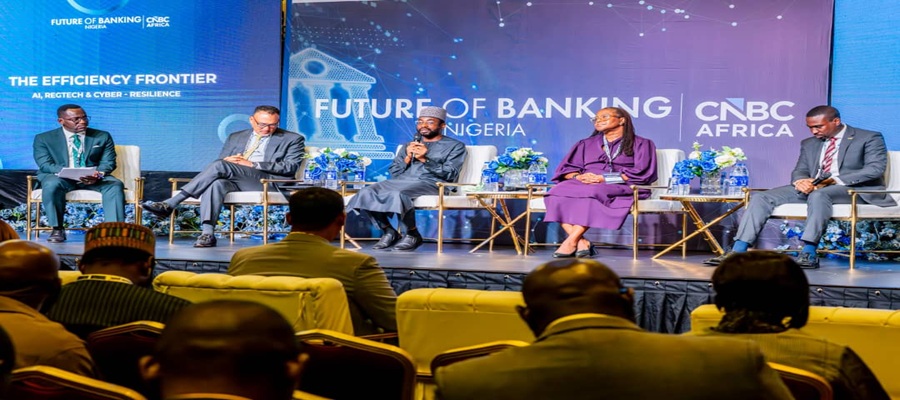
Kashifu Inuwa, director general of the National Information Technology Development Agency (NITDA), has said the next phase of growth for Nigeria’s banking sector will be driven less by capital accumulation and more by the ability of financial institutions to build digital trust through artificial intelligence (AI), regulatory technology (RegTech) and cyber resilience.

From left: Wole Famurewa, Ayotunde Coker, Managing Director, Rack Centre; the Director General of the National Information Technology Development Agency (NITDA), Kashifu Inuwa; Prof. Olayinka David West of Lagos Business School; and Femi Osinubi, Africa Advisory Leader, PwC, during the panel session, “The Efficiency Frontier – AI, RegTech and Cyber Resilience,” at the Future of Banking Nigeria Summit organised by CNBC Africa in Lagos.
Speaking during a panel session titled “The Efficiency Frontier – AI, RegTech and Cyber Resilience” at the Future of Banking Nigeria Summit organised by CNBC Africa in Lagos, Inuwa argued that while Nigeria’s banking industry has successfully weathered major reforms over the past two decades, the emerging threats confronting the sector require a different approach.
He noted that the industry has repeatedly demonstrated resilience through landmark milestones such as the 2005 banking consolidation, the 2009 banking reforms and the ongoing recapitalisation exercise. According to him, the priority has now shifted from simply raising capital to ensuring that such capital is protected and sustained in an increasingly digital economy.
“Today’s question is no longer whether we can raise capital, but whether we can protect, preserve and grow that capital in the digital era. Trust has become the foundation of modern banking, and that trust must be built on resilient digital infrastructure and effective regulation,” he said.
Inuwa observed that digital channels have become the primary point of interaction between banks and customers, making technology resilience, cybersecurity and uninterrupted service delivery essential to maintaining public confidence in the financial system.
He described artificial intelligence as a strategic tool capable of transforming banking operations by improving productivity, strengthening decision-making, boosting revenue and delivering personalised financial services that reflect the expectations of digitally connected customers.
The DG also highlighted the growing importance of regulatory technology, saying its adoption can simplify compliance, lower operational costs, improve transparency and strengthen governance across financial institutions.
According to him, effective regulation must evolve alongside innovation. He explained that NITDA combines formal regulatory instruments with collaborative, innovation-friendly approaches that allow emerging technologies to develop while regulators establish appropriate standards and safeguards.
“Technology evolves much faster than traditional regulation. Regulators must work closely with innovators to create enabling frameworks that encourage innovation while protecting consumers and maintaining market confidence,” he said.
Using Nigeria’s thriving fintech ecosystem as an example, Inuwa said technology has fundamentally changed the delivery of financial services by enabling customers to open accounts, access banking products and carry out transactions remotely without visiting physical branches.
He further called for closer collaboration among regulators to improve access to finance for Small and Medium-sized Enterprises (SMEs). He explained that AI-powered credit assessment and digital financial management tools can help financial institutions better understand business performance, reduce lending risks and expand credit to underserved enterprises.
On responsible AI adoption, Inuwa disclosed that NITDA’s National Artificial Intelligence Strategy provides a framework for deploying AI across critical sectors in partnership with sector regulators, including the Central Bank of Nigeria (CBN) for financial services.
He added that the Agency is also developing National Standards for Sovereign Cloud infrastructure and data classification to strengthen Nigeria’s digital sovereignty and ensure that sensitive national and financial data remain adequately protected.
Inuwa concluded that deeper collaboration among regulators, technology innovators and financial institutions will be critical to building a secure, resilient and globally competitive financial ecosystem that supports sustainable economic growth.

Indian government has asked Meta Platforms to suspend the rollout of WhatsApp’s proposed username feature in the country over fears that it could fuel online fraud, impersonation and phishing attacks.

The directive, issued by the Ministry of Electronics and Information Technology (MeitY), comes days after WhatsApp announced plans to introduce usernames globally, allowing users to connect without sharing their phone numbers in a move aimed at enhancing privacy.
India, WhatsApp’s largest market with more than 500 million users, expressed concern that the feature could make it easier for cybercriminals to impersonate individuals and organisations, particularly among users with limited digital literacy.
According to media reports, the ministry, in a letter to Meta, warned that the feature could increase incidents of online fraud, phishing, digital arrest scams and identity theft.
A senior government official was quoted as saying that malicious actors could claim usernames resembling those of legitimate individuals and use them to deceive unsuspecting users.
The ministry has reportedly asked Meta not to launch the feature in India until consultations with the government are concluded and the company provides satisfactory explanations on the safeguards built into the system. Authorities have also asked WhatsApp to respond to the concerns within three days.
Responding to the concerns, Meta said the username feature had not yet gone live in India and stressed that multiple security measures had been incorporated to prevent abuse.
The company said usernames for high-profile public figures and verified organisations had already been reserved to prevent impersonation.
Meta added that users would still require a phone number to register for WhatsApp and that the platform had introduced several layers of protection, including limits on messaging unknown users, restrictions on repeated attempts to guess usernames, and systems to detect and remove impersonation and scam-related activities.
The latest development comes as India intensifies efforts to combat cybercrime amid a sharp rise in digital fraud cases across the country.
Government data indicate that financial losses from cyber fraud have risen significantly in recent years, prompting closer scrutiny of digital platforms and their security features.

WhatsApp’s introduction of usernames ostensibly to increase privacy for users so they don’t have to swap phone numbers – could backfire if hackers turn usernames into a new avenue for privacy attacks.

This is according to two experts, who both note that usernames will be fair game for hackers, while also being accessible to governmental agencies and advertisers, upending WhatsApp’s key to success: conversations and calls are end-to-end encrypted by default.
WhatsApp has always stated that its encryption “ensures that only you and the person you are communicating with can read or listen to them, preventing anyone in between – including WhatsApp, Meta, or cyber criminals – from accessing your data”.
Over the weekend, the messaging app said it was introducing usernames so that users provide these as contact details instead of phone numbers, which it calls “a major privacy feature”. It is encouraging users to “reserve your username now, before the feature launches later this year”.
“Sometimes you just want to chat without handing over your digits,” WhatsApp says, noting that a phone number is personal and tied to many parts of a user’s life.
The Facebook and Instagram owner says: “This is also true for group conversations. You want to join the parent chat for the soccer team but you’re not ready to give your phone number to people you’ve never met.”
Trading View, a financial markets analysis platform, says: “The approach could help Meta position the update as a controlled privacy tool rather than a discovery feature, while bringing WhatsApp closer to rival messaging apps such as Signal, which already allows username-based conversations.”
It adds there will be no directory or username suggestions, so users will need to know a person’s exact username to contact them for the first time. An optional username key can be enabled to further restrict who is able to message them.
Meta is also introducing safeguards as the feature rolls out to reduce the risk of impersonation and scams, Trading View explains. Existing Facebook and Instagram usernames will be reserved for their current owners during the reservation period, and certain usernames associated with public figures, celebrities and government entities will remain permanently protected.
ICT veteran commentator Adrian Schofield, however, questions whether the feature will deliver the privacy benefits users expect. “Short usernames will not be difficult to find and are likely to become a new ‘game’ for those who enjoy breaking privacy protection,” he says.
The big issue is privacy, says T4i director Mark Walker, formerly with research company IDC. WhatsApp built its reputation on shielding users’ identities regardless of which groups they joined, or who they associated with. That promise, he argues, is now being quietly redefined.
“‘Privacy’ now means protection from impersonation by other users, not privacy from the platform’s own surveillance, data linkage, or other entities. It’s a security feature rebranded for a privacy-sensitive audience, directly trading away individual privacy for a form of collective safety,” he says.
Walker adds: “Users value WhatsApp for its privacy; none of the groups you join or people you associate with are shared externally with advertisers. That is what is being eroded.”
This move, Walker says, is “a sophisticated monetisation play,” using privacy, security and regulation to motivate users to verify their identities – for a fee – while positioning Meta as what he calls “the all-seeing trusted eye” attractive to both advertisers and government agencies.
In its announcement, Meta says users can reserve a username to use later this year when the feature launches. “A lot of names overlap, which is why we’re opening reservations early so everyone has the opportunity to select the username that matters to them.”
Content creators, small businesses and organisations that want to maintain a consistent online presence will be able to claim their existing Instagram or Facebook username on WhatsApp through reserved username options, says Meta.
“For most people, choosing a WhatsApp username should be something unique that only people you want to contact you will know. If you need help picking one, we have a username generator to make one work just for you,” Meta says.
WhatsApp had reached three billion users globally as of Meta’s 2025 first quarter results, or 36% of the world’s population. “WhatsApp now has more than three billion monthly actives, with more than 100 million people in the US and growing quickly there,” CEO Mark Zuckerberg said at the time.
During Meta’s latest results, Zuckerberg said: “WhatsApp continues to see strong momentum too, including in the US.”
Schofield questioned whether desirable short usernames could become targets for impersonation. “Look at the older Gmail accounts! Time to take a good look at alternative platforms? This feature will be rolled out in tranches,” Meta says.

Court Declares Keystone Bank Staff Wanted over Alleged N35m Fraud

IMF Raises Concerns over N8.83 Trillion Unreported Spending in Nigeria’s Budgets

NOTAP to Commercialise University Research, Expands Patent Drive

FG Unveils Digital Postcode System for MDAs

BoI, NBCC Sign MoU to Deepen Bilateral Trade, Industrial Growth and Investment

Mobile Internet Gender Gap Widest in Africa – GSMA

London Strengthens Global Investment Ties with Africa @ First Ever London-Africa Business Summit

FG Targets Alleged N3tn Capital Flight, Opens Airtime Credit Market to Nigerian Fintechs

Japan, UNESCO Boost Digital Learning in 15 CoEs with Donation of ICT Equipment

Nigeria Launches FreeTV Nationwide




 News2 days ago
Verve Strengthens Global Acceptance Across Leading Digital Platforms

 News2 days ago
Army Says Terrorists Now Recruiting, Raising Funds Online

 E-Business2 days ago
Kaspersky Warns of The Gentlemen Ransomware Group Expanding Operations with New Malware

 Telecom2 days ago
Lebara Nigeria Becomes Member of GSMA Network

 Telecom2 days ago
Airtel Nigeria Deepens Focus on Data Usage Transparency @ Customer Forum

 Telecom2 days ago
Vitel Wireless Warns Public, Says it Not Running any Investment Scheme

 General News2 days ago
FG to Abolish JSS-SSS Separation Policy after 20m Pupils Drop Out

 E-Financial2 days ago
Bank of Industry Appoints Kuramo Capital as Manager of Dice Fund of Funds