

Telecom
YouTube Unveils 2018 Year-End Ads Leaderboards


YouTube on Thursday unveiled the top ads of the year in Nigeria and globally for 2018.
Juliet Ehimuan-Chiazor, Country Director, Google Nigeria unveiled this during a media chat with news men in Lagos.
She noted that the top ads of the year represent brands that have executed the most popular ads, as determined by YouTube’s strongest signals of viewer choice, including factors like watch time, views, and mix of paid/organic views.
According to her, YouTube has over a billion users, almost one-third of all people on the Internet and each day those users watch a billion hours of video, generating billions of views.
“YouTube users spend over an hour a day watching videos on mobile. It’s not surprising, then, that some of this audience is choosing to watch ads online.
“The top 10 ads on the Nigerian Leaderboard represent over 17 million views,” she stated.
She listed the top 10 2018 Nigeria Year-End YouTube Ads Leaderboard as follows: MTN – Traditional Wedding Day 2.6M views, Jumia Black Fridays 2018 2.3M views, Stanbic IBTC – Enabling you to be you 2.1M views, Union Bank of Nigeria – Enabling Success 2.7M views, United bank of Africa – 919 Dance Video 1.6M views
Others are MTN MPULSE – The Takeover 1.6M Views, Airtel NG – The-Inlaws – Tutorial 1.4M views, P&G Nigeria – Ariel Assurance 1.3M views, GTBank – Come Let’s Eat Together – GTBank Food & Drink 2018 1.2M views, LG INVERTER – The new Inverter equation of home appliances 1.2M views
She also listed the 2018 Global Year-End YouTube Ads Leaderboard as Alexa Loses Her Voice – Amazon Super Bowl LII Commercial, 50.1M views, YouTube Music: Open the world of music. It’s all here., 39.5M views, OPPO F7 – Real Support Makes Real Hero, 31.7M views, Nike – Dream Crazy, 27.3M views, Turkish Airlines: Safety Video with The LEGO Movie Characters, 25.2M views,
Others are Groupon 2018 Super Bowl Commercial | “Who Wouldn’t”, 25.5M views, Samsung Galaxy: Moving On, 17.4M views, HomePod — Welcome Home by Spike Jonze — Apple, 16.3M views, Gatorade | Heart of a Lio, 13.7M views, Rescue Blue the Dinosaur – LEGO Jurassic World – Pick Your Path, 10.8M.
Looking at this year’s top ads on YouTube, we found a few key trends, said Google Nigeria, country director, Juliet Ehimuan-Chiazor, announcing the Leaderboards.
• Keeping it in the family: Emotive storytelling is key to building brand love and preference; that’s an insight this year’s top performers quite literally brought home, with family and belonging emerging as key ad themes, as shown in Airtel NG – The-Inlaws.
• Culture Connects: More and more brands are infusing culture into their storytelling to boost resonance, as MTN did with its Traditional Wedding day ad.
• Music: Music has found a place at the heart of YouTube – so it’s no surprise to see many of our winners riffing on musical themes this year, like Uba did with 919 Dance video.
• Connecting to 2018: Amid a year of political and social turmoil, many brands chose to take a stance on social topics, leading to some of the year’s most thought-provoking work, including Union Bank’s Enabling success.
• Connecting to a trend: Infusing popular offline trends into YouTube ads helps brands build authenticity and connect to the heart like P&G Nigeria did in its Ariel Assurance ad.
“Congratulations to each of the brands on this list (and their creative / media agencies) for embracing the storytelling power of YouTube,” Ehimuan-Chiazor said.
“In 2018, as in every other year, clarity of purpose, generosity of spirit and finesse in execution mark out top performers.”


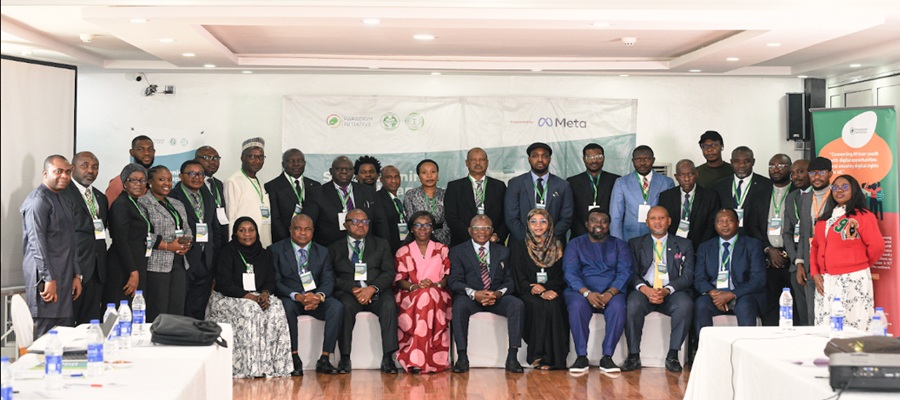
Paradigm Initiative (PIN), a pan-African digital rights and inclusion organisation, says it has engaged more than 1,300 stakeholders across 11 African countries through a series of forums, training sessions and policy dialogues aimed at strengthening digital rights, inclusion and online civic participation.

The organisation disclosed this in a statement, saying the engagements were carried out during the second quarter of the year through 26 programmes focused on election monitoring, judicial capacity building, digital literacy and policy development.
According to PIN, the initiative brought together policymakers, judges, lawyers, journalists, civil society organisations and community groups to promote a safer, more inclusive digital ecosystem across the continent.
The organisation said the programmes focused on safeguarding electoral integrity in Zambia, The Gambia and Ethiopia, while also strengthening the capacity of Nigeria’s judiciary on issues relating to Artificial Intelligence (AI), data privacy and digital evidence.
In partnership with Meta, PIN trained 35 judges in Lagos across two cohorts on privacy, data protection, AI and digital evidence.
It described the initiative as a significant step towards equipping Nigeria’s judicial officers to effectively handle legal disputes arising from an increasingly digital society.
The organisation also expanded its Digital Rights and Elections in Africa Meetings (DREAM) to Ethiopia, The Gambia and Zambia.
According to the statement, the programme equipped 110 civil society organisations, media professionals and election management bodies with skills to monitor digital rights violations and protect online civic spaces during election periods.
PIN further said its Digital Rights Academy (DRA) trained more than 100 lawyers, law students and digital rights advocates from Cameroon, the Republic of Congo, Ghana, Nigeria, Tanzania and Zimbabwe.
The academy focused on strengthening participants’ capacity in strategic litigation and promoting accountability for digital rights violations.
The organisation also hosted a Digital Policy Engagement Roundtable, bringing together 34 stakeholders, including organisations representing persons with disabilities, to discuss accessibility and inclusion in digital policy development.
It said Afrocities roundtables held in Nigeria and Tanzania attracted 80 participants who explored ways of improving informal workers’ access to digital social protection and financial services.
According to the statement, a ministerial roundtable in Zambia also aligned the country’s digital priorities with the World Summit on the Information Society (WSIS+20) review process.
PIN said it also implemented the Digital Rights and Inclusion Board Learning Experience (DRIBLE) Ambassadors Training in Cameroon, Nigeria and Senegal.
The programme reached 315 participants and strengthened their capacity to deliver digital rights education through experiential learning approaches.
The organisation said the training improved participants’ understanding of digital rights and increased interest in practical digital rights education across communities.
PIN also highlighted the successful hosting of the Digital Rights and Inclusion Forum 2026 (DRIF26) in Abidjan, Côte d’Ivoire.
The forum, themed “Building Inclusive and Resilient Digital Futures”, attracted 415 participants from more than 39 countries.
According to the organisation, the event brought together policymakers, civil society organisations, media professionals, academics, legal experts, technologists, human rights defenders and development partners to promote dialogue, partnerships and knowledge sharing on Africa’s digital future.
PIN said the engagements underscored the growing importance of collaborative efforts in advancing digital rights, promoting inclusion and strengthening digital governance across the continent

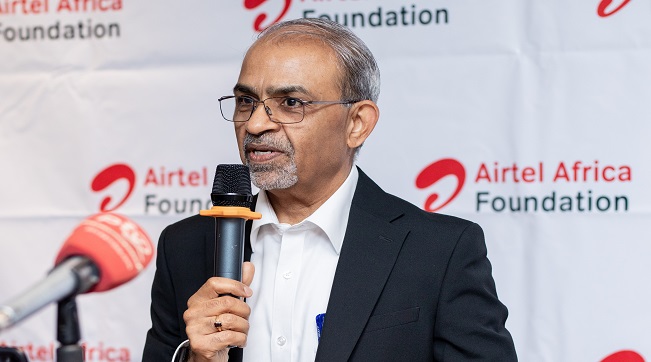
Airtel Africa, a telecommunications and mobile money services provider across 14 African countries, saved 9.1 million litres of diesel during its just ended 2025/2026 financial year, as part of efforts to drive responsible growth by minimising the environmental impact of its operations.

This was achieved by reducing reliance on diesel and increasing use of lower-carbon energy sources, including the conversion of 390 infrastructure sites to on-grid power during the year, thus improving efficiency and reducing emissions.
Airtel Africa CEO, Sunil Taldar highlighted this achievement during a media roundtable held in Lusaka, Zambia, where he presented the Group’s Sustainability Scorecard and progress towards building a more sustainable, inclusive and connected Africa.
Other initiatives to reduce Airtel Africa’s environmental impact during the year included promoting the circular economy, recycling 94% of total waste generated. These form part of Airtel Africa’s broader sustainability strategy, which seeks to create long-term value by balancing business growth with environmental stewardship, digital inclusion and socio-economic development.
Mr. Taldar emphasized that responsible growth remains central to Airtel Africa’s business strategy and is reflected in the company’s ability to extend services and opportunities to millions of people across the continent while advancing sustainability goals. Airtel Africa’s network now reaches 81.9% of the population across its markets, enabling greater access to connectivity, information, education and economic opportunities for individuals and communities.
The company recorded progress in its efforts to advance financial inclusion. Airtel Money now serves 54.1 million customers through a network of 2.4 million agents, making it one of Africa’s largest digital financial services ecosystems. Notably, 44.1% of Airtel Money customers are female, demonstrating the platform’s growing role in empowering women through access to secure, affordable and convenient financial services.
Beyond connectivity and financial inclusion, Airtel Africa, through its philanthropic arm, Airtel Africa Foundation continued to drive meaningful change across communities in the continent, investing US$6.2 million in priority programmes in four strategic areas namely Financial Inclusion, Education, Environmental Sustainability and Digital Inclusion.
Through its partnership with UNICEF, 3,296 schools have been connected to the free internet access, helping to bridge the digital divide and expand access to quality education reaching over 2 million learners and 38,868 teachers, while 64 zero-rated digital learning platforms enabled more than 11 million learners to access free digital educational content.
Also, during the year, more than 30,000 young people received digital skills training, while over 250 full undergraduate STEM scholarships were awarded through the Airtel Africa Tech Fellowship programme, helping to prepare the next generation of African innovators and technology leaders.
Microsoft has announced plans to cut about 4,800 jobs globally, representing approximately 2.1 per cent of its workforce, as part of a broader restructuring aimed at improving efficiency and competitiveness.

The layoffs include about 1,600 employees in the company’s Xbox gaming division.
The company said additional job cuts are expected later this year as it continues efforts to reposition its gaming business.
According to an internal memo from Xbox Chief Executive Officer, Asha Sharma, the restructuring is intended to “reset” the business amid increasing competition in the gaming industry.
“Our business today is not healthy,” Sharma said in the memo.
“We are operating at margins that are three to 10 times lower than comparable platform and publishing businesses.”
She attributed the challenges facing the division to rising production costs and intense competition in the gaming hardware market.
According to Sharma, the gaming industry is currently experiencing a severe hardware crisis as the cost of components used in gaming consoles continues to rise.
Xbox competes with gaming platforms such as Sony’s PlayStation and Nintendo’s Switch.
The latest layoffs form part of Microsoft’s broader strategy to streamline operations and strengthen the long-term sustainability of its gaming business.

Court Declares ARCON’s N60Bn Fine against Facebook Nigeria Illegal

NIN Enrollment Hits over 136m as New ID Law Takes Effect

NRC, Ponzi Scheme Collapses Resulting Loss of Billions of Naira

Plateau PCC Collects Nigerians’ Data without Privacy Policy – FIJ

FG Suspends New Internet Regulations to Prevent Overlapping Rules

Mobile Internet Gender Gap Widest in Africa – GSMA

NASENI Moves to Digitize CCB’s 5m Assets Declaration and Operations

Nigeria Launches FreeTV Nationwide

CANAL+ Partners Samsung to Pre-Load DStv Stream on New Samsung TVs In Nigeria, Other African Countries

UK, Nigeria Launch £15m Growth Programme to Accelerate Economic Transformation




 E-Financial2 days ago
Tokenization, Blockchain Technology will Transform Financial Institutions – IMF

 General News2 days ago
NIS Deploys Advanced Surveillance Masts, other Critical Infrastructure to Boost Border Security

 Broadcasting2 days ago
Obi, NDC Presidential Candidate Faces N50Bn Defamation Claim over Alleged Podcast Remark

 E-Business2 days ago
Weebly Websites to Shut Down for Nigeria, 66 Other Countries from September

 E-Financial2 days ago
FG Denies N8 Trillion ‘Shadow Budget’, Says IMF Quoted out of Context

 Telecom2 days ago
No Plans for Fresh Tariff Hike – MTN

 General News1 day ago
IHS Nigeria, FCT-HSES Concludes Clean Cooking Energy Campaign “Project Breathe Clean Air” in Abuja

 News2 days ago
World Bank Sounds Alarm: Low Revenue, Not Debt, Is Nigeria’s Biggest Fiscal Threat