

Telecom
MTN Nigeria Records Further Revenue Decline in Q3 of 2016


MTN Nigeria reported a smaller revenue decline in the quarter ended 30 September, as subscriber numbers continued to recover in the West African country.
After reporting a year-on-year decline in revenue in the first and second quarters of 2016 of 6.2% and 3.3% respectively, in the third quarter MTN Nigeria’s revenue decline was limited to 1.2% year-on-year.
The group says it is confident MTN Nigeria will deliver positive year-on-year revenue metrics in the fourth quarter. In Nigeria, constant currency data revenue increased by 6.7% and contributed 20.4% to total revenue.
“Despite a tough operating environment as a result of weaker macro-economic conditions, particularly in oil-dependent economies, as well as the regulatory challenges experienced, we are confident the fundamental changes implemented over the past year position the group well to participate efficiently and effectively in the data evolution and ensure sound stakeholder relationships and governance processes,” Phuthuma Nhleko, MTN Group executive chairman says in a statement.
“This is largely the result of a weaker macro-economic environment negatively impacting consumers, a decline in the effective data tariff because of competition and regulatory requirements impacting out-of-bundle billing.”

In SA, data revenue increased by 15.1% year-on-year and contributed 34.4% to total revenue.
The number of smartphones on the SA network also increased by 9.3% year-on-year, to 9.2 million. Average revenue per user increased by 10.4% quarter-on-quarter.
Nigerian data traffic increased by almost 44% year-on-year and the MTN Nigeria network saw the number of smartphones on the network increase by over 59% to 19.2 million year-on-year.
Nhleko says MTN is pleased to report it has commenced the repatriation of cash from MTN Irancell to the group and expects to conclude the process over the next six months.
MTN Irancell’s constant currency data revenue increased by over 61% quarter-on-quarter and contributed 41.5% to total revenue despite a decrease in data tariffs. The number of smartphones on the Iranian network increased by 35% to over 29 million.
MTN says it also embarked on a material transformation project during the third quarter, focusing initially on its key operations of Nigeria and SA.
“A dedicated transformation office was established to drive this transformation to maximise revenue growth, enable a distinct customer experience and ensure operational efficiencies, including concerted initiatives to drive optimal return on investment, with hard targets set for the next 12, 18 and 24 months.”
Nhleko says the operations are expected to deliver the first results on clearly defined targets in the first half of 2017.
MTN grew its group subscribers by 0.9% quarter-on-quarter to a total of 234.7 million, as Nigeria’s numbers recovered slightly despite a small drop in subscribers in SA.
MTN South Africa reported a marginal decline in subscribers of 0.5% quarter-on-quarter to 29.7 million. This was as a result of a 0.7% decline in the prepaid subscriber base to 24.5 million, largely due to churn from low revenue-generating customers. The postpaid subscriber base, however, increased by 0.7% to 5.2 million.
The rest of the SEA region – which includes Uganda, Zambia, Rwanda, Botswana (joint venture), Swaziland (joint venture) and South Sudan – saw the number of subscribers increased by 1% to 23.3 million. This was mainly driven by growth of almost 3% in Uganda, which now has 10.2 million customers.
MTN Nigeria reported a 2.5% quarter-on-quarter increase in its subscriber base to 60.5 million. The rest of the WECA region – Ghana, Cameroon, Ivory Coast, Benin, Congo Brazzaville, Liberia, Guinea Conakry and Guinea Bissau – saw overall subscriber numbers grow by 2.3% to 47.6 million. This was driven by 2.7% subscriber growth in Ghana to 18 million, and 3.7% growth in the Ivory Coast to over 8.5 million subscribers.
MTN Irancell increased its subscriber base by 1.1% quarter-on-quarter to 47.8 million “in a highly penetrated market”. However, the rest of the MENA region – made up of Syria, Sudan, Yemen, Afghanistan and Cyprus – saw subscriber numbers drop by almost 4%, to 25.8 million, owing to a 13% decline in Sudan due to the subscriber registration process.
SEA has 52.9 million subscribers; WECA remains the largest contributor with over 108 million subscribers while MENA has 73.6 million customers.



Nigeria is partnering with Burkina Faso on Project Building Resilient Digital Infrastructure for Growth (BRIDGE), to extend terrestrial fiber-optic routes through Niger and Benin, aiming to cut Burkina Faso’s internet transit costs by up to 50 percent.

Dr. ‘Bosun Tijani, minister of Communications, Innovation and Digital Economy and Dr. Aminata Zerbo-Sabané, his Burkinabe counterpart, have sealed a deal to establish a joint technical committee for regional digital integration at a meeting in Ouagadougou, Burkina Faso’s capital.
At the centre of the discussions was BRIDGE, Nigeria’s connectivity initiative aimed at expanding access to faster, more affordable and resilient internet infrastructure.
Under the proposed collaboration, technical teams from both countries will assess connectivity routes linking Nigeria to Burkina Faso through Nigeria-Niger-Burkina Faso and Nigeria-Benin-Burkina Faso corridors.
The assessment is expected to identify a viable pathway for lowering Burkina Faso’s internet connectivity costs by up to half.
The two countries also agreed to establish a Technical Working Committee to develop an implementation framework for the partnership.
The cooperation will extend beyond fibre infrastructure to other areas of the digital economy.
Nigeria and Burkina Faso plan to explore collaboration on digital skills and talent development, including the potential sharing of Nigeria’s 3 Million Technical Talent (3MTT) model.
The countries will also seek to strengthen ties between their startup ecosystems, support Burkina Faso’s Innovation Campus and collaborate on artificial intelligence, local-language technologies, shared computing infrastructure, cybersecurity and research.
Tijani said the engagement forms part of Nigeria’s broader outreach to neighbouring countries, following a recent visit to Benin Republic, with planned engagements in Niger and Chad.
Federal government said the broader objective is to leverage the country’s expanding digital infrastructure and capabilities to support shared economic opportunities across borders, strengthen regional digital integration and position Nigeria as a digital gateway connecting West Africa and the Sahel.
As the federal government is thinking os helping Burkina Faso, Nigeria’s internet cost is too high.
The cost of internet in Nigeria is driven by a 50% tariff floor increase approved by the Nigerian Communications Commission (NCC), pushing average mobile data to over ₦431 per GB.
Major telecom networks, fiber providers, and satellite services like Starlink have raised prices due to severe inflation, local currency devaluation, and expensive diesel maintenance for cell towers.


Airtel Nigeria is approaching the 18,000-cell-site mark as the telecommunications operator accelerates network deployment across the country, adding more than 1,000 new sites annually and extending high-speed mobile connectivity deeper into rural communities.

The expansion places Airtel as an operator making one of the largest sustained infrastructure commitments to Nigeria’s digital economy, with the company’s network now spanning all 774 Local Government Areas in the country.
More than 99 percent of Airtel Nigeria’s sites are 4G-enabled, with the company continuing to add new capacity and upgrade existing infrastructure as demand for mobile connectivity rises. Airtel Africa’s latest annual report said the Nigerian operation added more than 1,050 new sites during its 2025-26 financial year.
The pace represents a significant increase from the approximately 15,000 sites Airtel operated two years ago. By early 2026, the operator had crossed 17,000 sites, after adding about 2,000 sites in two years.
The current expansion has also taken the network further into locations that have historically been underserved by telecommunications infrastructure. These communities include Kukawa, Borno State; Okomu-Udo, Edo State; Chimbi, Niger State; Orile Ijaiye, Oyo State; Kopii, Benue State; and Aran-Orin, Kwara; among others.
Airtel has previously said a significant portion of its network investments is targeted at deep rural communities, small towns and the fringes of major cities. At a media roundtable in February, Chief Executive Officer, Dinesh Balsingh, said the company intended to maintain the large scale of network expansion during 2026.
“Everyone has the right to digital connectivity, including people in deep rural markets and small communities,” Balsingh said.
The impact of the growth extends beyond the ability to make calls or browse the internet. Wider network availability gives families more reliable access to one another, enables businesses to communicate with customers and suppliers, and supports access to digital banking, education, healthcare and government services.
For farmers in remote areas, mobile connectivity can provide access to current crop prices, weather information, market information and agricultural advisory services. For small businesses, reliable mobile data supports payments, customer acquisition, logistics and digital commerce. For communities, connectivity can improve access to health and social services and help residents participate more fully in the digital economy.
Airtel’s network strategy is also increasingly focused on improving the experience delivered through the infrastructure already in place. In 2025, the company upgraded capacity on about a quarter of its existing sites, deploying higher-capacity radios and moving portions of its backhaul from microwave to fibre.
The operator has also reported a continued addition of spectrum to strengthen its spectrum position. Since November 2025, it has added 20MHz spectrum, which is on track for full integration on all sites this quarter.
Balsingh said the company’s investment programme was designed to improve coverage, capacity and resilience, with the benefits ultimately reflected in the quality of service experienced by customers.
“We have invested with discipline and clarity to strengthen our network nationwide. Those investments are now translating into measurable improvements in performance, customer experience and reach, including in underserved communities,” he said.
Third-party measurements have also continued to provide evidence of changing network performance in Nigeria. Ookla’s Speedtest Global Index, for example, reported a median mobile download speed of 97.74 Mbps for Nigeria in June 2026.
For Airtel, the network expansion not only extends the geographical footprint; but also increases the speed, capacity and stability available to existing customers.
Director of Marketing, Ismail Adeshina, said the company’s network investments were ultimately aimed at making connectivity more useful in the everyday lives of Nigerians, as increasing numbers of consumers, families and businesses depend on mobile services for communication, commerce and access to essential services.
Airtel’s infrastructure programme is also contributing to the wider development of Nigeria’s digital economy.
“With mobile connectivity increasingly serving as the platform for financial services, commerce, education, healthcare, agriculture and enterprise, expanding the physical network effectively increases the number of Nigerians able to participate in those activities,” Adeshina said.

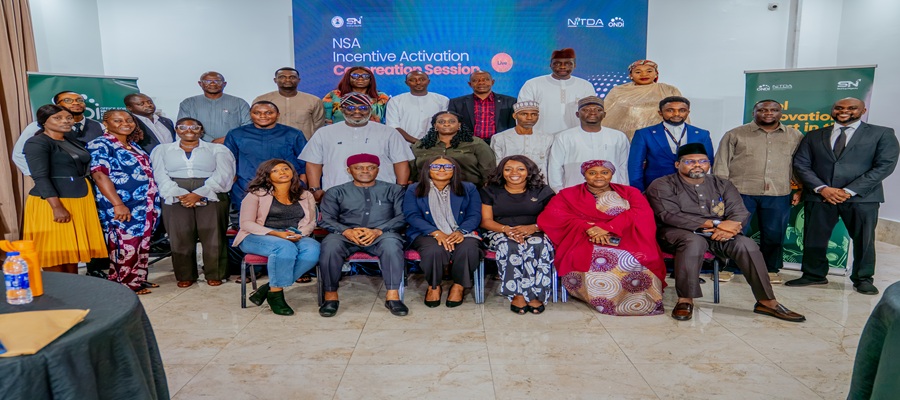
National Information Technology Development Agency (NITDA) is calling for a unified, cross-sector push to translate the framework of the Nigerian Startup Act (NSA) into practical benefits for local entrepreneurs and investors.

The Director-General of the National Information Technology Development Agency (NITDA), Kashifu Inuwa, CCIE, represented by the National Coordinator, Office for Nigerian Digital Innovation (ONDI), Ms Victoria Fabunmi, in a group photograph with participants from various Ministries, Departments and Agencies (MDAs) at the Nigerian Startup Act (NSA) Incentives Activation Co-Creation Workshop in Abuja.
Speaking at the NSA Incentives Activation Co-Creation Session in Abuja, organised by NITDA’s subsidiary, the Office for Nigerian Digital Innovation (ONDI), the NITDA boss stressed that while enacting the legislation was a historic milestone, its ultimate success will be measured by its tangible impact on everyday tech ventures.
Delivering remarks on behalf of NITDA Director-General Kashifu Inuwa, ONDI National Coordinator Victoria Fabunmi emphasised that Nigeria must now transition from policy design to operational delivery.
Inuwa noted that while early structural achievements such as setting up the Startup Consultative Forum and launching the digital startup portal have established vital channels for dialogue, the true test of the law lies in whether founders can easily access the relief and resources promised to them.
He said the establishment of the Startup Consultative Forum and its governance structures had created an important platform for sustained engagement among stakeholders, but stressed that the real test of the legislation would be its impact on businesses operating within the innovation ecosystem.
According to him, government agencies, private-sector actors and other ecosystem stakeholders must work collectively to remove institutional bottlenecks and ensure that startups can access the opportunities created by the Act.
Inuwa said the participating institutions possessed different mandates, resources and policy instruments that, if properly coordinated, could significantly improve the operating environment for Nigerian startups.
“We want to go to the next level. We want to be able to say that the actors in our ecosystem have been able to benefit significantly from the legislation that has been passed, and it wouldn’t happen without everyone sitting in this room,” he said.
He urged stakeholders to shift attention from the mere existence of the legislation to its practical implementation, particularly the activation of incentives designed to promote investment, innovation and enterprise growth.
The DG noted that the implementation of the NSA involved institutions across several sectors, including trade, finance, communications, innovation, digital economy, science and technology.
He said bringing these institutions together was necessary to identify gaps, clarify responsibilities and develop workable mechanisms for delivering the incentives to intended beneficiaries.
Inuwa also urged stakeholders to embrace continuous engagement and feedback, noting that the success of the Act would depend largely on the ability of implementing institutions to work together and respond to the evolving needs of the startup ecosystem.
He said recommendations from the session would contribute to ongoing efforts to strengthen the implementation framework and create an environment where Nigerian startups could scale, attract investment and compete effectively in global markets.
In a context-setting presentation, “Operationalising the Incentive Provisions of the Nigerian Startup Act,” Ms Elma Andah, Acting Lead, Strategy, Research and Analytics at ONDI, said the Act provides more than 31 incentives distributed across six major categories.
She identified the categories as tax and fiscal incentives, regulatory support, funding access, exports and trade, ecosystem enablers, and training and capacity building.
Andah explained that implementing the incentives required the participation of more than 15 government institutions, making inter-agency coordination central to the success of the legislation.
She said the Nigerian Startup Act, signed into law on October 19, 2022, was designed to promote innovation, improve access to funding, strengthen collaboration and position Nigeria as a leading technology and innovation-driven economy in Africa.
According to her, Nigeria’s startup ecosystem has continued to demonstrate significant potential, with more than 3,000 startups and several globally recognised technology companies.
She added that Nigerian startups attracted about $410 million in funding in 2024, despite the challenging economic environment.
Andah highlighted several areas of progress under the Act, including engagements with states on adoption, the operational startup support engagement portal, improved startup labelling timelines, the Startup Consultative governance framework, the Startup Investment Seed Fund framework and ongoing efforts to operationalise the regulatory sandbox framework.
She, however, stressed that the interconnected nature of the incentives meant that no single institution could deliver them independently.
“No single institution can deliver all these incentives alone. Implementation requires coordination across more than 15 MDAs,” she said.
Using practical examples, Andah explained that a startup seeking funding could simultaneously require tax incentives, while an enterprise seeking to export its products might need regulatory approvals. Investors seeking tax credits could also depend on access to the startup labelling system.
She consequently challenged participating institutions to clearly establish ownership of the incentives assigned to them, strengthen coordination, simplify access procedures and introduce effective monitoring and accountability mechanisms.
The session therefore provided stakeholders with an opportunity to identify implementation gaps and develop practical approaches for ensuring that the incentives contained in the Startup Act are accessible to startups, investors, innovation hubs and other beneficiaries.
The outcome, stakeholders noted, is expected to support a more coordinated implementation of the NSA and strengthen its contribution to Nigeria’s innovation, investment and economic development objectives.

FG Seeks to Half Burkina Faso’s Internet Cost while Nigerians Pay more

Cyberthreat: New Malware, Turns Phones into Tools for Card Fraud- Report

SEC Clears Blockchain for Accelerated Regulatory Incubation Programme

Union Bank Secures Global Payment Data Security Certification

NLNG, NCDMB Boost Engineering Research with Innovation Centre

Fact-Check: Elon Musk’s “Tesla Pi Phone” is Internet Rumor

EFCC Busts NIS Visa Overstay Racket, Uncovers N700m in an Account

NBC Tasks Broadcasting Stations over 2028 DSO Global Deadline

Glo Sponsored African Voices to Feature Netflix’s “The Polygamist” Stars

Access Bank Debunks Shutdown Report, Vows Action against Perpetrators




 Telecom3 days ago
Airtel Nigeria Adds Over 1,000Cell Sites in Nationwide Expansion to Surpasses 17,000

 E-Financial3 days ago
Mastercard, TeamApt Collaborate to Expand Digital Payments Across Africa

 News3 days ago
Access Holdings Sets New Benchmark in Nigeria’s Finance Talent Pipeline

 E-Business3 days ago
MacOS Users Report More Cyber Threats than Windows Users – Survey Reveals

 Telecom3 days ago
Nigerian Startup Act: NITDA Calls for Stronger Inter-Agency Collaboration

 E-Financial3 days ago
SEC Orders Immediate Freeze of Assets Linked to Six Terrorism Financiers, Three Entities

 E-Business2 days ago
World Cup, AFCON, Blord saga top Nigeria’s Google searches in 2026

 General News2 days ago
NITDA Seals Strategic Deals with Goose FL and Fireflies AI to Power $1 Trillion Digital Economy Vision