

Telecom
Nerds Unite 2022 Highlights the Power of Global Interconnection for Businesses in West Africa


The critical role of infrastructure for the global interconnection of West African enterprises to achieve borderless growth’ was the main theme of the keynote address at MainOne’s Nerds Unite 2022.

Taking place last week, the event is MainOne’s flagship customer event, bringing industry experts together with MainOne customers to discuss trends and opportunities in the Digital economy.
In this year’s keynote speech by Judith Gardiner, Vice President Growth and Emerging Markets at Equinix, Judith said that Equinix will be a prime mover in interconnecting Africa with the rest of the world on its global digital infrastructure platform, enabling access to virtual network services through the MainOne data centers and network.
She emphasized the role that Equinix has played in other geographies as an industry leader and that the acquisition of MainOne is a key part of Equinix long-term strategy to become a leading African carrier-neutral digital infrastructure company in Africa.
“Businesses in Lagos, Accra, and Abidjan now have equal access to the power of Platform Equinix’s entire data center network, connecting into the same network as some of the biggest multinational companies in the world.” Said Judith Gardiner, Vice President Growth and Emerging Markets at Equinix.

“By supporting the growth and maturity of digital infrastructure in Nigeria and West Africa, we believe that the Equinix acquisition of MainOne will be transformational across several sectors of the economy including financial services, content and digital media and many of the enterprise sectors.” She added.
Globally, the Equinix Platform is comprised of over 240 data centers, providing digital infrastructure, colocation and interconnection services to over 10,000+ companies including more than half of the Fortune 500 and more than one-third of the Forbes Global 2000.
The two-hour virtual event featured two-panel sessions. The first panel included top executives from Meta, Tizeti, Lagos Free Zone, Eko Electricity Distribution Company discussing the theme “Unlocking Growth through an Interconnected Global Digital Infrastructure” – expanding on the opportunities that global digital infrastructure offers to Pan-African focused organizations.
The second panel focused on “Maximizing Business Efficiency and Minimizing Talent Drain and Rising CAPEX through IT Outsourcing” and included a discussion with executives from leading businesses such as HPE by Selectium, Access Bank, NIBSS, and Deloitte shed light.
Funke Opeke, CEO of MainOne, an Equinix company, maintained that with the pandemic induced recession and high rates of inflation, technology will be responsible for propelling the growth of many African economies.
MainOne will continue to drive this tech-fueled growth through the expanded capabilities now available to West African enterprises.
In her words, she highlighted the Equinix entry into Africa through MainOne, with the objective of integrating MainOne facilities into the global Equinix Fabric platform. Businesses can now enjoy borderless growth right here in our region through the power of global interconnection that Equinix brings.



Nigerian Communications Commission (NCC) has said that more than 5,000 fibre-optic cable cuts linked to road construction, excavation and related civil works were recorded in the first six months of 2026.

The commission said that the damage is disrupting telecommunications services, increasing operators’ costs and exposing businesses and essential public services to avoidable interruptions.
Aminu Maida, executive vice chairman, NCC, disclosed the figure at a stakeholders’ workshop on the protection of fibre-optic infrastructure during road construction and rehabilitation.
He said the scale of the incidents showed the need to prevent damage rather than wait to repair networks after they had been cut
Maida said fibre networks support banking, healthcare, education, government services, commerce, security and emergency communications.
He recalled the widespread telecommunications disruption in February 2024, when fibre cuts affected millions of Nigerians and caused congestion on alternative networks as subscribers switched providers.
He said a Standing Committee on the Protection of Fibre Optic Cables had been established by the Federal Ministries of Works and Communications, Innovation and Digital Economy to improve coordination before, during and after road construction.
The committee was later expanded to include the Office of the National Security Adviser and the Nigeria Security and Civil Defence Corps because of the critical nature of telecommunications infrastructure.
Raphael Adelador, permanent secretary of the Federal Ministry of Works, said road construction and telecommunications infrastructure often occupy the same physical space, making coordination essential.
Adelador called for better mapping of fibre routes and improved information sharing so contractors and consultants know where telecommunications infrastructure is located before excavation begins.
He said damage to fibre networks could lead to service disruptions, lost productivity, financial losses and inconvenience to citizens.
Representing Nadungu Gagare, permanent secretary, Federal Ministry of Communications, Innovation and Digital Economy, Stanley Musa, director of Telecoms and Postal Services, said the protection of telecommunications infrastructure was a shared national responsibility.
The Permanent Secretary said that the government was working with relevant stakeholders to strengthen compliance with technical standards and right-of-way requirements, improve information sharing and develop clearer procedures for infrastructure protection.
Air Vice Marshal Effiom Ewa, director of Critical National Standards and Infrastructure Protection at the Office of the National Security Adviser, said fibre-optic infrastructure had been designated as critical national information infrastructure and warned that damage caused by negligence, interference or actions that expose the infrastructure to damage could attract legal consequences.
Air Vice Marshal Ewa called for strict compliance with established procedures during construction and maintenance activities.
The two-day workshop brought together representatives of government ministries and agencies, security organisations, telecommunications operators, contractors and other stakeholders to develop practical measures for reducing fibre damage during construction projects.
The stakeholders are expected to strengthen coordination, information sharing and accountability so that road development does not undermine the digital infrastructure supporting Nigeria’s economy.
Telecom
ipNX Joins Calls for Innovation-Friendly Ecosystem and Stronger Local Opportunities at Regenesys AI Summit

ipNX Nigeria has joined stakeholders at the Regenesys AI Summit to call for innovation-friendly regulations and stronger local opportunities. Chief Technology Architect, ipNX Nigeria, Oluwaseun Oluboyo, made the call for a collaborative approach to advancing Artificial Intelligence (AI) in Nigeria, and emphasized the need to foster innovation while developing enabling frameworks that support responsible adoption and sustainable growth.

Speaking during a panel session at the summit themed “The Future of Nigeria in the Age of AI,” Oluboyo encouraged business leaders, policymakers and technology stakeholders to create an environment where innovation can flourish through experimentation, collaboration and continuous learning.
“If you don’t try new things, if you only stick to what is familiar, we are not going to go progress as a society or an ecosystem,” he said. “Innovation requires the confidence to explore new ideas, while ensuring that customers remain protected.”
Reflecting on the rapid evolution of AI technologies, Oluboyo noted that governance frameworks should remain adaptable to accommodate emerging innovations and evolving industry needs.
“As technology continues to evolve, it is important that we focus on the outcomes we want to achieve while creating room for innovation. Organisations naturally build on what works, but continuous improvement is essential to unlocking new possibilities.”
He observed that creating a supportive innovation ecosystem will enable organisations to deploy AI responsibly while accelerating digital transformation across industries.
Oluboyo also highlighted the importance of strengthening Nigeria’s technology ecosystem by creating more opportunities for local talent to innovate, build and thrive within the country.
“We should continue creating the environment that makes Nigeria an attractive destination for innovation and enables our brightest talents to contribute meaningfully to national development.”
He noted that sustained investment in digital infrastructure, skills development and innovation ecosystems will be instrumental in positioning Nigeria to maximise the economic and societal benefits of Artificial Intelligence.
Held recently in Victoria Island, Lagos, the Regenesys AI Summit convened technology leaders, policymakers, entrepreneurs and industry experts to examine how Artificial Intelligence is transforming industries, reshaping business models and redefining leadership priorities.
Other speakers on the panel were Ugo Umeseaka, COO, Redtech Limited; Oladele Adedoyin, Partnership Development Manager, Liquid Intelligent Technologies, and Dr Oluwatomi Kogo, Managing Director, Iwosan Lagoon Hospitals.
The summit, themed “The Future of Nigeria in the Age of AI,” provided a platform for meaningful dialogue, knowledge sharing and practical insights into the opportunities AI presents for economic growth, business innovation and national development.
As AI adoption continues to accelerate across Nigeria, conversations such as these remain essential in fostering collaboration among industry, academia and policymakers to ensure Artificial Intelligence is deployed responsibly, inclusively and for the benefit of society.

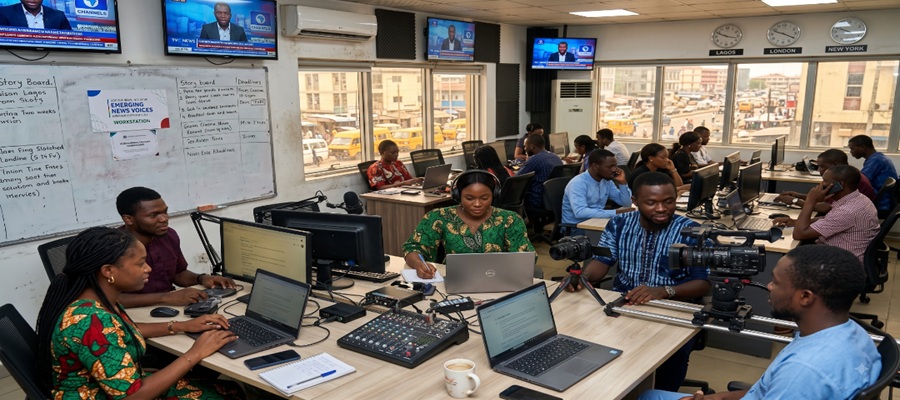
Google News Initiative (GNI) has selected six Nigerian independent news creators to participate in its Emerging News Voices Growth Lab for Sub-Saharan Africa.

The selected Nigerian creators are Onlinebanker, Adetunji Films, More Branches TV, Wearegst, Iswellthecapitalist and The Republic.
They are part of a cohort of about 20 emerging news creators from across Sub-Saharan Africa participating in the multi-month virtual programme, which runs through September 2026.
The initiative is designed to strengthen the capacity of creator-led and digital-native newsrooms through practical training in artificial intelligence, video production, audience development, direct reader engagement and sustainable revenue strategies.
The GNI said the programme was developed in response to the changing way Nigerians, particularly younger audiences, discover and consume news through social-first channels and digital platforms.
According to the initiative, while creator-led journalism is expanding rapidly, many independent newsrooms operate with limited resources and do not have the same access to technology, training and revenue expertise available to established media organisations.
Participants in the Growth Lab will work with Google trainers and product experts across four key areas.
The first is AI in the newsroom, where participants will receive hands-on guidance on integrating tools such as Gemini, NotebookLM, Google Trends and SynthID into newsroom workflows for research, transcription, translation and verification.
The programme will also focus on video and audience growth, providing practical strategies for building YouTube channels and using both Shorts and long-form video to reach new audiences.
Another area is direct reader relationships, with participants expected to strengthen their open-web presence and newsletters in order to develop first-party audiences that newsrooms can directly engage.
The fourth area is sustainable revenue, with sessions covering monetisation strategies, product differentiation and audience growth models.
Marianne Erasmus, News Partnerships Lead, Middle East and Africa at Google, said independent news creators and digital-native newsrooms were increasingly shaping how Africans, particularly Nigerians, find and understand news.
“Independent news creators and digital-native newsrooms are shaping how Africans, and Nigerians in particular, find and understand the news,” Erasmus said.
She said the Growth Lab would equip emerging newsrooms with practical AI skills, video and audience strategies, direct relationships with readers and approaches to sustainable revenue.
Erasmus added that strengthening the capabilities and financial independence of emerging news voices would contribute to a more resilient, diverse and sustainable news ecosystem.
Wale Lawal, Founder and Editor-in-Chief of The Republic, said the programme was providing practical ways for the publication to combine audience insights, product thinking and responsible AI use.
“Google’s Emerging News Voices Growth Lab is giving us practical ways to combine audience insight, product thinking and the responsible use of AI as we build a more sustainable future for The Republic’s journalism,” Lawal said.
Similarly, Nasir Achile Ahmed, Editor-in-Chief and Co-founder of MoreBranches, said the programme had provided practical resources, new tools and opportunities to connect with experts and fellow journalists.
Ahmed said the initiative had also provided information that validated some of the newsroom’s previous observations while equipping its team with knowledge on how to use new tools effectively.
He said the engagement with experts and fellow journalists had created a supportive environment for strengthening storytelling.
The Growth Lab emerged from the Global News Gap Project, a continent-wide mapping initiative conducted with Project Oasis and Code for Africa to identify independent African news creators and areas where emerging newsrooms require additional support.
The programme is part of Google’s broader support for the Nigerian media industry.
Since 2018, Google has supported newsroom transformation projects through the Google News Initiative and provided publishers with opportunities to strengthen their advertising revenue capabilities through the Ad Manager Academy.
Google said that since 2024, it had trained more than 1,500 Nigerian journalists and editors in areas including online safety, advanced Search, digital verification and audience analytics.
It also supports media skills development through its collaboration with the MTN Media Innovation Programme, where fellows receive practical training on AI as a productivity partner and newsroom technologies, including News Consumer Insights and Gemini.
The latest initiative reflects the growing importance of digital-native journalism as news consumption continues to shift towards social media, video platforms and other online channels.
Through the Growth Lab, GNI is seeking to help emerging news creators build stronger digital operations, expand their audiences and develop sustainable business models while responsibly adopting emerging technologies.

NUPRC Warns of Counterfeit, AI-Generated Appointment Letters

KudiWave Asks for Clarification over N750m Transfer from PalmPay Account

NCC Reports over 5,000 Fibre Cuts in 6 Months

PalmPay Reinforces Commitment to Youth Empowerment on International Youth Day

ipNX Joins Calls for Innovation-Friendly Ecosystem and Stronger Local Opportunities at Regenesys AI Summit

EFCC Busts NIS Visa Overstay Racket, Uncovers N700m in an Account

Fact-Check: Elon Musk’s “Tesla Pi Phone” is Internet Rumor

NBC Tasks Broadcasting Stations over 2028 DSO Global Deadline

NBC Scraps Annual Digital Access Fee on DSO

Glo Sponsored African Voices to Feature Netflix’s “The Polygamist” Stars




 E-Business3 days ago
X Replaces Revenue Sharing wit New Creator Rewards Programme

 Telecom3 days ago
MTN Alerts Subscribers over Fake 25GB Anniversary MTN Data Giveaway

 E-Financial3 days ago
Interswitch, Temenos Commit to Advancing Nigeria’s Digital Banking Technology

 E-Financial3 days ago
FG Spent N3.1 Trillion on Domestic Debt Servicing in Q1- DMO

 General News3 days ago
Fake Agency: ICPC Indicts NITDA, Others over Inadequate Due Diligence

 General News3 days ago
UNESCO Taps Oguamanam,Nigerian Scholar to Advisory Body on Science, Tech Ethics

 General News3 days ago
Tax Reform Built on Taxing Prosperity, Not Poverty– Adedeji

 Telecom2 days ago
MTN Nigeria Clocks 25, Connects over 90m People